The Best tool to Export Google Takeout Email Files to Standard File Formats.
Google Takeout saves all Gmail data as an MBOX file containing all mailbox data. This tool offers users to export selective emails or folders from data files including Inbox, Drafts, Sent, etc. The user has the option to select the emails or the folder that they need to convert. In this way, one can avoid unwanted conversion and save storage space.
This Google Takeout converter offers the user to save the resulting email file in various formats. With this tool, users can easily store email data like from- date, from-subject-date, year-month-day-hour-minute-subject, and also provide custom file name format according to their needs.
With this tool, there is an advanced filter that helps users to convert selective emails from the Google Takeout email data files. You can select from various parameters that this software provides such as date range, From / To, Subject, Name, CC, and other email attributes. This feature helps the user to convert only needed emails and avoid unwanted conversion.
This tool maintains the structure of the email folder or subfolders throughout the conversion process. With this utility, user can export emails from Google Takeout File to other file format or email server account in their original form. This tool make sure to save email messages along with attachments, online images, hyperlinks, and digital signatures during conversion.
With this tool, users can efficiently convert Google Takeout to PST files from Outlook 2019, 206, 2013 and other earlier versions. If the user wants to create a separate PST file for each folder saved in the Google Takeout email data file, then this utility is able to do it without facing any error.
This converter provides an advanced function where user can convert multiple emails from Google Takeout email archive to multiple file formats at once. This tool saves all emails with their header part containing a, cc, bcc, date and time of sending / receiving. It is best when the user has multiple email files and needs to export emails with full precision.
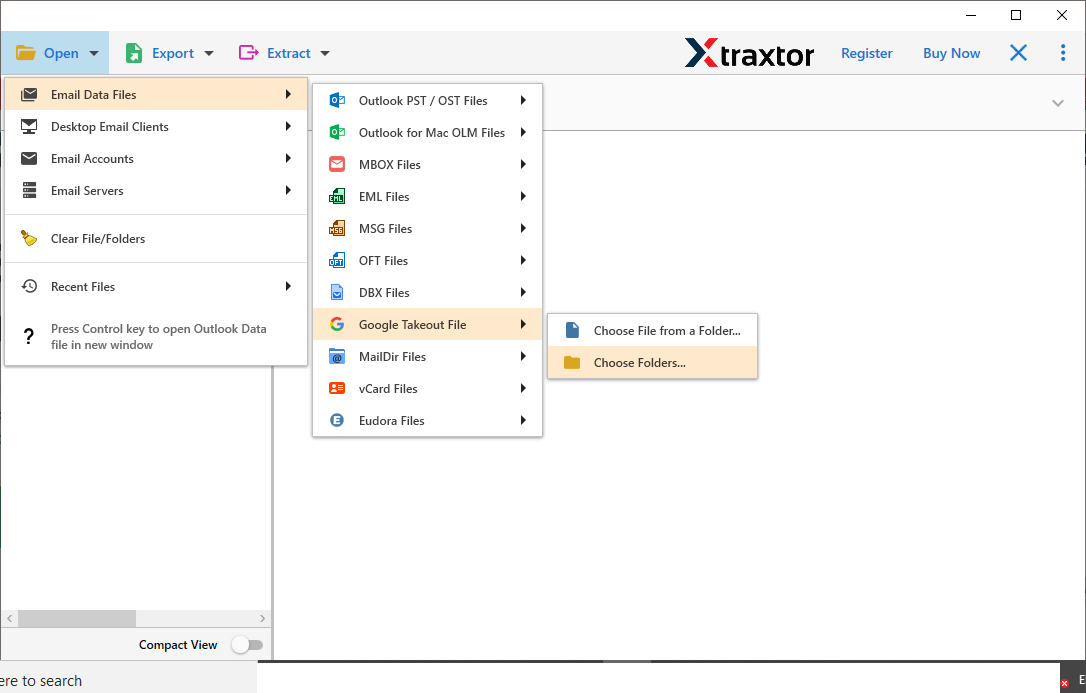
This Google Takeout Converter offer two option to select email file to export. With this tool user can select single Google Takeout email file and convert it into a desired format. Or user can choose an entire folder that contain multiple Google Takeout files and export their emails into other file format or cloud without loosing any single bit of data.
Google Takeout Converter offer an advance option using which user can extract certain information from email file into simple text format. Using this utility user cn save email addresses, phone numbers, attachments and associated email addresses and phone numbers. All the extracted information will be saved in a separate text file.
The Google Takeout Converter offer an email preview option to read and view email messages before conversion. After importing the Gmail Takeout MBOX file, this software scan the complete mailbox data. Then load in its interface and preview them. You can read them and decide which email folder you want to convert. In this way, you only save emails that are needed and avoid unwanted conversion.
This utility is fully compatible with Windows OS. You can operate Google Takeout converter on Windows 11, Windows10, Windows 8, Windows XP, Windows Vista, and all other previous operating system versions. You don't need to worry about your system Windows compatibility with this tool. Install it on any Windows system and convert Google Takeout data without any trouble.
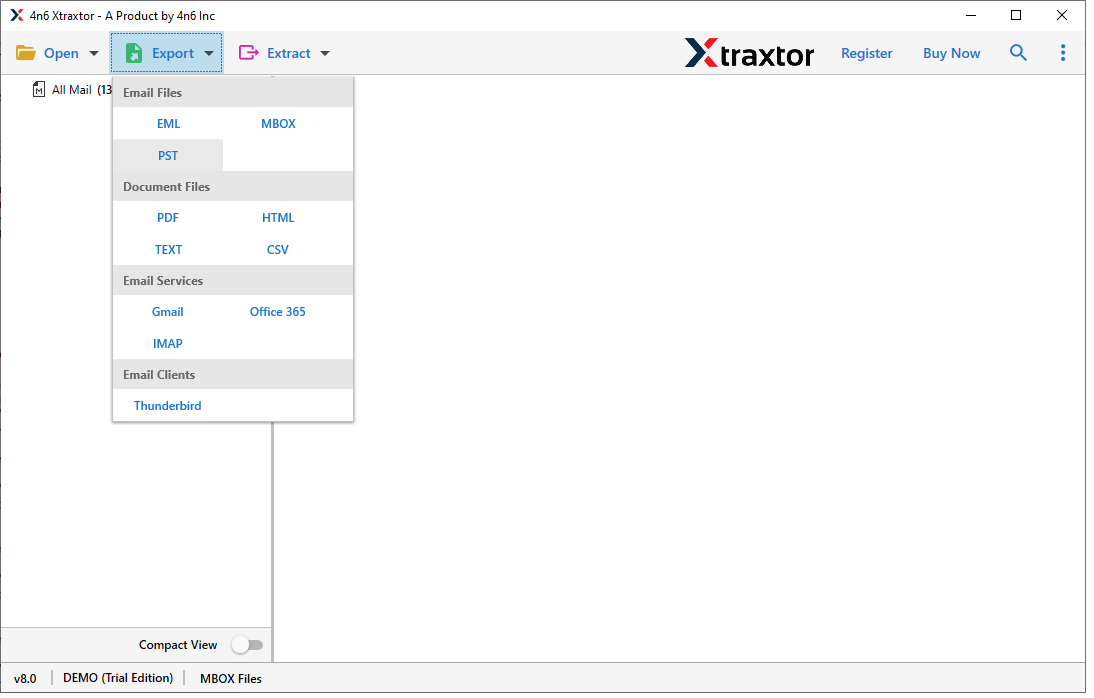
With this software, user can save their emails from Google Takeout email file into multiple file formats. With it one can convert Google Takeout to HTML, TEXT, PDF, MBOX, CSV, PST, and other file formats. It is a standalone utility that provide option to export Google Takeout emails into different file formats in a single interface.
This utility offers the option to directly export emails from Google Takeout to Mozilla Thunderbird account. If user uses Thunderbird email client and wants to transfer some Gamil emails from Google Takeout file, this tool can perform this process instantly without facing technical errors.
Trial Limitations
Download free edition to convert 10 emails from each folder.
System Specifications
Hard Disk Space
48.7 MB of free hard disk space
RAM
Minimum 512 MB is required
Processor
Intel® Pentium 1 GHz processor(x86,x64) or equivalent
Supported Editions
Win 11 & All Below Windows Versions
Click Open > Select Email Data File > Google Takeout file > Choose file or folder
Choose format to convert Google takeout file to various provided file formats
Browse location to save file after conversion and hit Save button


Commonly Asked User's Questions and Answers
With this tool it is easy to convert Google Takeout to PDF, just follow the given steps;
Step 1. Install and run this application on the machine.
Step 2. Click on the Open button to choose the email data file.
Step 3. Select Email Data file, then Select Google Takeout File and after that Select File or Folder.
Step 4. Click on the Export button and choose PDf File format.
Step 5. Browse the location to save the resultant file and click on the Save button.
Yes, this utility is powerful enough to convert Google Takeout Archive in bulk without any hassle.
Yes, this tool can directly import Google Takeout to Gmail account with no data loss.
There is multiple file saving option provided by this tool. Users can convert Google Takeout emails to PDF, PST, EML, MBOX, and many other file formats.
Yes, this software support all versions of Windows OS be it 11, 10, 9, Vista, or other previous versions.
Yes, this tool allow to transfer selctive Google Takeout emails into any file format with ease.
Yes, Google Takeout Converter has a date range filter to export emails from a specific date.
No, this tool is powerful enough to convert Gmail archive data file into various file formats.