Summary: In this blog, we talked about the best approach to convert OLM to CSV with full email data. Using those methods, users can easily export OLM contacts, calendar data, tasks, and email messages in comma-separated value files (spreadsheet format).
If you have OLM files and want to export them into CSV format, then you landed in the right place. Stay with us and get to know how to convert OLM to CSV file format.
Before we move forward, let’s get to know a little bit about both file formats and their use.
What is OLM & CSV?
OLM or Outlook for Mac is a file format used in MAC operating system to save Outlook emails. This file format stores email messages, tasks, calendars, contacts, events, journals, and other email components. There is generally no size limitation with the OLM files, but it is recommended not to exceed 2GB to avoid damage.
On the other hand, CSV or Comma Separated Value file stores email data in plain text format. All the data is stored in a tabular form that is separated by a comma. It can be easily accessed in Microsoft Excel, Google Sheets, and any other application that supports CSV format.
How to convert OLM to CSV file? Firstly you need to import the OLM file into the Mac Outlook profile using the Import/Export tool. After that, using the same tool export the emails in a CSV file.
Reasons to Opt CSV format over OLM
There are many reasons why users want to convert OLM to CSV. Some of the reasons that force users to choose CSV file format are listed below.
- CSV enables unlimited email data to be stored in a table format.
- This file can be accessed easily in any spreadsheet program such as Google Sheets, MS Excel, etc.
- Effortless access for both non-technical and technical users.
- Easy to save due to its limited file size.
As we get to know the reasons for this conversion process, now move ahead and talk about the methods that simplify this process.
Methods To Convert OLM to CSV Format
After searching a lot, we came up with these two methods that help to export emails from Mac Outlook to CSV file format.
#1. Manual Method Using Mac Outlook
#2. Expert Approach Using OLM to CSV Converter
The above methods are tested by experts and are reliable for OLM to CSV conversion. Let us know how these methods work in detail.
How to Manually Export Outlook for Mac file into CSV format
In this method, we manually transfer all email data from the OLM files into a tabular file format i.e. CSV using Outlook for Mac Operating System.
Follow the given steps to complete the process properly and convert OLM to CSV file format.
- Firstly import OLM file into Mac Outlook interface using the Import/Export option.
- Open Mac Outlook on your system.
- Go to the File option and select the Open & Import option.
- Then, Import/Export >> Outlook for Mac file (.olm) and click on continue.
- Now browse the .olm file and choose Import.
- Now again go to File >> Open & Import >> Import/Export.
- After that, select the Export a file option and choose CSV file format.
- Here choose the folder you wish to export and click on Next.
- Now browse the location to save the .csv file and hit the save button.
You have now successfully converted OLM to CSV using manual techniques. But with these methods, there are certain limitations. Some of the drawbacks are mentioned in the next segment.
Limitations With Manual Method
- It only exports one OLM file at a time, not multiple files.
- This approach allows the user to convert entire mailbox data into a single CSV file, not a selective email conversion option.
- Users cannot read/view emails from the OLM file before conversion.
- Most importantly, users need technical knowledge to properly complete the conversion process using this tool.
If you try this manual method and stuck somewhere then don’t worry. In the next section, we are going to talk about an automated tool that can easily export OLM to CSV file format with no restrictions.
How to Convert Mac OLM to CSV format Instantly?
To overcome the limitation of the manual method, OLM Converter is the best approach. This software is able to export multiple emails from OLM files in a single attempt. Apart from this, it offers to save resultant files into multiple file formats with all data as the original. With this users can also transfer OLM to Office 365, Gmail and many other cloud-based email accounts.
SysConverter for OLM software is a smart tool that offers various outstanding filter options that help in specific OLM to CSV conversion. One can apply filters such as – to, from, cc, bcc, name, date, time, content, etc.

Now without any further delay, let’s dive in and know how to open an OLM file in Excel.
Follow the given steps to convert emails from OLM file to CSV format –
- Install and open this Email Converter on your machine.
- Click on the Open drop-down button present on the screen.

- Now, Select Email Data File >> Select OLM file >> Select File from Folder.
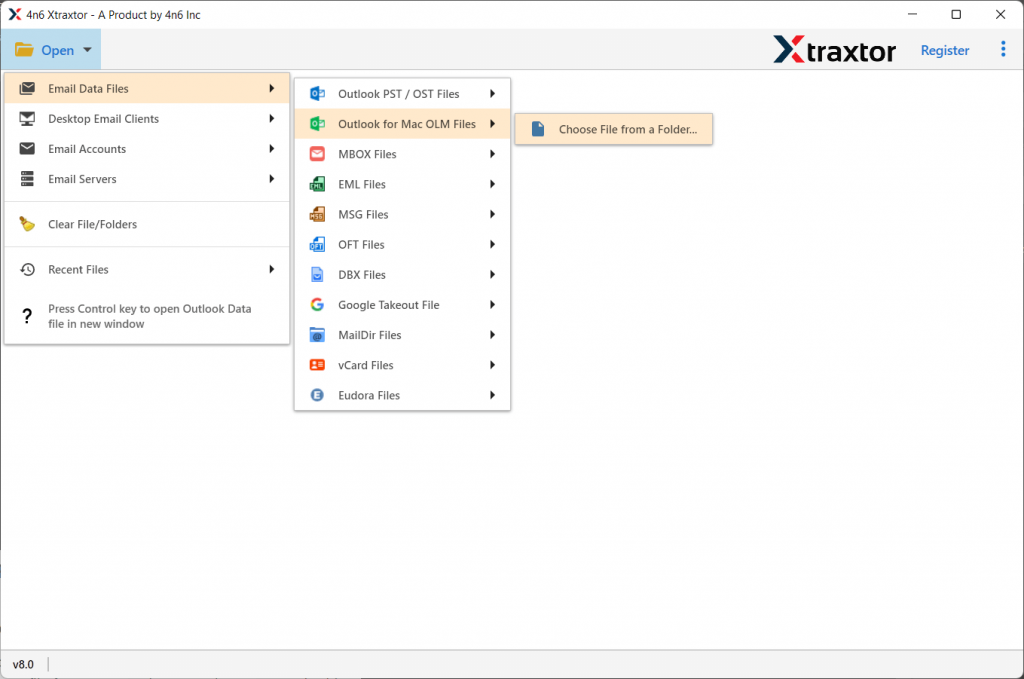
- This tool previews all emails that are stored in the OLM file.

- After this, click on the Export button and select CSV file format.

- In the last, browse the location to save the converted file and hit the Save button.

Here complete the conversion process in a few simple steps without any data loss. You can use the demo version of the tool and transfer emails from OLM file to CSV format with attachments.
Key Features of OLM to CSV Converter
- Convert OLM to Multiple File Format
This tool is designed with an advanced algorithm that helps the user to export emails from Outlook for Mac files to various file formats. Most importantly, users can do this multiple conversions in a single interface. Users can convert OLM to PST, CSV, HTML, PDF, MBOX, and many other file formats. - Preserve Key Attributes
This tool makes sure to preserve all the key elements of emails. This tool efficiently exports calendar data from OLM file as well as preserves email messages, contacts, journals, tasks, etc during the conversion process. - Fast and Secure Email Conversion
With his OLM to CSV Converter, user can securely convert their emails from Mac Outlook OLM file into desired file formats. It also makes sure to maintain your data integrity throughout the email conversion process. - Simple User Interface
The software is specially designed for beginners with no technical knowledge. With its self-explanatory feature user can operate this utility and convert emails from OLM files without facing any technical glitches. - Export Emails to the Cloud
This email converter intelligently transfers emails from OLM files to a web-based email client and server without causing any disruption. The user can easily export OLM to Yahoo, Office 365, Yandex, Gmail, Thunderbird and many others. - Maintain Folder Hierarchy: While converting emails from OLM file to CSV format, this tool makes sure that there will be no changes in email folders and sub-folder hierarchy. Email will be present in their respective folders in the exported data file.
Conclusion
Here in this article, we will discuss two different methods to convert OLM to CSV in an efficient way. The user can choose any method to perform this file conversion. Either method can do the job, but the manual method has certain limitations, and to overcome that limitation we will use an automatic utility. You can use the demo version of this software and export emails from the OLM file into PDF, MBOX, ICS, and other file formats.
Frequently Asked Questions
Question 1. Does this software export contacts from OLM files?
Answer. Yes, this tool can easily convert contacts from OLM files into vCard format easily.
Question 2. Can this tool convert OLM to CSV with attachments?
Answer. Yes, this tool can export emails from OLM files to CSV format with complete attachments.
Question 3. I am a Mac user and need to send some emails to my client who uses the Thunderbird email client. Can anyone tell me how can it be possible?
Answer. Thunderbird doesn’t support OLM file format. In order to access Mac Outlook email in Thunderbird, you need to convert OLM to MBOX as this email client supports it.
Question 3: Does this tool support OLM file from Mac Outlook 2019?
Answer: Yes, this software will support all versions of Mac Outlook data file and convert OLM to CSV and other file formats without any hassle.