In this post, we will discuss the reliable solutions to convert OLM file to PST format. If you are searching for a secure approach to export Mac Outlok emails to Windows Outlook, then this post is for you. Read the complete post and convert OLM to PST with complete data.
How to convert OLM file to PST with attachments? Firstly you need to configure your Gmail account with Mac Outlook and transfer your data to Outlook interface. Then, you need to configure your same Gmail account with your Windows Outlook. Then you can export the emails in PST format using the Import/Export tool.
Let’s discuss the process in detail. Before that, know the location of OLM file, if you exported it from your profile.
- Outlook 2011 for Mac: /Users/‹username›/Documents/Microsoft User Data/Office 2011 Identities/Main Identity
- Outlook 2016 for Mac: Users/‹username›/Library/Group Containers/UBF8T346G9.Office/Outlook/Outlook 15 Profiles/Main Profile
- Outlook 2019 for Mac: Users/‹username›/Library/Group Containers/UBF8T346G9.Office/Outlook/Outlook 15 Profiles/Main Profile
How to Convert OLM to PST Manually?
The free process of OLM to PST conversion includes IMAP configuration with your webmail account (e.g. Gmail).
1. Sign in to your Gmail account and enable the IMAP setting.
2. Now open your Mac Outlook and add the Gmail account in it.
3. For that, go to File >> Add Account >> Enter your Gmail login details (enter App Password).
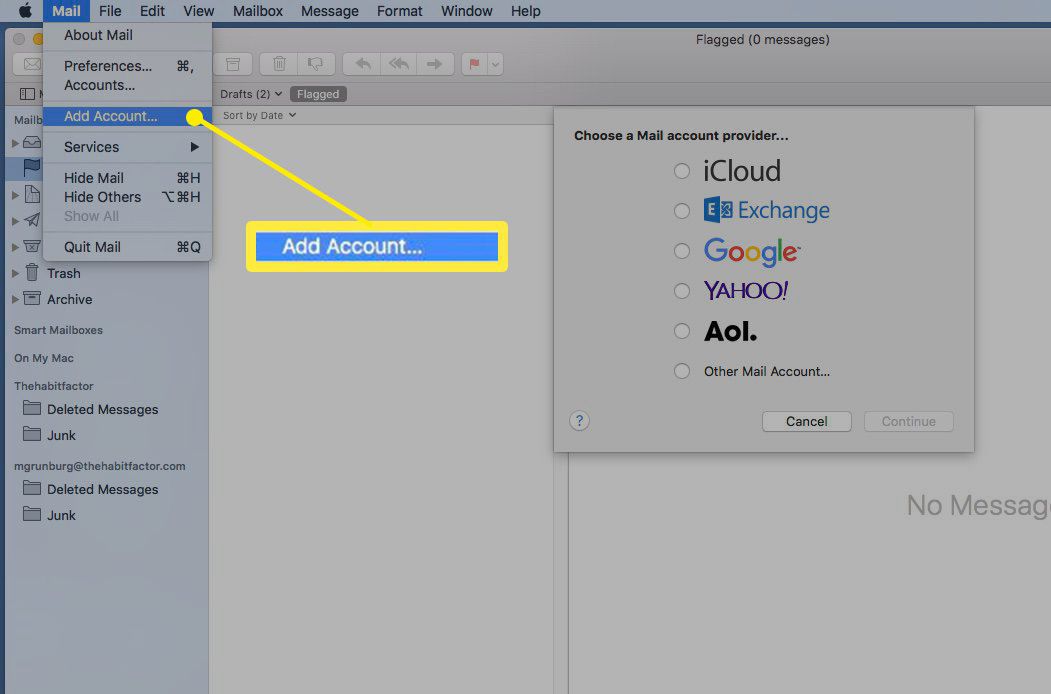
4. Now import the OLM file to your Mac Outlook.
5. After that, right-click on the imported folder and move to >> your Gmail account.
6. Now you have OLM file data in your Gmail account. Now add the same Gmail to Windows Outlook.
7. Open your Windows Outlook and go to File >> Add Account >> Enter your Gmail login data.
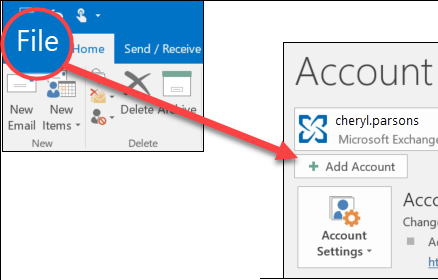
8. Check the IMAP setting and complete the configuration process.
9. Now, select File >> Open&Export >> Import/Export.
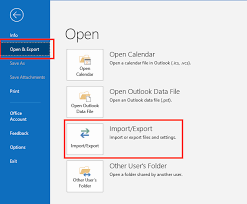
10. Export to a file >> Outlook Data File (.pst).
11. Select the folder to export and browse the targeted location.
12. At last, click on the Finish button to complete the conversion process.
Here you export OLM to PST file manually. However, with this approach, there are a few limitations,
- Lengthy process that required lots of time.
- If the Outlook import & export tool not working, then you were not able to complete the converting.
- Required both Mac and Windows systems with Outlook installed in it.
How to Export OLM to PST Instantly?
OLM Converter is the ultimate solution to export email data from OLM files with accurate and effective results. It can easily convert contacts, calendars, journals, and other email data from OLM file to PST format effortlessly. It support OLM file from all versions of Mac Outlook. Its simple graphical interface makes it easy for any user to convert OLM to PST format without any issues.
Download the free version and analyse the complete conversion process.

Steps to Convert OLM to PST File
- Install and launch this software on your Windows OS.
- Click on the Open drop-down button and select the data file.

- Here, Select Email Data File >> Select OLM files >> Select files or folder.

- All the emails present on the OLM file will be shown on the software interface to read/view emails.

- Go to the Export button and select PST file format.

- In the last stage, browse the targeted location and hit the Save button.
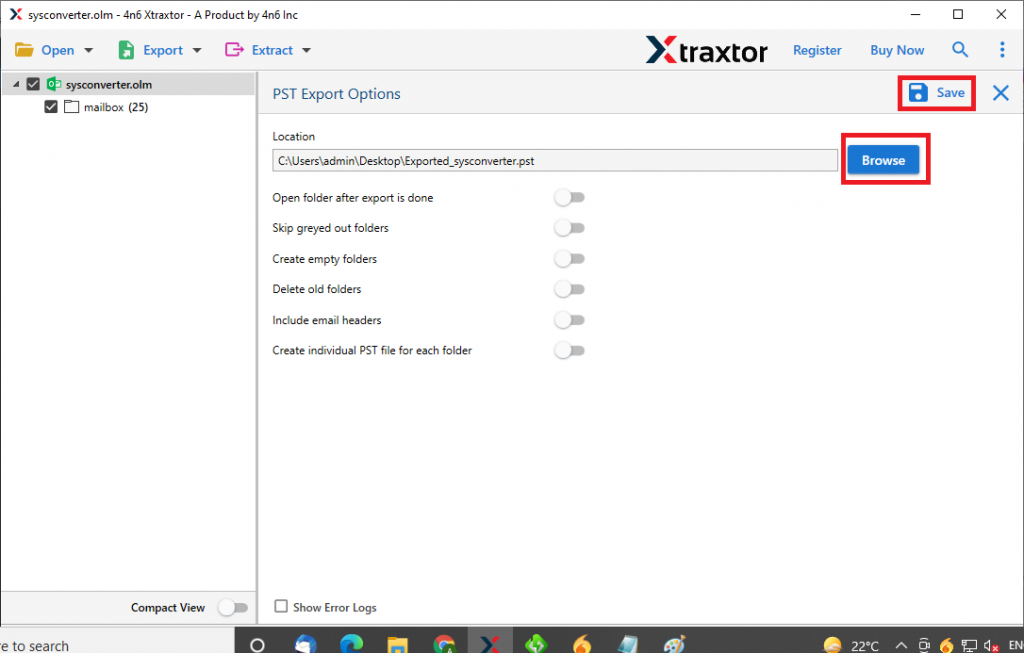
With this tool, you proficiently convert OLM to PST with complete mailbox data. Let’s get to know about some of the highlight features of this tool.
Reasons to Opt OLM to PST Converter
There are multiple reasons to choose this tool to export OLM to PST with completed email data in a single attempt. Some of them mention here;
- Various File Saving Formats
This utility provides multiple email file conversion options in a single interface. The user can also convert OLM to PDF, MBOX, CSV, ICS and other file formats with absolute accuracy. - Export OLM with complete e-mail component
This utility enables the user to export OLM calendar data, email messages, contacts, journals, tasks, and other mailbox components. - Interactive user interface
This OLM to PST Converter tool is designed in such a way that it can also be used by non-vice users without any technical problems. Its self-explanatory functionality simplified the licensing process. - Export OLM to the Email Clients Immediately
Transferring OLM files to cloud-based clients with this software is like a breeze. All you have to do is enter your login details and export all email files to Apple Mail, Eudora, Opera Mail, and other important email clients. Most importantly it directly export OLM file to MBOX format. This file format can easily import into many popular desktop email clients. - Extract information
With this tool, any user can get specific information from an email file with just a few clicks. It helps to retrieve contact details from OLM files, as well as email addresses, contact photos, related email addresses and phone numbers, as well as attachments. - Export selective emails
This OLM to PST converter offers an advanced function with which users can transfer some selective emails from OLM files. This OLM Converter offers various email filter options such as date range, from, to, cc, bcc, subject, and other email attributes.
Conclusion
In this article, we talked about the 2 methods to convert email files. Manual and automated, both tools are described here with their complete working. Using a manual method to convert OLM to PST is a challenging task with no assurance of data integrity. It is better to rely on a knowledgeable and authentic tool that will do the conversion with 100% accuracy. It is highly recommended that you export Mac Outlook OLM files to Windows Outlook File Format (PST) using this Email File Converter.
Frequently Asked Question
Question 1. Can I transfer some transfer emails from the OLM file from a particular sender?
Answer. Yes, with this tool users can export particular date range emails from OLM files by just applying email filters provided by this tool.
Question 2. Is it possible to export multiple OLM files using this tool?
Answer. Yes, with this tool you can batch convert OLM files without any data loss.
Question 3. Does this tool convert OLM files in a format that can easily open on any Windows web browser?
Answer. Yes, you can simply use this tool and convert OLM to HTML format and then open that file on any browser.
Question 4. I use Mac Outlook 2019 version, can this tool convert OLM file from this version?
Answer. Yes, this software is designed with advanced algorithms so that it can support Outlook all versions without facing any errors.