How can I export emails from Mac Outlook in the browser? This article includes two workable and reliable methods to help you to convert OLM to HTML without any trouble.
OLM to HTML Conversion Solution
#1. Manual Method Via IMAP
#2. Use Third-Party Software
If you are looking for the best possible way to export Mac Outlook emails into HTML file format, then you can opt for any of the above mention solutions.
Now the question arises, why do we need to convert OLM emails to HTML format? To know the answer read the next segment of this article.
Reasons for Converting OLM to HTML
Since the OLM file is only accessible in Mac Outlook, the user must perform an OLM to HTML conversion to open emails from the OLM file. The following are the reasons for doing this process;
- The HTML file can easily be edited with any text editor.
- It doesn’t need any additional program to view/read the content.
- The HTML file is easy to download because of its smaller file size.
- It also offers better search engine optimization.
Regardless of whether you want to convert an email file, you can choose any of the methods listed below to get the conversion done with ease.

Method 1: Export OLM to HTML Via Mac Outlook Interface
In this method, users can save all emails from OLM files into HTML format using the Outlook on Mac system. So let’s move ahead and know how this method works.
Steps for Converting Emails from OLM file in HTML Format
Follow the below steps to export OLM to HTML without any single bit of data. Make sure to perform each step in a given sequence.
Step 1. Open Mac Outlook on your Mac system.
Step 2. Move the cursor to the email file you want to convert.
Step 3. Right-click on file and select Save as option.
Step 4. Choose HTML from the given list and click on the save option.
Step 5. In the end, browse the location to save the .html file and hit on Finish button.
Here complete the process, you successfully convert OLM file in HTML format. User checks at the targeted location and open that file in any web browser.
- Export single email at a time.
- Time-consuming process.
- High chances of data loss.
- Unable to preserve email hierarchy.
- Only save the email messages, not the header.
Method 2. OLM to HTML Conversion Using Professional Tool
In this method, we use an automated tool named OLM File Converter a secure and reliable solution to all conversion problems. This tool is smart enough to export emails from multiple OLM files in a single attempt. With an interactive user interface, any novice user can operate it with ease.
Let’s know the working of this email converter in a descriptive manner. Below is the step by step process of OLM to HTML conversion.
Step 1. Install and open this OLM to HTML converter on Windows OS.
Step 2. Click on the Open button and select the file you wish to convert.

Step 3. Now, Select Email Data File >> Select OLM File >> Select File or Folder.
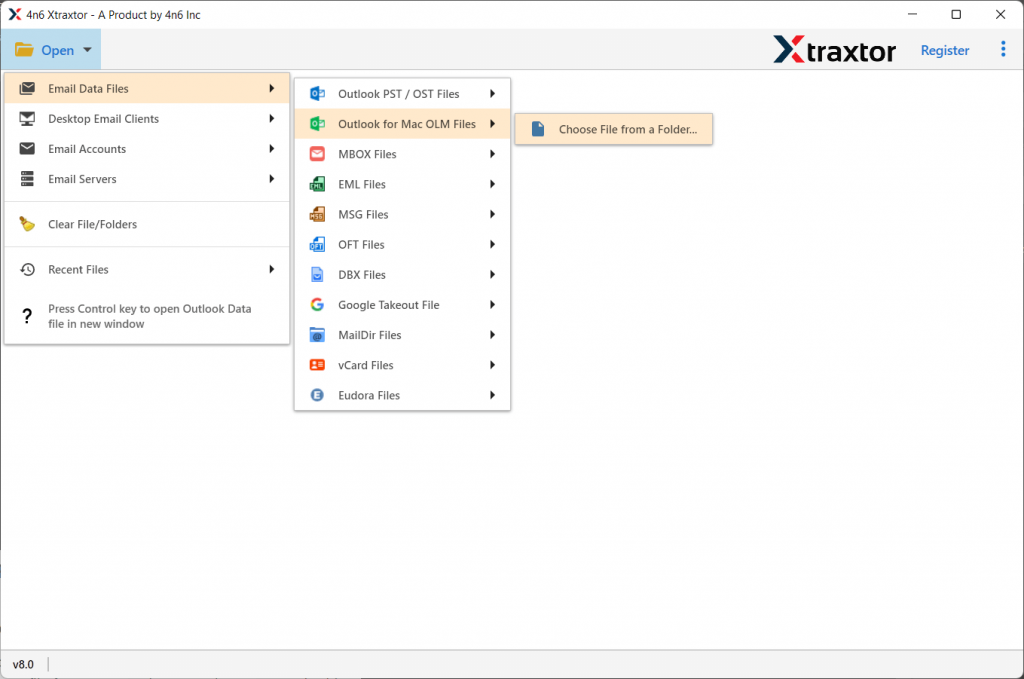
Step 4. This tool access the OLM file and previews all emails in its interface.

Step 5. After this, click on the Export button and select HTML format.

Step 6. At last, browse the location to save the converted file and click on the Save button.

Done! here you successfully convert OLM to HTML using this software with complete data.
Reasons to Choose OLM to HTML Converter
There are outstanding features of this software, some of them mention below;
- Batch Convert OLM file
Using this software users can export multiple OLM files into PDF, MBOX, PST, CSV, and another file format without any data loss. - Windows Compatibility
This tool support all Windows Operating System. Whether it is Windows 11, 10, 9, or other previous versions. Users can operate this software without worrying about their windows compatibility with this tool. - Selective Email Conversion
With OLM to HTML Converter, users can convert emails that are necessary and avoid unwanted conversion. One can use various email filters provided by this tool and export the emails which are needed at that time.
It’s your turn to convert OLM to HTML
In this blog post, we cover two methods to successfully export emails from OLM files to HTML format. The user can go through the conversion process with any of the above solutions.
Hope we can solve your query and the best answer to how to convert OLM to HTML question.