A professional tool for converting email files to multiple file formats in a snap.
Data is a crucial component for any corporate business. And losing a single bit of data is not an option. While dealing with this scenario, our experts designed an email conversion utility. This tool converts all email data from one file format to other formats while maintaining 100% data integrity.
This utility intelligently exports various email files to different file formats. To do this, select the folder that contains the email files and convert them to the formats offered by the tool. This allows you to export the entire folder at once without changing any information.
This software offers users to convert email files into various standard email formats. Users can export to PST, HTML, EML, CSV email format as well as convert to MBOX, PDF, vCard, ICS, and many more formats. Now with this utility, it is easy to export email files to various generic file formats.
The structure of the email file may change at the time of file conversion. This email converter exports email files to different file formats while maintaining the email hierarchy. In this suitable structured email folder, it is easy to search for specific emails. Also, this tool maintains key email attributes like to, from, bcc, cc, date, etc.
This utility has a built-in advanced email filter that allows you to convert some emails selected by their attributes. Emails can be exported by date range, from, to, subject, period, and many more. This tool also offers the option to convert emails, contacts, calendars, journals, notes and tasks from different email files.
This is the best authoritative email converter wizard for transferring emails between different email accounts. It uses IMAP for both the source and output options, ensuring a secure conversion. This utility exports emails between Office 365, Yahoo, Zimbra, Yandex, Gmail, and other email servers in the cloud.
This email converter is compatible with all Windows operating systems. It supports Windows 11, 10, Vista, XP and earlier versions without any problem. With this software, the user can convert the email file into various file formats without worrying about the compatibility of their system with this tool.
With this software, multiple information can be extracted from email files. This tool offers the ability to explicitly retrieve email addresses, phone numbers, attachments, contact photos, associated email addresses, and phone numbers in separate files..
This software gave the freedom to choose the name of the converted file. This helps to store the resulting email file and document in various formats. Data can be stored as Subject + Date (dd-mm-yyyy), From + Subject + Date (dd-mm-yyyy), Date (dd-mm-yyyy) + From + Subject and some other formats.
This tool is expertly programmed and offers the best method to export email files to various email clients without facing technical errors. Users can upload emails to Outlook 2019, Thunderbird, SeaMonkey, Opera Mail, Lotus Note, Zimbra, Eudora, and many others.
Trial Limitations
Download free edition to convert 10 emails from each folder.
System Specifications
Hard Disk Space
48.7 MB of free hard disk space
RAM
Minimum 512 MB is required
Processor
Intel® Pentium 1 GHz processor(x86,x64) or equivalent
Supported Editions
Win 11 & All Below Windows Versions
Commonly Asked User's Questions and Answers
This tool is easy to use, just follow the below steps;
Step 1. Run this Email Converter on the system and choose the email file you want to convert.
Step 2. Click on the Export drop-down button and select the desired file format.
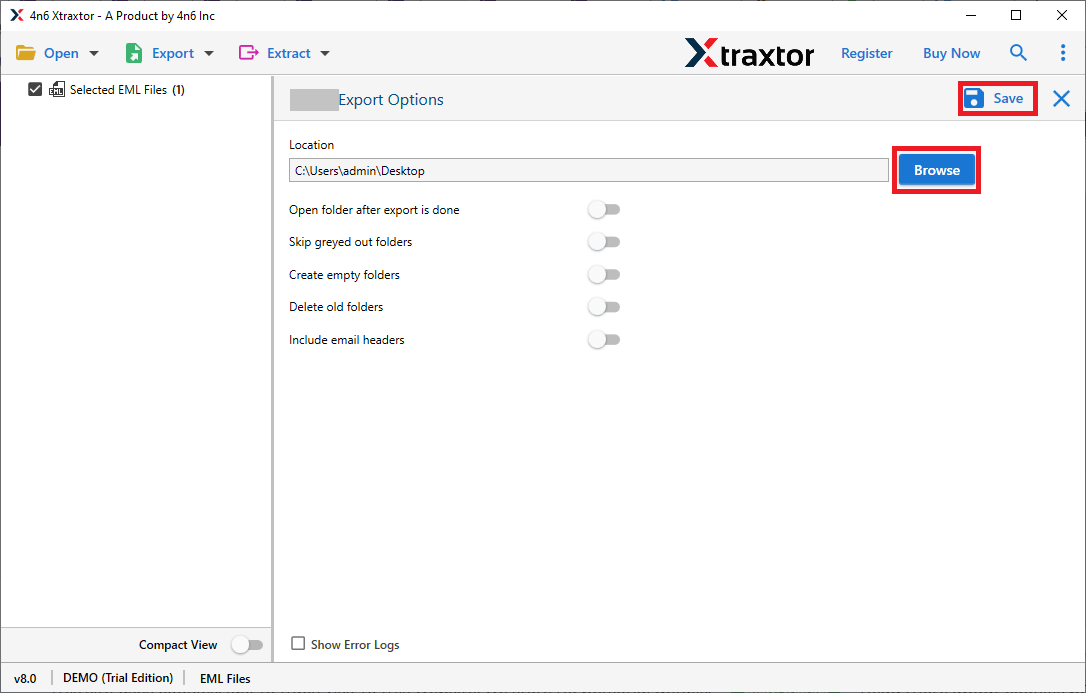
Step 3. Browse the saving location and click on the Save button.
You successfully convert email files using this software.
Yes,using this tool you can convert5 emails with attachments. And also it gives an extra option to achieve this.
Yes, this tool can easily convert email files into cloud-based servers in a few simple clicks.
Yes,with this tool it is possible to transfer any selective folders.
Yes,this software supports all Windows operating systems.