Here in this blog, we will discuss the secure and instant solution to open OST file in Outlook without any hassle. If you want to read OST file data in Outlook, then this post is for you. Opening OST file is possible by an expert approach and in this post, we will discuss it.
OST File is a data file that saves Exchange mailbox components in Offline mode. In offline mode, you can send, receive and modify emails which will be updated when your Exchange is synchronized with the Outlook application.
How to Open Orphan OST file in Outlook?
If you have an orphaned OST file and want to open it in Outlook interface, use OST Converter software. Using this utility you effortlessly open emails from OST file into Outlook in a few seconds. The software will first convert OST to PST and then you can easily upload teh data file into Outlook.
Download the software and try for free.

Steps to Open OST File in Outlook
- Download and Install SysConverter for OST on your Windows OS system.
- Select Open >> Email Data File >> OST File >> Select File from Folder.

- Here you can view emails from the OST file before exporting the emails.

- Click on Export and choose the PST option from the given list.

- Now you can select the emails folder.

- Browse the targeted location and hit on the Save button.

- Run your Outlook interface on your Windows OS.
- After that, click on File >> Open & Export >> Import/Export.

- Select – Import from another file or Program >> Outlook Data File.
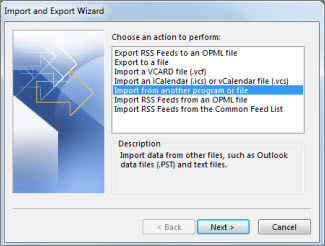
- After that browse the data file from the system.
- At last, select the email folder that you want to import and hit the Finish button.
Here you change .ost to .pst in Outlook, you can import the data file into the Outlook interface using the Import/Export tool.
Done! Here complete the process and you open OST file in Outlook interface.
Features Of Autoamted Tool
- Maintain Mailbox Hierarchy: When you open OST file in Outlook using this software make sure to preserve the formatting of emails. With this utility, there will be no changes in the email folder or sub-folder structure and hierarchy.
- Advance Filter Options: If you want to open OST emails from a particular date, then you can apply the date range filter of this utility. Along with that, you can also use different filter options – to, from, cc, bcc, subject, name, time, content, etc.
- Move OST File to Cloud: Using this software you can also import OST to Exchange, iCloud, Gmail, Yahoo, and many other webmail accounts. Most importantly all these saving options will be present in a single interface.
- Preserve Email Properties: When you open OST emails in Outlook, this utility holds the email attributes and properties. It will save emails and their components, such as – to, from, subject, cc, bcc, content, inline image, hyperlinks, signatures, etc.
- Other File Saving Options: This utility also gives an option to save OST file data into different file formats. You can convert OST to PDF, CSV, MBOX, EML, HTML, and other file formats also.
- Windows-Based Utility: The converter tool is designed for Windows-based OS systems. You can run this tool on Windows 11, 10, 8, Vista, XP, and all other previous versions without facing any errors.
Conclusion
You can’t directly open OST file in Outlook, for that firstly you need to export all data in a format that is supported by Outlook. In this blog, we discuss one such tool that allows you to open corrupted, damaged and inaccessible OST file in Outlook interface. You can use the demo version of this utility and access your OST file emails in Outlook 2021, 2019, and all other previous versions.
Frequently Asked Questions
Question 1: Can this software allow us to read orphan OST emails in the Outlook interface?
Answer: Yes, this tool efficiently reads orphan, damaged, encrypted OST file on any Outlook profile with ease.
Question 2: Is there any file size limitation with this tool?
Answer: No, you can read large OST file data into Outlook without any hassle.