Summary: This article consists of a way to migrate Kerio to Exchange server. A lot of users looking for an efficient approach to migrate Kerio Connect to Exchange Server with complete data. Read the complete article and know the Kerio to Exchange Migration process.
Kerio is a popular web server that provides email management and other services to many business organisations. It is specially designed for small and medium-sized businesses to provide them with an email solution.
Although Kerio grow since its launch, it still has some restrictions that prompt mainly the large organisation to switch to an advanced platform. Thus they consider to migrate Kerio to Exchange Online or Hosted Server.
Let’s understand the user intent by analysing a user query.
This query states the need for an instant solution to migrate Kerio Connect to Exchange. Thus without any further delay, let’s dive in.
Method To Migrate Kerio to Exchange
For instant and accurate Kerio to Exchange migration, use Kerio Migrator on your Windows OS system. This software allows to migrate emails from Kerio server to Microsoft Exchange in no time. Using this utility, you can also migrate emails from multiple Kerio accounts to Exchange in a single attempt. With its simple working interface, even novice users operate this Kerio to Exchange Migration tool and move their Kerio emails to Exchange Server.
In addition to these, this tool is useful to perform selective email migrations by selecting the email folder that you want to move. Along with that, it offers an advanced filter option to search emails with specific attributes. You can also migrate Kerio emails to Gmail, Office 365, Zimbra, and many other webmail accounts in a single interface.

How To Migrate Kerio Emails to Exchange
To perform the Kerio Connect to Exchange migration process, follow the given instructions.
Step 1. Download and execute this tool on your system.
Step 2. Click on the Open button present on the software interface.
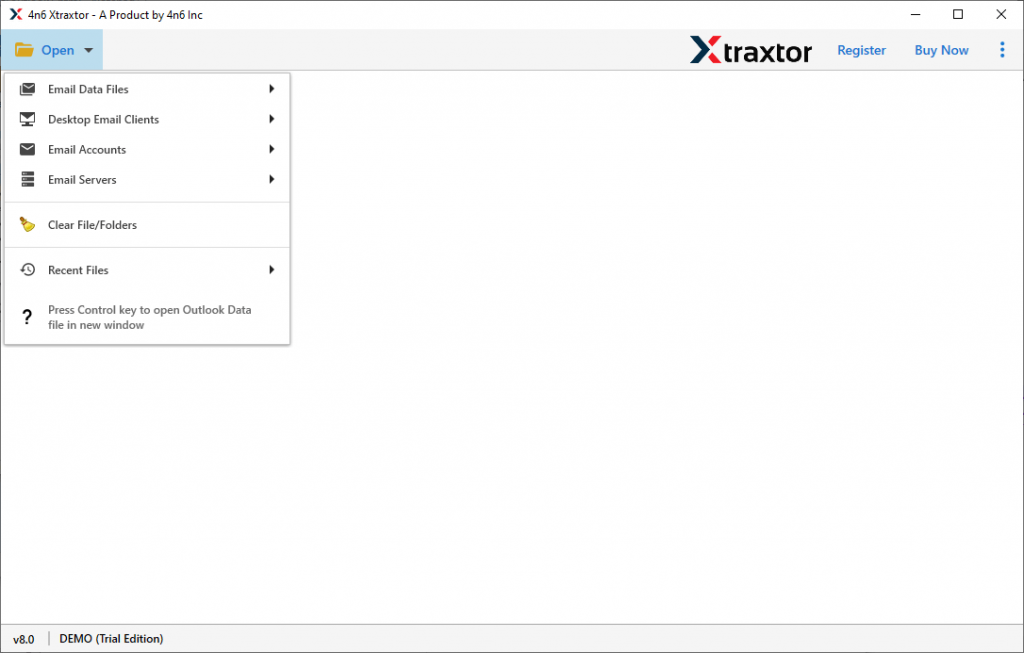
Step 3. Now select Email Server >> Kerio File >> Choose the applicable option.

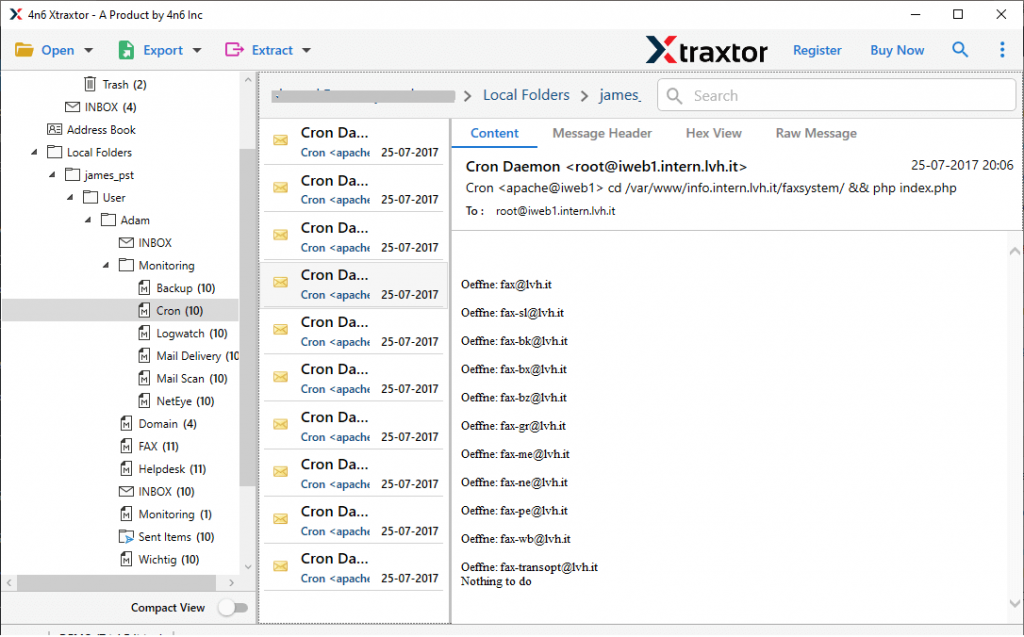
Step 4. Here you will find all Kerio emails, read them and select the email folder that needs to migrate.
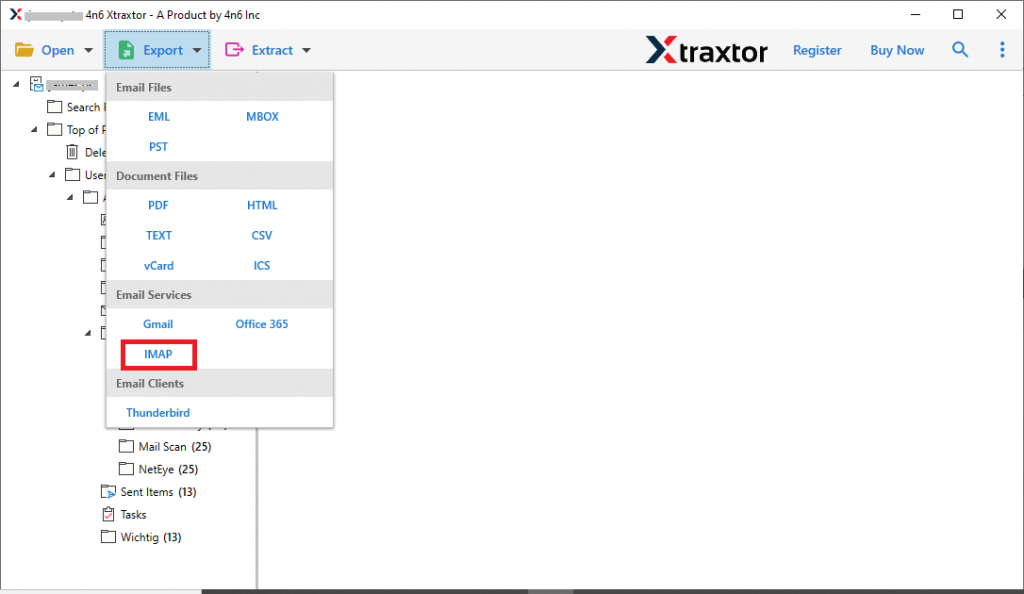
Step 5. Click on the Export and opt for the IMAP option.
Step 6. At last, enter your Exchange login details and hit on the Save button.
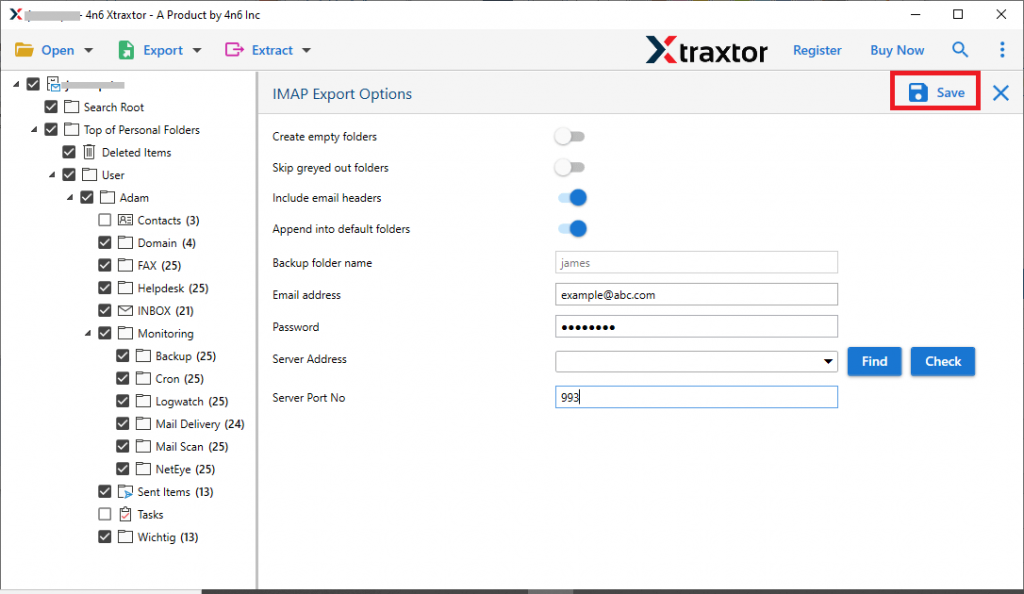
All Done! Now you can access your Kerio emails in Exchange Server with ease. If you want to migrate Kerio emails to Exchange yourself, then use the demo version of this tool. Some of the features of this utility are mentioned below.
Why Choose Kerio to Exchange Migration Tool
This automated tool offers various advanced features that make it a stand-alone entity among another. Some of them are cited here, have a look at them.
Migrate Kerio Emails In Bulk: If you have a folder with various Kerio mailbox data files, then using this tool you can perform the batch migration. This software offers to select a folder option, using which you can move multiple Kerio mailbox to Exchange Server in a single attempt.
Windows OS Support: This Kerio to Exchange Migration tool is compatible with all Windows-based Operating systems. You can operate this tool on Windows 11, 10, 8, XP, Vista, and all previous versions.
Easy to Use Migration Tool: With self-explanatory features, this utility can be used by both technical as well as non-technical users. Even novice users can operate this utility without any technical assistance.
Maintain Mailbox Structure: While migrating Kerio emails to Exchange, this utility makes sure to preserve the email folder and sub-folder structure and hierarchy. At the end of the Kerio to Exchange migration process, you will receive all your emails in the same format as the original.
Save Kerio Emails In Different Formats: Using this Migration tool, you can also convert Kerio emails to PST, PDF, MBOX, HTML, CSV, ICS, vCard, and many other file formats.
Conclusion
In this blog, you learn the best way to migrate Kerio emails to Exchange Server in a few simple steps. Along with that, we method the detailed description to move Kerio emails to Exchange with screenshots. You can also use the Kerio to Exchange Migration tool and migrate Kerio Connect to Exchange with complete accuracy.