Want to export Kerio mailbox to PST and don’t know the way to do the same? If your answer is yes, then you are in right place. Read the complete blog post and know an efficient way to convert Kerio emails to PST format with complete mailbox data.
As we already know Kerio connect is a mail server that provides email management services for small and medium organizations. However, sometimes users want to export Kerio mailbox to PST format.
Although the user is looking for a way to convert Kerio emails to PST, they do not know the proper solution to perform this conversion process. Although you will find a different solution, finding the best way to export Kerio Connect emails to PST format is a difficult task.
To solve your Kerio to PST export problem, we found a safe and reliable solution which we will discuss in the next section. Before that, analyze the situation with a user query.
Method to Export Kerio Mailbox to PST Format
To open Kerio emails in Outlook, you can opt for any one of the two methods mentioned below. Both methods can perform the conversion process, try them and decide which one fulfils your export needs.
#1. Manual Way for Kerio to PST Conversion
#2. Automated Approach to Save Kerio emails in PST file
Let’s discuss both the method in detail and know-how they transfer emails from Kerio mailbox to PST.
Solution 1: Convert Kerio Emails to PST Using Connector
Before you start the process you need to know that, there is no direct manual way to transfer Kerio emails to PST format. To perform this task you need to install Kerio Outlook Connecter and synchronize Kerio with Outlook.
The Kerio Outlook Connector is a plugin provided by MS Outlook that allows you to access your Kerio emails, contacts, calendar, and other data in the Outlook interface.
Let’s know how to use this plugin to export Kerio connect mails to PST format. For that follow the given instruction.
Step 1. To start with go to Kerio Outlook Connector (Offline Edition) home page.
Step 2. Click on the Integration with Windows option.
Step 3. Press on the user name in the top right corner of the window.
Step 4. Select the Integration with Windows option from the drop-down.
Step 5. Click on download Kerio Outlook Connector in the Outlook Connector section.
Step 6. Open Outlook email client and go to File >> Info >> Add Account.
Step 7. Click on the “Manual setup or additional server type “ and click on the Next button.
Step 8. Now select the other option >> Kerio Connect.
Step 9. Enter your Kerio account login credentials and click on the Connect button.
After that synchronization process will start and all your mailbox data will be saved in Outlook. Now using Import/Export tool export Kerio mailbox data into PST format.
Limitations With Manual Method
Although this method will transfer your Kerio emails to PST format, still you can face restrictions. Some of them mention below,
- Kerio Outlook Connector is a free service for up to 30 days, after that, you need to purchase this plugin.
- To buy the subscription version of this plugin, you have to pay a high price.
- To use this plugin, you need technical knowledge to complete the manual process.
- There are high chances of data loss during the conversion process.
Method 2: Instant Way to Convert Kerio Emails to PST Format
With the manual way, there are certain limitations. To overcome those drawbacks, it is convenient to use the Kerio Migrator tool. Using this utility you can easily export Kerio mailbox to PST format with complete data. This converting tool offers an array of filter options to export selective Kerio emails to .pst file. Along with that, this smart utility directly convert emails from Kerio mail account without facing any glitch.
In addition to these, this utility also allows to select the email folder from mailbox data and export them into PST and other file formats. This utility not only export Kerio emails to PST, but also migrate Kerio to Office 365, Gmail, Zimbra, and other webmail accounts with ease.

Steps to Export Kerio Mailbox to PST Using Professional Approach
Follow the given instructions to save emails from Kerio account to .pst format.
Step 1. Install and run this tool on your Windows OS system.
Step 2. After that click on the Open button and choose the required field.
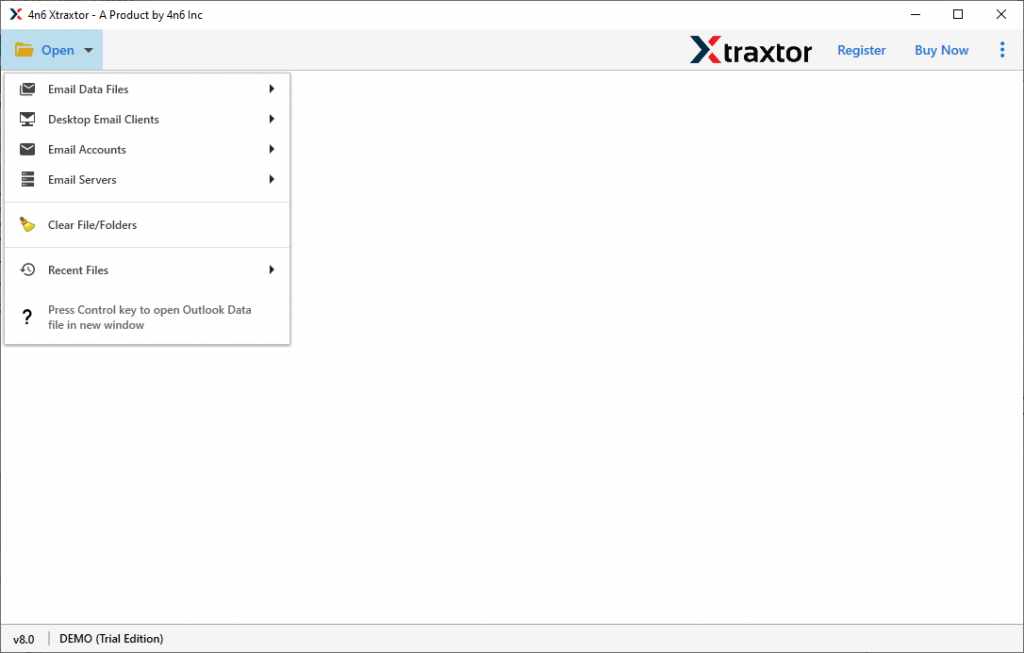
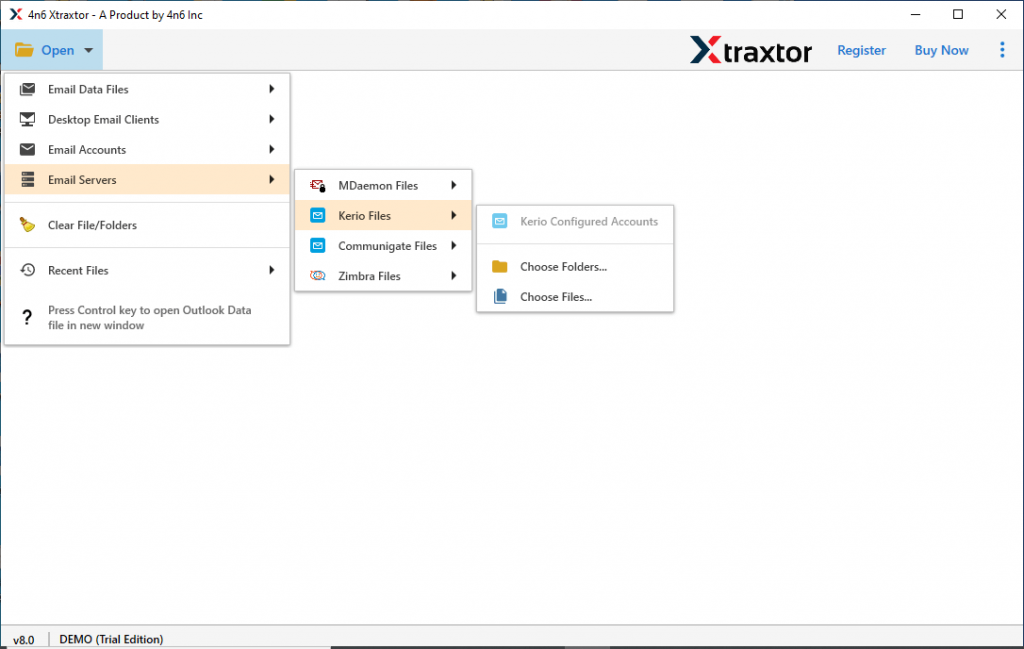
Step 3. Select Email Server >> Kerio File >> Select the option.
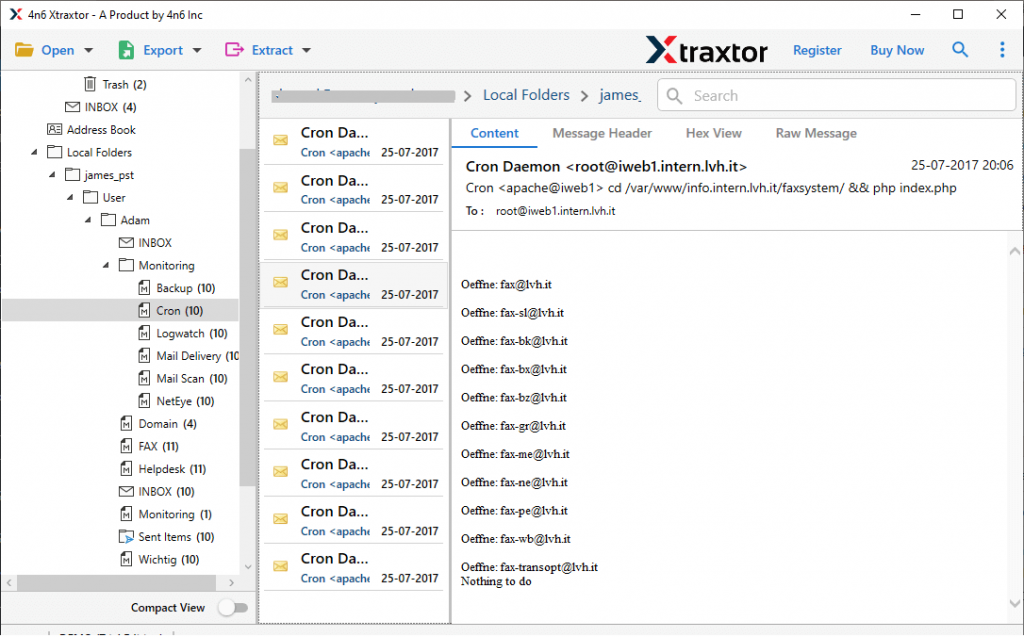
Step 4. Here read your emails and choose the email folder that needs to convert.
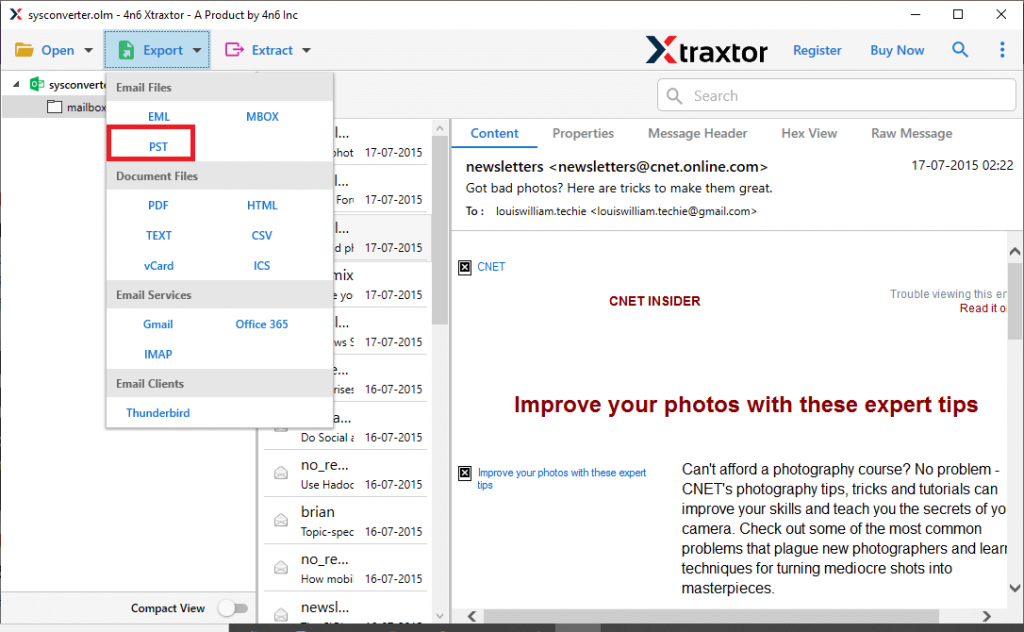
Step 5. Click on the Export and opt for the PST option.
Step 6. At last, browse the saving location and hit on the Save button.
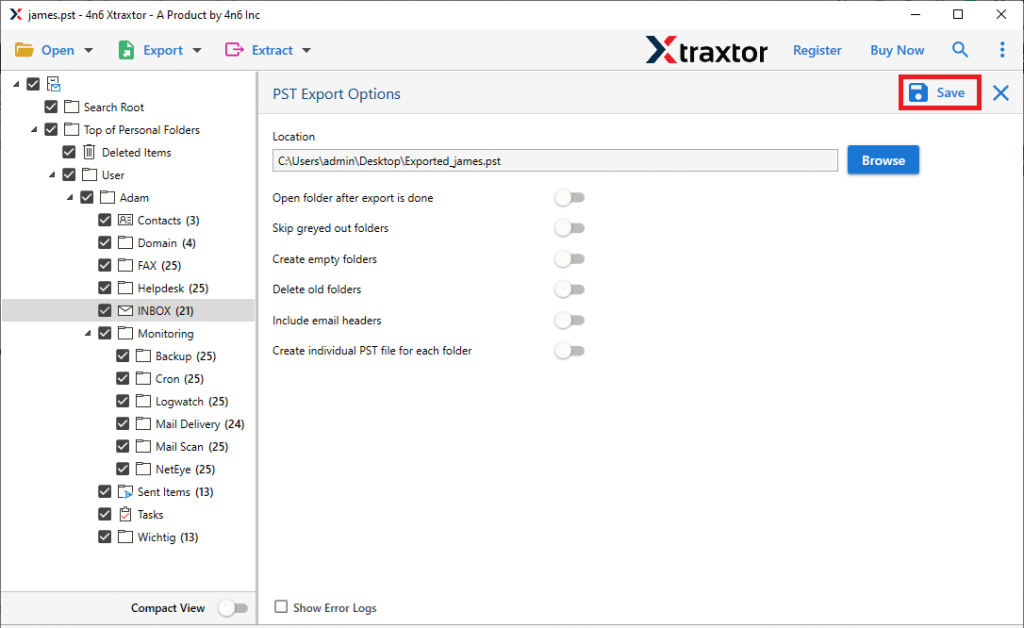
Here completes the Kerio to PST export process. Now you can easily access your emails in the Outlook interface with ease.
Outstanding Features Of Automated Tool
This expert solution has many outstanding features that make it an independent entity among others. Some of them mention here.
Advance Email Filter: This automated tool offers a wide range of filters to locate emails with particular attributes. Users can apply various filters such as – to, from, subject, property id, property name, has attachments, date range, time, and many more to choose from.
Direct Kerio to PST Export: With this utility, you will find an option to directly convert the emails from the mail account. Users can instantly export emails from the Kerio mailbox to PST format without facing any problems.
Maintain Mailbox Structure: While converting Kerio emails to PST format, this tool makes sure to uphold the email ket elements and properties. Along with that, it also maintains the email folder and subfolder structure and hierarchy during the export Kerio mailbox to PST format.
Conclusion
In this write up we discuss two different ways to convert Kerio emails to PST format. Although the manual method can perform this conversion process, still there are various limitations with it. To avoid those drawbacks, we recommend the automated tool that can easily perform Kerio to PST export in a few simple steps.