Summary: In this write up we will discuss secure and reliable solutions to upload PST file into Outlook web. If you are among those who are looking for a way to import PST to Outlook.com account, then this article is for you. Read the complete article and know the way to transfer emails from PST file to Outlook on web.
Outlook.com is a free personal email service from Microsoft that includes email, calendar, contacts, tasks, and other services. Similar to Outlook, this application gives you the flexibility to access mailbox data on any browser. Users can access their email regardless of their location and the needs of Outlook installation on your system.
Let’s take a look at the situation with user queries and understand the reasoning behind the import process.
From this query, it is clear that the user has a PST file and he/she wants to import it into an Outlook.com account but doesn’t know how to do it.
If you have the same problem, don’t worry, this article will solve your issue. Unfortunately, there is no direct manual solution to import PST to Outlook.com account. It only left us with the use of a third-party solution. Let’s move ahead and learn about the tool that will transfer emails from PST file into Outlook web account.
How to Import PST to Outlook on Web?
In order to move PST file emails to Outlook web account, you can use the PST Converter software. This smart tool very efficiently import emails, contacts, journals, etc from PST file into Outlook.com with accuracy. Along with that, the tool has the capability to import emails with exact attributes and properties. While importing PST file, this utility maintains the mailbox folder and subfolder hierarchy and structure.
In addition to these, you can also import PST to Office 365, Exchange Server, Gmail, Google Workspace and other webmail accounts. With its easy to use interface, any novice user can operate it and move their .pst file emails.

Simple Steps to Import PST to Outlook.com directly –
- Install and Run SysConverter for PST on your Windows OS.
- Select Open >> Email Data File >> PST File >> Select File from Folder.

- After uploading the data file, this software scans them and shows all the data of the PST file into its interface.

- Now click on the Export and choose IMAP from the given list.

- Here you can select the email folder if you want to import selective data.
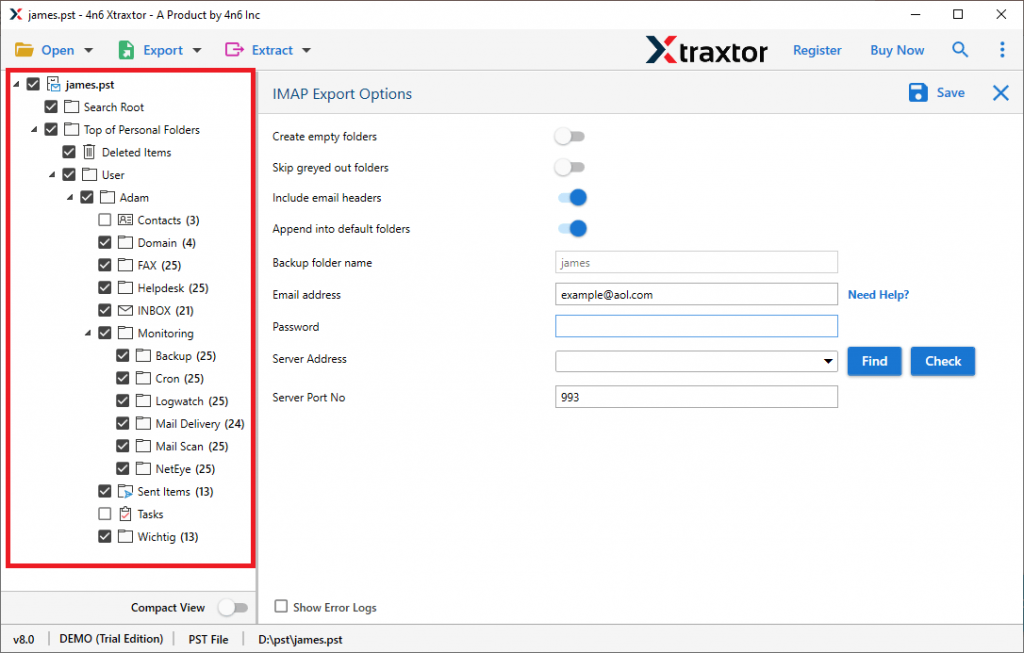
- At last, enter your Outlook.com email address & password and hit on the Save button.

Finish! Here completes the import process. Now you can access your PST emails into Outlook.com account without facing any issues.
Benefits Of Using PST to Outlook.com Import Tool
This automated tool has many outstanding features, some of them mention here,
Email Filter Options: With the import tool there are various filter options that help users to import specific email. One can apply different filters such as – to, from, subject, name, content, cc, bcc, date range, time, has attachments, property id, and many more.
Multiple File Saving Options: This software not only import PST to Outlook.com, but save emails and other mailbox components into different file formats. You can easily convert PST to MBOX, PDF, CSV, EML, and many other formats.
Maintain Mailbox Hierarchy: During the import process, this software preserves the email folder and sub-folder structure and hierarchy. After the import process, you will find your PST file emails in the exact format as the original.
Move PST to Cloud: The tool securely transfers PST file into various webmail accounts without any data loss. Using this stool you can import PST to Exchange Server, Gmail, cPanel Webmail, and many other emailing accounts.
Easy to Use Tool: This utility is designed while keeping beginners in mind. With its simple graphical interface users can easily operate this tool and import their PTS file data.
Windows-Based Utility: The PST to Outlook.com Import tool is designed for Windows OS users. You can install and run this software on Windows 11, 10, 8, XP, Vista, and all other previous OS versions.
Conclusion
Outlook.com has the same interface and works as the Outlook email client. However. Outlook web doesn’t have any option to import PST files. In this blog, we discuss a reliable solution to import PST to Outlook.com and include full mailbox data. Users can use the demo version of the utility and easily move PST emails to Outlook Web.