Are you searching for a workable method to convert OLM to TEXT format? Then you are at the right place. Today in this write-up we will discuss an effective and efficient solution for OLM file conversion into TEXT format.
Sometimes users can’t able to access their Mac Outlook. Then in this scenario, it is best to save the emails in the file format that can be accessed offline.
One such scenario we are going to learn where we learn to convert OLM to TEXT format using a professional tool. Before we move ahead let’s know about these file formats.

OLM vs TEXT Format
The OLM file is created by Mac Outlook to store mailbox data. It saves emails, calendars, journals, notes, attachments, contacts, etc. in a systematic folder or subfolder. OLM file is not compatible with other formats, it is only accessible on the Mac Outlook interface. This makes it inflexible to work with.
Whereas the TEXT file format can be easily used on different platforms. Most important users can open TEXT files on any platform and also consume little space. It is a transferable file format and all major text editors support this file format.
Having conceded on both file formats, now look at the OLM to TEXT conversion process and reason to choose this tool over others on the internet.
Before that, let me ask you a question: What quality do you want in the tool that converts OLM to TEXT?
If your answer is safe, workable and efficient, then this OLM to TEXT converter is the solution to all your questions. Before we process to discuss the working of this tool in detail, let’s get to know the reasons behind this conversion.
Why Convert OLM to TEXT?
There can be many situations where the user wants to export emails from MacOutlook OLM file to a text format, some of them are mentioned below;
- After converting OLM to TEXT, the user can open and edit the email message on any platform.
- The text file takes up less storage space than the OLM file.
- Mostly, TEXT is a transferable format. The user can share it with others on the network.
How To Export Emails From OLM Into TEXT Format
As we already mention about the automated tool i.e. OLM Converter is an all one solution for transferring Mac Outlook emails into plain text format. This tool can export emails from multiple OLM files in TEXT format without losing a single bit of data. Users just need to upload email files to the software interface and the rest of the work will be performed by it. Now know the working of this tool step by step.
Steps To Convert OLM File to TEXT Format
Follow the below-given steps for secure and accurate OLM to TEXT Conversion,
Step 1. Install and open the OLM to TEXT Converter on your system.
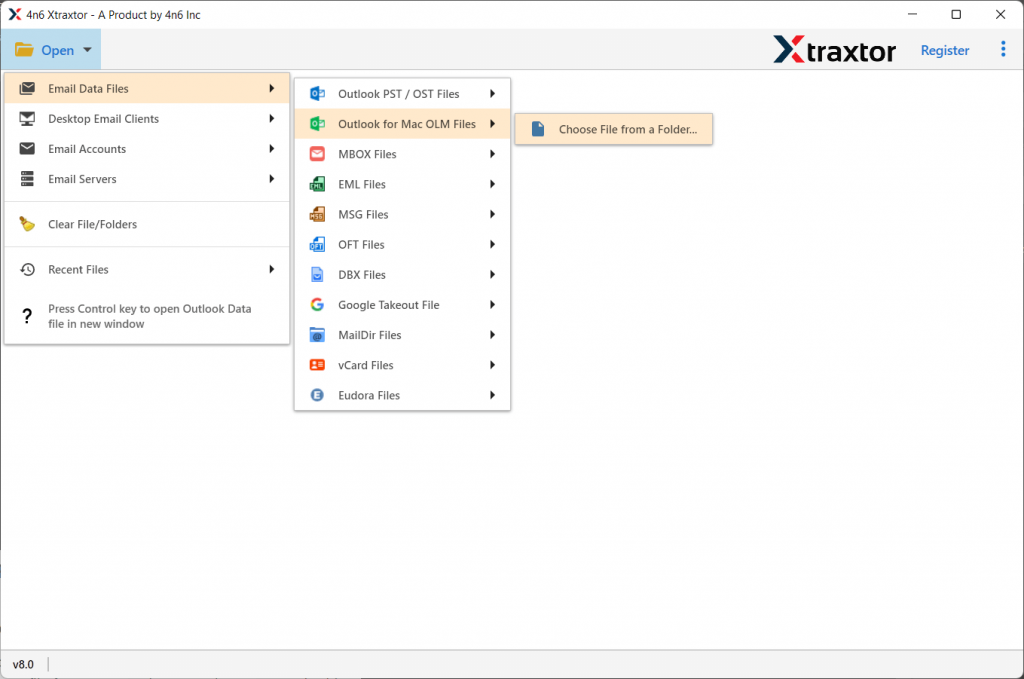
Step 2. Mouse-click on the Open button to choose the email file.

Step 3. After that, Select Email Data File >> Select OLM File >> Select files or Folder.
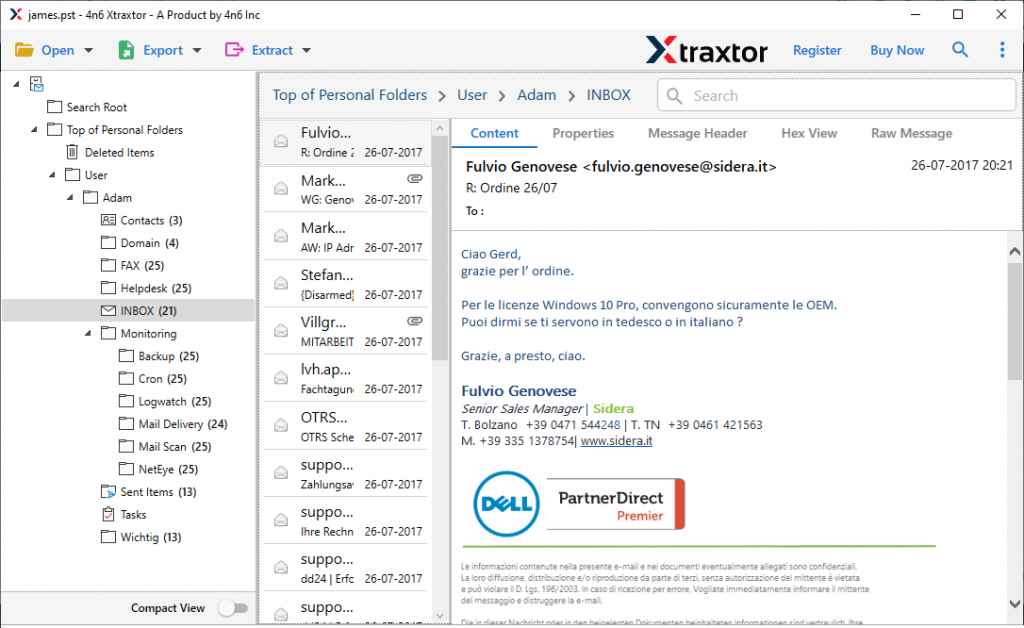
Step 4. Here users can read/view all emails that are saved in the OLM file and decide which need to convert.
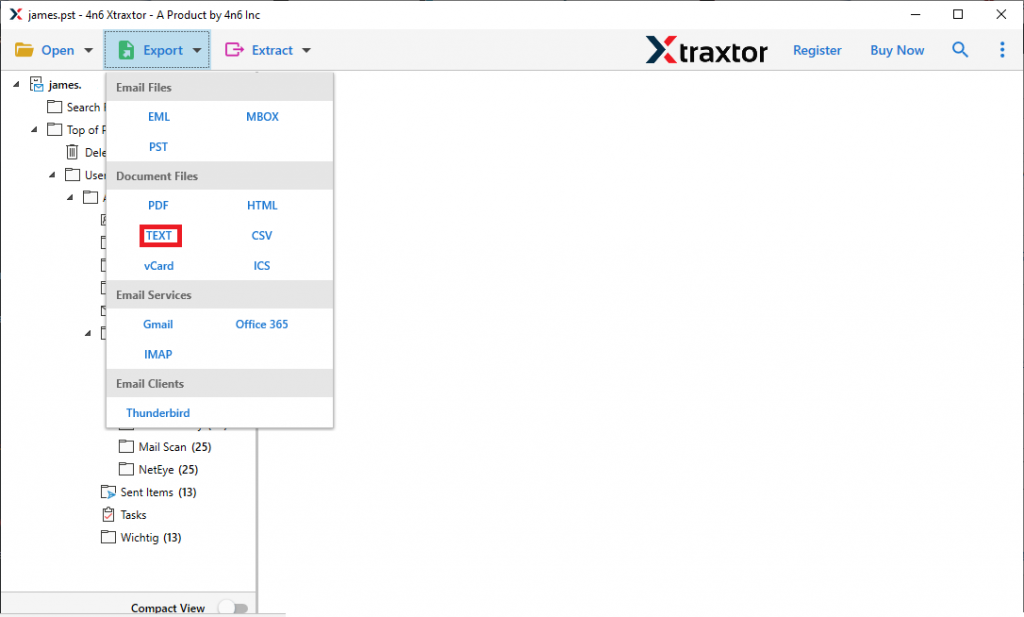
Step 5. After selecting emails to transfer, click on the Export button and choose TEXT format.
Step 6. At last, select the saving location and hit on Save button.
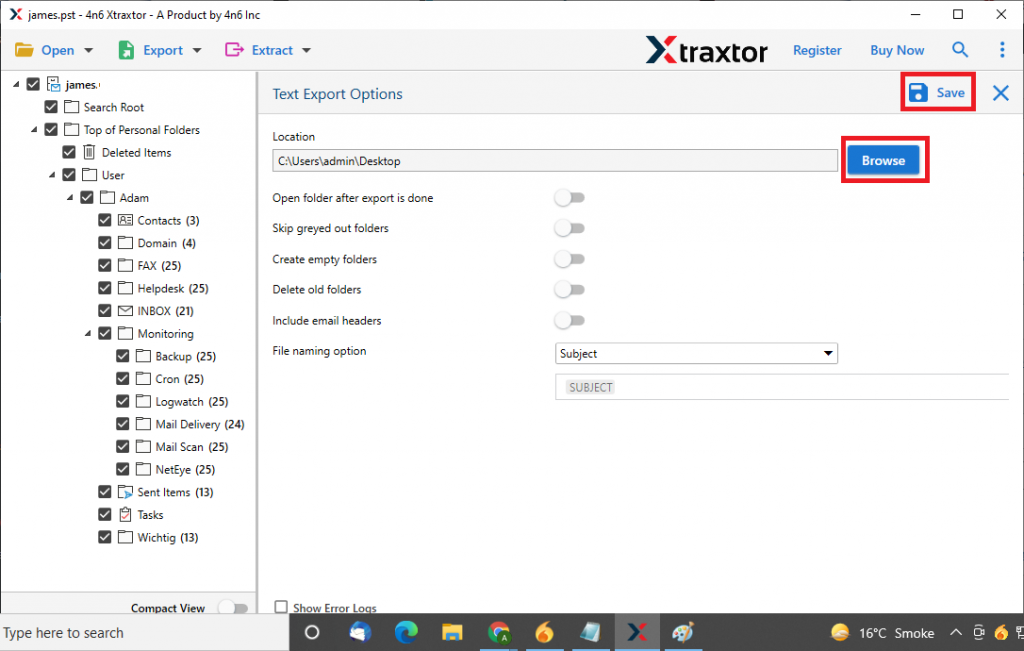
Over here, you successfully convert emails from OLM files into TEXT format with complete data. Let’s get to know some interesting key features of this software.
Why Choose OLM to TEXT Converter
- Multiple Saving Option
This tool offers multiple file formats to save emails from OLM files. Users can convert OLM to PST, HTML, MBOX, and another file format without any data loss. Most importantly this tool provides all these features in a single interface itself. - Maintain Folder Hierarchy
With this Email File converter, user can transfer their emails with complete data in a proper folder and sub-folder structure. It makes sure to perform the operation accurately and export emails as the original. - Offer to Extract Contacts from OLM file
This utility provides a special feature where users can save contact information from OLM files into vCard format. It also offers to extract email addresses, attachments and associated email addresses and phone numbers in a plain text format. - Email Filter Option
It has an inbuilt advanced email filter option where users can export selective emails from OLM files by just applying filters. With it users can save calendar data from OLM files, as well as user can export journals, tasks, events, email messages from the particular date range.
Conclusion
Many users search for a workable solution to convert OLM to TEXT format, in that case using an automated tool is the best option for secure conversion. In this write up we learn one such tool that can easily export OLM files into PDF, EML, and other file formats without facing any glitches.