OST or Offline Storage Table is a well-known file format used by Outlook to save a copy of its emails. As the name suggests, this email file can be accessed offline also. But there is a certain restriction with this file format, it only accesses the same environment. It is impossible to open this file in another space. And above this, the OST file is corrupted easily. Due to these drawbacks, it is necessary to export the OST files into another file format. Today we are going to discuss the best possible way to convert OST to MBOX with attachments. Before moving forward let’s know about users’ queries regarding this conversion.
Table of Content
- OSTto MBOX Conversion related User Quries
- Why Need for Converting OST File to MBOX
- COnvert OST to MBOX Instantly
- Why Use SysConverter
- Conclusion
- Frequently Asked Questions
Queries Related to OST to MBOX Conversion
“My Outlook email client corrupted last day without taking backup. And I left with the OST file which I found from the default location. Now I need to convert OST files to MBOX. Can anyone suggest a reliable software to do this conversion process?“
“I have an orphan OST file. Can I convert OST to MBOX with attachments?”
“I have a corrupted OST file on my system. Is there any way to repair this .ost file and export it into Mozilla Thunderbird with all email properties?”
How to convert OST file to MBOX format? Well, it is a crucial process to export OST emails to MBOX file, since there is no manual solution. Therefore, you need an automated solution for converting OST emails efficiently.
Why Need for OST to MBOX Conversion?
There are many situations where users think to convert OST to MBOX like;
- Outlook crashed without any backup.
- Have an orphan OST file and urgently need to access emails in it.
- OST file is supported by Outlook only, not accessed on any email clients.
In the above case, it becomes necessary to convert OST emails to MBOX with attachments. So in the next section, we are going to discuss the finest tool that is powerful enough to transfer all your Outlook .ost files into .mbox file format with ease.
How to Convert OST to MBOX Instantly?
There is no official method to export Outlook .ost files into .mbox format. To resolve this aspect, it is recommended to use trusted and reliable third-party software OST Converter to do the conversion process without data loss. This tool is designed in a smart manner where it effortlessly exports all .ost files to .mbox within a few clicks.
Additionally, using this tool you can also convert OST to PDF, CSV, EML, vCard and many other file formats. There are various advanced email filters – to, from, cc, bcc, name, date, time, has attachments, etc. There is a demo version of teh software that allows us to analyse its working.

Follow the given instructions and Save OST Emails in MBOX File –
- Install and launch the SysConverter for OST software on your system.
- After opening the application an interface will appear, click on the Open option present there.
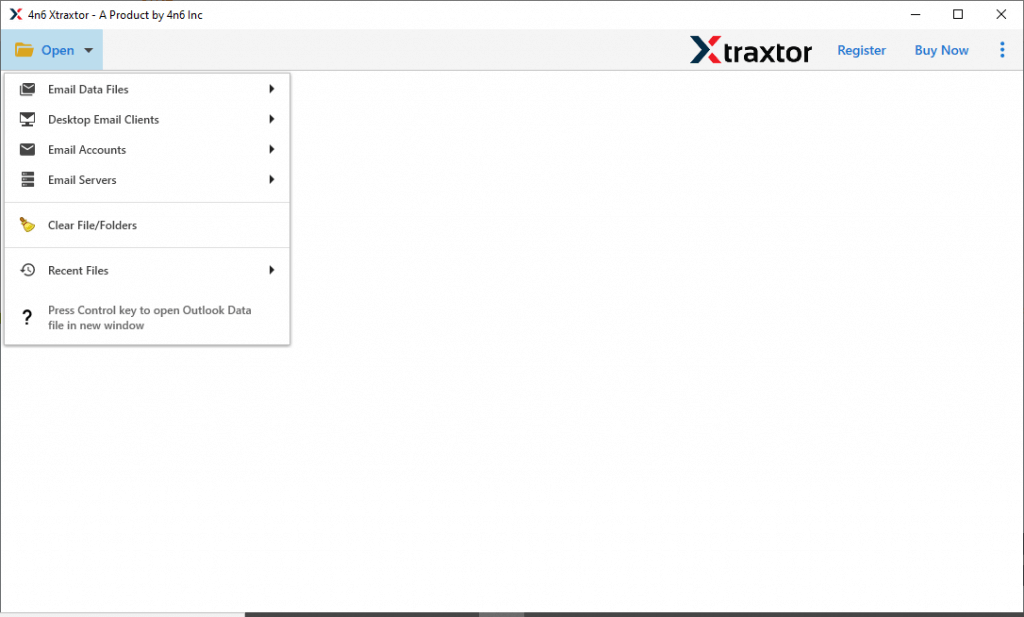
- After this, Select Email Data File >> Select Outlook OST file >> Select file from the folder.

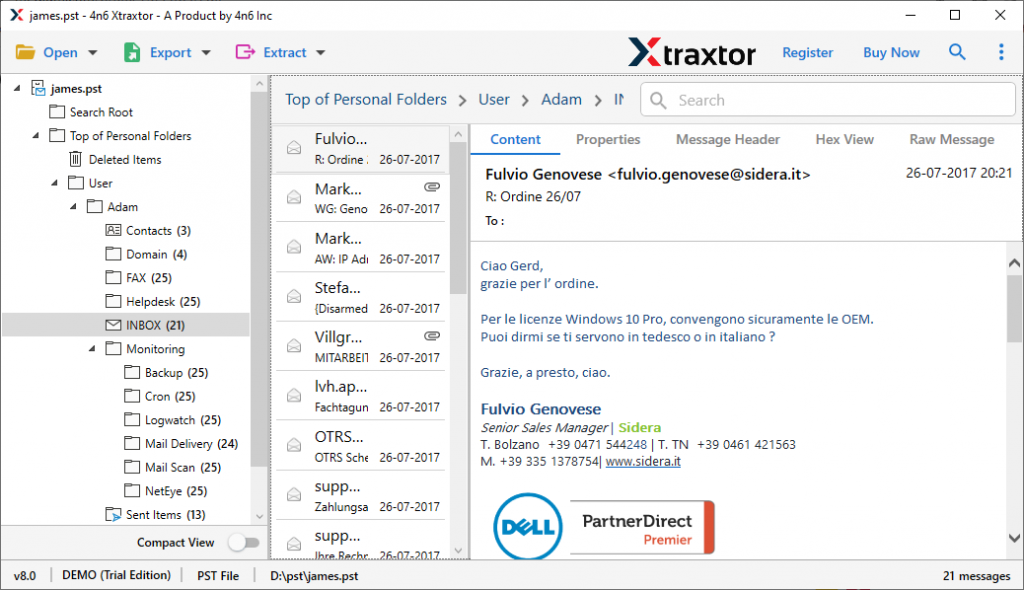
- After selecting a file, this tool accesses your email file and show all emails at its interface.
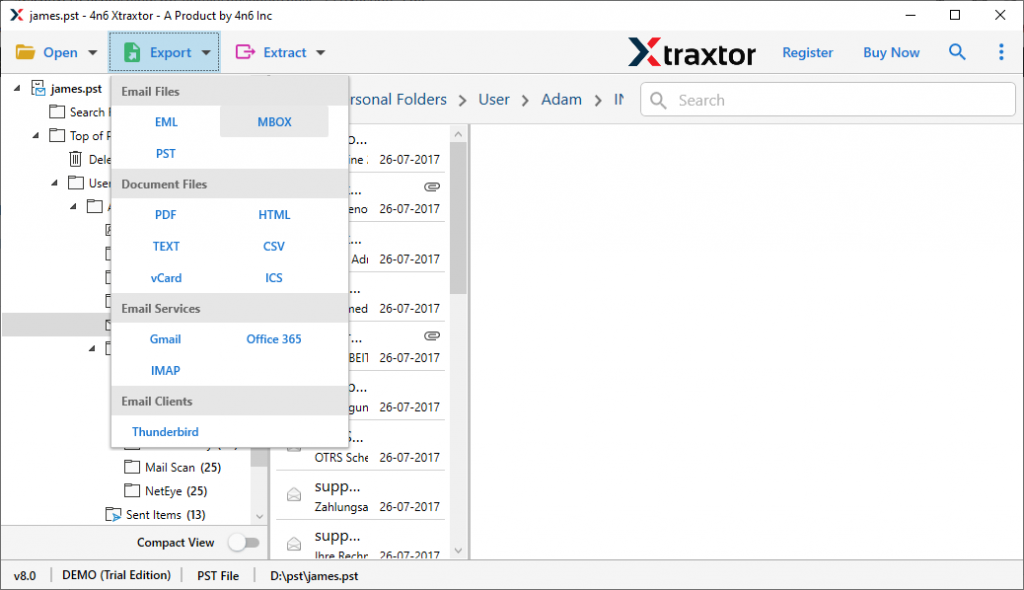
- Now move your cursor to the Export option and select MBOX from the given format.
- Now, browse the targeted location and hit the Save button.
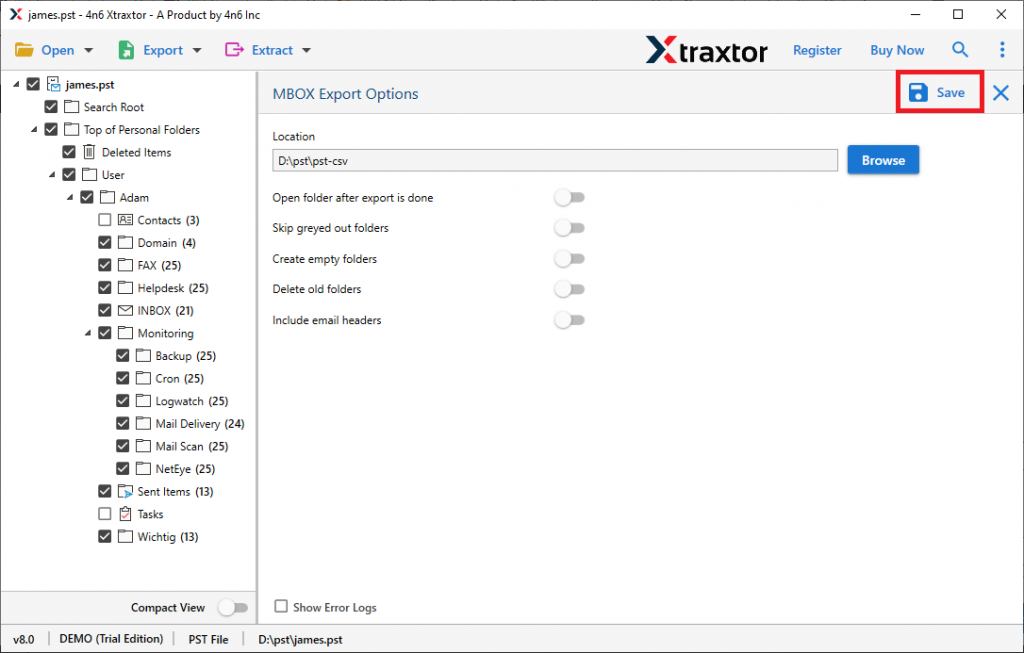
Here we go, now you have successfully completed the process and exported OST to MBOX with attachments in just a few steps.
As we discuss the working of this tool, let’s focus on some key points that make it unique among other tools.
Remarkable Attributes Of OST Converter
- Export Multiple OST file
Using this software you can transfer batch Outlook OST files to MBOX and other file formats. This tool is smart enough to preserve email data while converting it and you will get exact replica of emails after the process is completed.
- Convert Corrupted OST file
This converter is skillfully programmed to convert corrupted, damaged, encrypted, and password-protected OST files into MBOX files with ease. This tool accesses your corrupted email file, detect the issue and solve it in a smart manner without affecting data present in the .ost file.
- Export OST files to Cloud
With the help of this tool, anyone can transfer their OST file emails to different cloud-based servers. This software access all emails from OST files and export them to the cloud server in the file format supported by them. Using it, you can import OST to iCloud, Yahoo, Yandex, Office 365, Gmail, Thunderbird, Zoho, and other email clients and servers.
- Email Filter Option
While exporting OST files to another file format, this software provides you with enhanced email filter options. Using those filters users can export selective email to other formats or email servers as per requirements. You can choose from multiple email attributes like emails, calendars, tasks, journals, contacts, attachments, and many more.
- Several File-Saving Options
This tool provides multiple options to save your OST file in a single interface. Anyone can use this software and convert OST to MBOX as well as convert OST to PST, PDF, CSV, EML, vCard, etc. Most importantly this tool ensures your data security and integrity while the OST file conversion process.
- Preserve Email Hierarchy
This converter holds your email hierarchy after converting OST to MBOX. After the conversion process user got a mirror copy of their emails present on the OST file.
Conclusion
Here we explain the reasons and process of OST to MBOX conversion. We try to address all the issues and try to solve the query – How to convert OST to MBOX. We describe the working and various features of this tool and it is very easy to use. You can try it yourself by using our demo version and check the efficiency of this amazing tool.
Frequently Asked Questions
Question 1. Is it possible to convert more than one OST file at once?
Answer. Yes, using this tool it is possible to convert multiple .ost files.
Question 2. Can this software export corrupt OST files to MBOX?
Answer. Yes, with the help of this tool you can easily convert corrupted, damaged, encrypted, and password-protected .ost files into .mbox files.
Question 3. I want to export the OST file into Thunderbird. Is it possible?
Answer. Yes, this tool gives you an option to directly transfer .ost files to Thunderbird with attachments.