Best Tool to Backup Emails from various Webmail accounts With Attachments on Windows Platform
This Email Backup Tool helps you to save emails from various cloud servers. Using this software you can effortlessly backup Gmail emails, Yahoo mails, Office 365 emails, Yandex, GoDaddy, and various other IMAP accounts in a few simple steps. Most importantly, the backup process will not affect the email integrity and save emails the same as the original.
With this Email Backup Software, you will get different options to save emails from webmail accounts. This feature helps you to save emails into PST, CSV, PDF, HTML, MBOX, EML, MSG and other file formats. In this way, you were able to save your mailbox emails in a local system and drive and save your data from hackers and accidental loss.
If you have unlimited emails in your webmail account but need to download only specific emails, then you can use the filter options offered by this tool. The Email Backup Wizard offers filters to apply such as - to, from, cc, bcc, name, subject, content, date range, time, has attachments, property id & name, and many more to choose from.
Sometimes email backup can lead to email data and structure modification. However, with this tool, you don’t need to worry about it. This software will backup emails with the exact email folder and sub-folder hierarchy and structure. Additionally, it will also uphold the email properties (header information, inline images, attachments, signature, hyperlinks, etc) during the backup process.
Most popular email service provider uses the IMAP protocol, and this tool supports all these email accounts. This Email Backup Tool will allow you to perform the IMAP to IMAP backup process. It includes the most popular email accounts, such as Gmail, Yahoo, Office 365, Zoho, etc. Most importantly, there will be no data loss during the email backup process.
SysConverter Email Backup Tool downloads emails from webmail accounts with attachments. You can use this tool and download emails from various email platforms without any data loss. The software with its advanced feature performs the backup process efficiently and accurately. There will be no data modifications and you will get an exact replica of your original mailbox data.
The Email Backup Tool with its advance allows you to save emails from your webmail accounts to the email client interface. Using this tool you can directly save your webmail emails to the Thunderbird application. If you want to backup email to a desktop client, then this tool converts the emails into a file format that is supported by that email client. After that, you can easily move the file into the email client interface.
This Email Backup Software not only gives you the freedom to save emails from your webmail account but also allows you to save any particular email item. Using this tool you can extract email addresses, attachments, phone numbers, profile photos and associated email addresses and phone numbers. All these extracted data will be saved in a separate text file.
This automated tool is specially designed for Windows-based users. You can operate this software on Windows 11, 10, 7, 8.1, Vista, XP, and all other previous OS version systems. It is designed with an advanced algorithm that backup emails with 100% accuracy and security.
With the simple user interface, both technical and non-technical users can operate this tool and backup their webmail emails. This tool comes with self-explanatory features that make the backup process easy even novice users can backup their emails without any technical assistance.
Trial Limitations
Download free edition to convert 10 emails from each folder.
System Specifications
Hard Disk Space
48.7 MB of free hard disk space
RAM
Minimum 512 MB is required
Processor
Intel® Pentium 1 GHz processor(x86,x64) or equivalent
Supported Editions
Win 11 & All Below Windows Versions
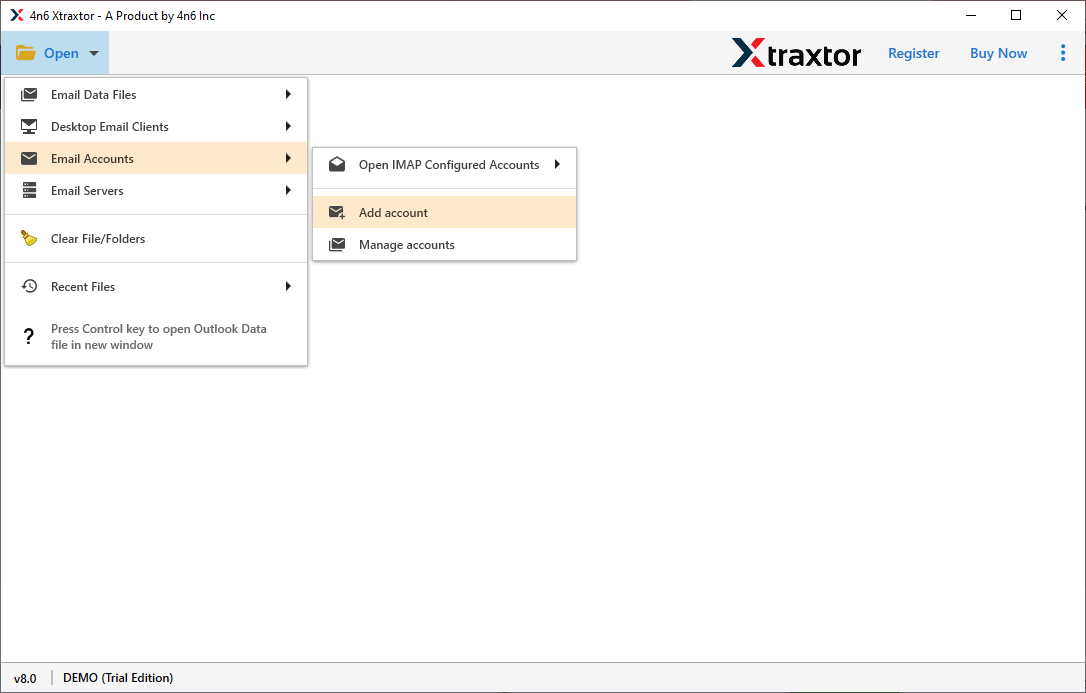
Select Open > Email Account > Add Account.
Put your email account login id and password (use App Password), then click on Add button.
After that click on Export and choose options to save webmail emails.
In the end, choose a saving location (if a file format is chosen) or enter login details (email account chosen) and hit on the Save button.


Commonly Asked User's Questions and Answers
Follow the simple steps to download emails from your webmail account -
Step1. Install and launch SysConverter Email Backup Tool on your Windows OS.Yes, this Email Backup Software allows choosing various email folders to backup.
Yes, the software will download your cPanel webmail account. You just need to choose the IMAP option and enter your mailbox login details and backup cPanel emails with attachments.
No, there is no such restriction. You can backup unlimited emails from your webmail account using this tool.
Yes, you can apply "from" filter options and save emails from a particular sender only.