Summary: In this write-up, we will discuss the process to open PST file without Outlook installation. If you are among those who want to access their old .pst file emails without using Outlook email client, then read the article to the end.
Nowadays most users opt for an email client for their day top day email management. Most of them prefer using freeware email applications. However, if a situation comes where you need to access an old PST file and you don’t have Outlook.
In that case, you will face the problem because only Microsoft Outlook can access the PST file. That implies that there is no manual way to access your data file.
If this is the situation, then you need to use third-party software that will open PST file without Outlook installation. Without any further delay, let’s proceed further and know the best approach to opening PST file without Outlook.
How to View PST File Without Using Outlook Application
To securely and efficiently access the PST file without any email client installation, use PST Converter software. This utility will efficiently open your PST file without using any external application. In order to open .pst file without Outlook, then you can convert PST to PDF, HTML, TEXT, or CSV format. In this way you can open emails from PST file on your systems. While transferring the email data to another format, this software maintains the email folder and sub-folder hierarchy and structure.
Additionally, using this tool you can also repair Outlook PST file without any data loss and modifications. This tool will save PST file to other formats along with their email attributes and properties.

Procedure to Open PST File Without Outlook
Follow the given instructions and open old PST file without using the Outlook application.
Step 1. Install and Run SysConverter for PST on your system.
Step 2. After that. choose Open >> Email Data File >> PST File >> Select File from Folder.

Step 3. Then, click on Export and choose PDF format.
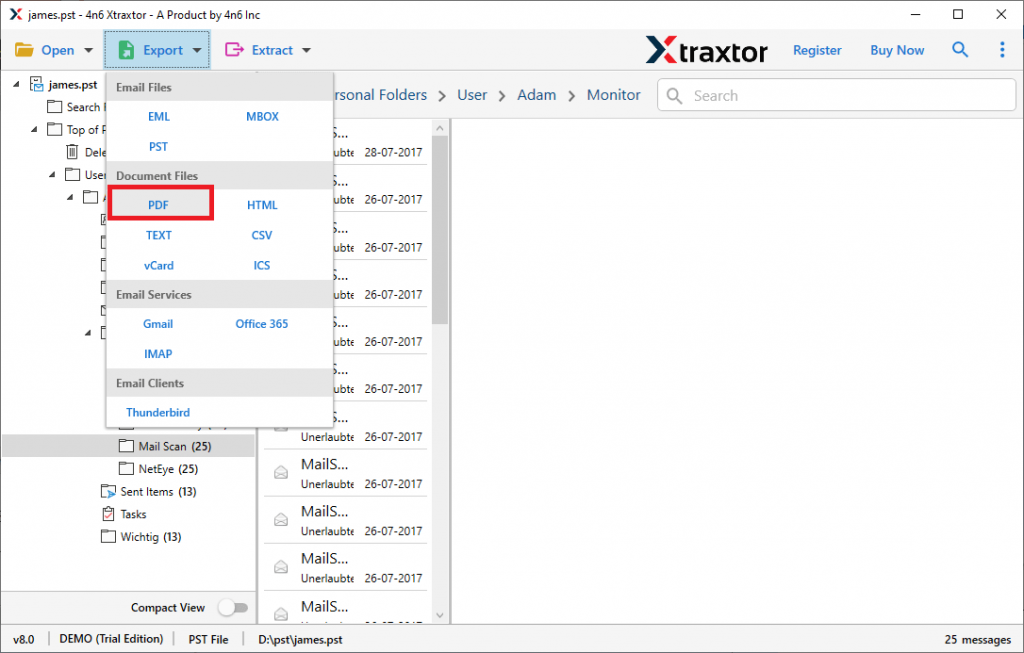
Step 4. If you want to save only important folders, then you can select the email folders.

Step 5. At last, browse the targeted location and hit on the Save button.

Done! Here you open PST file without Outlook installation. In this way, you can convert PST to HTML and TEXT format as well.
Benefit Of Using Expert Solution
There are various outstanding features of this tool, some of them mention below –
Open PST File Without Any Hassle: Use this tool and open PST file data in a few simple clicks. You just need to add the data file in the software and choose the file format to save it, so that you can access them without Outlook.
Maintain Mailbox Hierarchy: This email converter tool has the ability to uphold the email folder and sub-folder structure during the process. You can open your PST file without worrying about the format of your mailbox email.
Email Filter Options: There are various filter options that can be used to save specific emails from PST file. In this way, you will get only important data and avoid unnecessary storage space. You can apply filters such as – to, from, cc, bcc, time, date, etc.
Support Windows OS: This software is compatible with all Windows systems. You can install and run this tool on Windows 11, 10, 7, Vista, XP, and all other previous OS versions.
Simple Graphical Interface: With its easy-to-use interface, any novice user can operate this tool and open PST file without Outlook installation.
Extract Data: If you only need specific information from PST file, then you can fetch the data also. Use this tool and extarct email addresses, phone numbers, attachments, associated email addresses and phone numbers and profile photos.
Conclusion
To open PST file without Outlook is not easy as ABC, you need a proper technique for that. In this blog, we mention the step-by-step description of opening PST file without Outlook installation. You can use the demo version of this uti8lity and open .pst file created by any Outlook version.