In this blog, we will describe the procedure to import OLM to Outlook 2021 in Windows OS. To know the detailed description read the complete article and open OLM file in Outlook 2021.
Outlook is a popular email client preferred by many official enterprises. It comes in both Windows and Mac versions and saves its data in two different file formats. Whereas Windows Outlook use PST file and Mac uses OLM file format.
If you are trying to import OLM files to Outlook 2021 interface, then you should know .olm file extension is only associated with Mac Outlook. And most importantly Windows Outlook doesn’t offer an option to import .olm file in its interface.
In this situation, the only option is to rely on third-party software.
However, there are several tools present for this import process, but which one lives up to your expectations is a long process. For that, you have to use every possible tool and decide which one is the best to import OLM to Outlook 2021 on Windows.
To save you from this labour job, I am going to tell you a secure, reliable and effective utility. OLM Converter is that wizard that allows the user to open multiple OLM files into Outlook 2021. Know the detailed working of this tool in the next section with a pictorial description.
How to Import OLM File to Outlook 2021 Instantly?
The OLM Converter is a simple to use tool that allows you to open OLM file into Outlook 2021 interface. This smart tool does not require any other application to import OLM to Outlook 2021 for Windows. It easily imports email messages, contacts, calendars, journals, and other mailbox components to Outlook 2021 and other previous versions.
If you have a large email data file and want to move a few important emails, in that case, this software offers a select the required email folder to import. Along with that, it performs the import process without affecting data integrity, folder and sub-folder structure, hierarchy, etc. You can use this tool and import OLM to Gmail, Office 365 and many other webmail accounts.

Follow the Steps to Import Mac OLM to Outlook 2021 for Windows
- Install and run this tool on your Windows OS system.
- Click on the Open button and select from the given options.
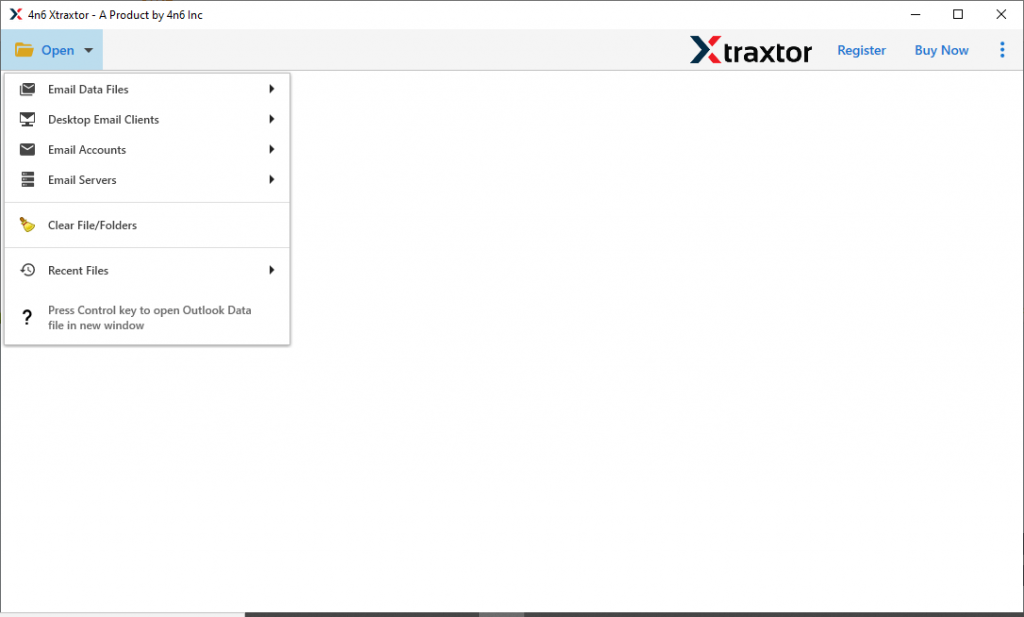
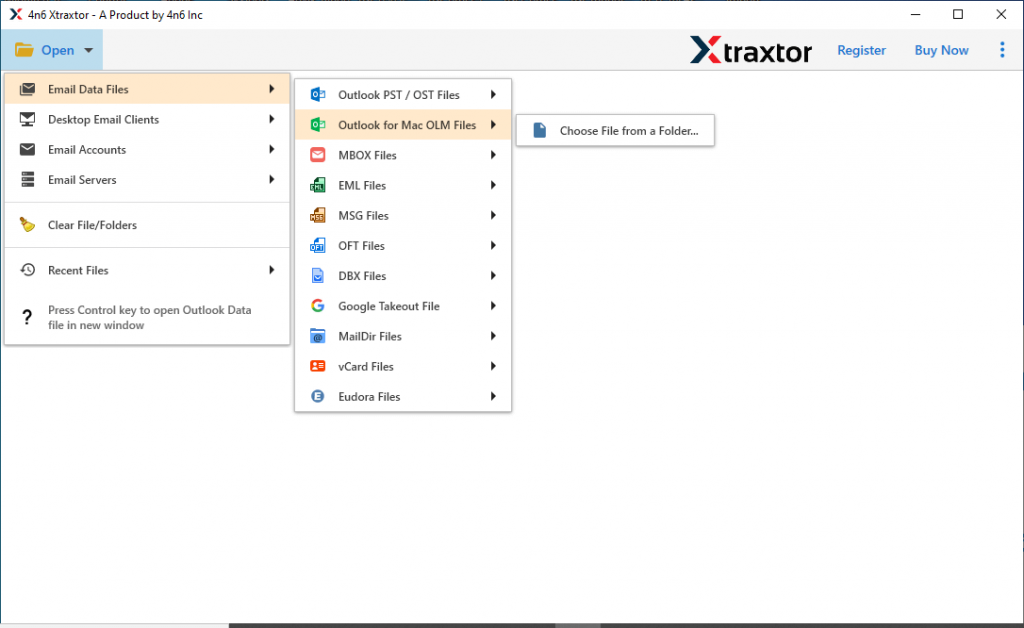
- Now Email Data File >> OLM Files >> Select File or Folder.
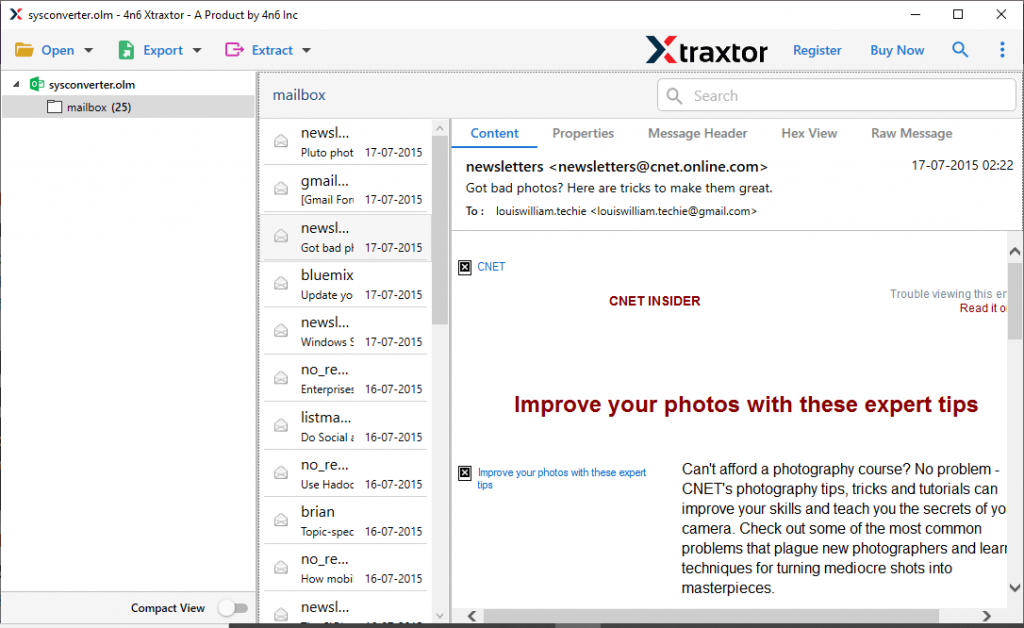
- Here you can read the email from the .olm file and select from which email folder you want to import data.
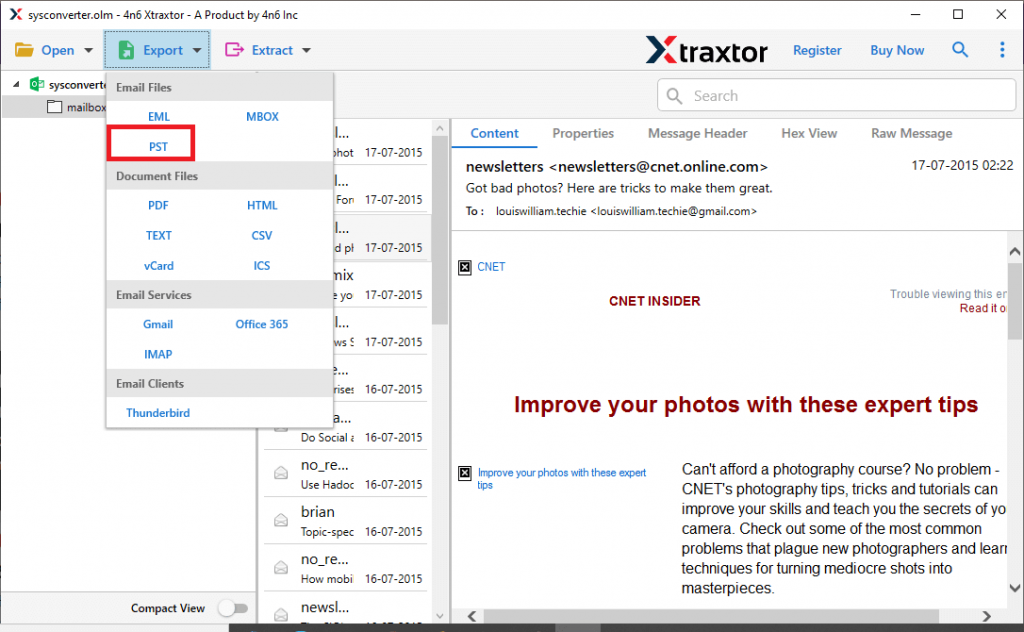
- Click on Export and choose PST file format.
- Browse the location to save the Outlook data file and click on the Save button.
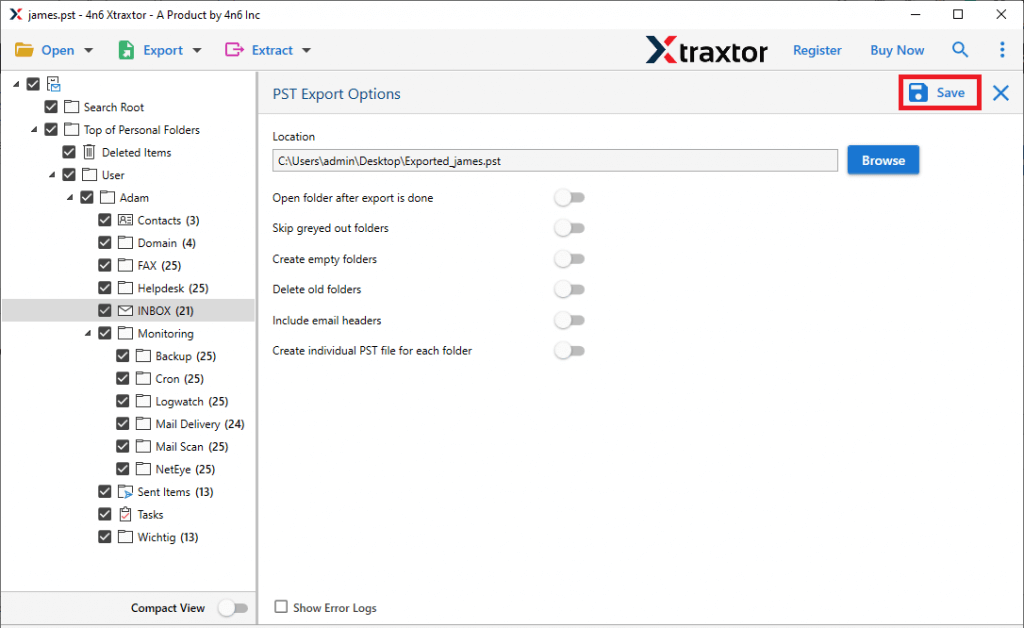
Here you convert OLM to PST, after that you need to move this file format into Outlook 2021 interface.
- Open the Outlook 2021 interface and click on File >> Open & Export >> Import/Export.

- After that Import from another program and file then select Outlook Data File (.pst).

- Locate the .pst file from the saved location and at last click on the Finish button.

Here you efficiently import OLM to Outlook 2021 in Windows with no data loss. Now know the specific attributes of this tool.
Benefits of Using OLM to Outlook 2021 Import Tool for Windows
Know the outstanding features of this automated tool, and know why you need to use this utility.
1. This utility has a batch mode that allows it to open multiple OLM files to Outlook 2021 with ease.
2. It gives the dual option to upload a .olm file – either select OLM file or choose a Folder of various .olm files.
3. Allow import of OLM file into Outlook 2021, 2019, 2016 and all other previous versions.
4. Maintain mailbox folder and sub-folder structure and hierarchy while transferring OLM files to Outlook 2021.
5. Offer a filter option to transfer selective OLM files to Outlook 2021 interface and avoid unnecessary transfers.
6. Easily move OLM file to Outlook 2021 created by Mac Outlook 2019, 2016, and other previous versions.
7. Extract email addresses, phone numbers, contacts, and other data from the Mac Outlook data file into Outlook 2021 interface.
Conclusion
This blog is dedicated to Mac Outlook data file to Outlook 2021 import process. Here we describe the workable solution to import OLM to Outlook 2021 interface. Users can try the demo version of this software and open OLM files in Windows Outlook 2021 interface. Hope we are able to solve your issue and provide a satisfactory answer.