This write-up is all about the way to upload MBOX file into AOL Mail account with attachments. If you are among those who want to import MBOX to AOL Mail, then this article is for you. Read the complete article and transfer emails from MBOX file into AOL WebMail account with ease.
In this digital age, everything is moving to the cloud. There are many reasons for this rapidity, but an important one is data security. Email is an essential part of any business and therefore needs to be protected.
Now the question is – how to protect the .mbox file? The answer to your question is to simply import MBOX into AOL Mail. However, the import process is not that simple as there is no direct manual way to transfer emails from MBOX files to AOL Mail account. In the absence of native solutions, there are only ways to rely on automated tools. Such utility SysConverter for MBOX is a complete solution to transfer mailbox data instantly.
Before we move ahead let’s know a little bit about AOL Mail.
Among the various email servers, AOL is one of the servers with a large number of users. It is a free web-based email service available worldwide in 54 languages. It offers various advanced features such as spam protection, virus protection, linking to other email accounts from different service providers, support for POP3, SMTP, IMAP protocols, and more.
Now without any further delay, let’s know the way to import MBOX to AOL Mail account.
How to Import MBOX Emails to AOL Mail With Attachments?
We already know that there is no direct manual way to perform this import process, so we can only use third-party software. MBOX Converter is a total solution that will directly import MBOX file into AOL Mail using IMAP protocol. Using this tool you can swiftly transfer multiple .mbox files into webmail account in a single attempt without any data loss. Moreover, during this importing process, there will be no data alteration or change in the mailbox data structure.
In addition to these, this utility is capable enough to import MBOX to Exchange, Office 365, iCloud, Gmail, and all other webmail accounts. Some additional functions of this tool are -email filter options, selective email imports, extract information, and so on.

Simple steps to import MBOX to AOL Mail without any hassle –
- Install and run this software on your Windows OS.
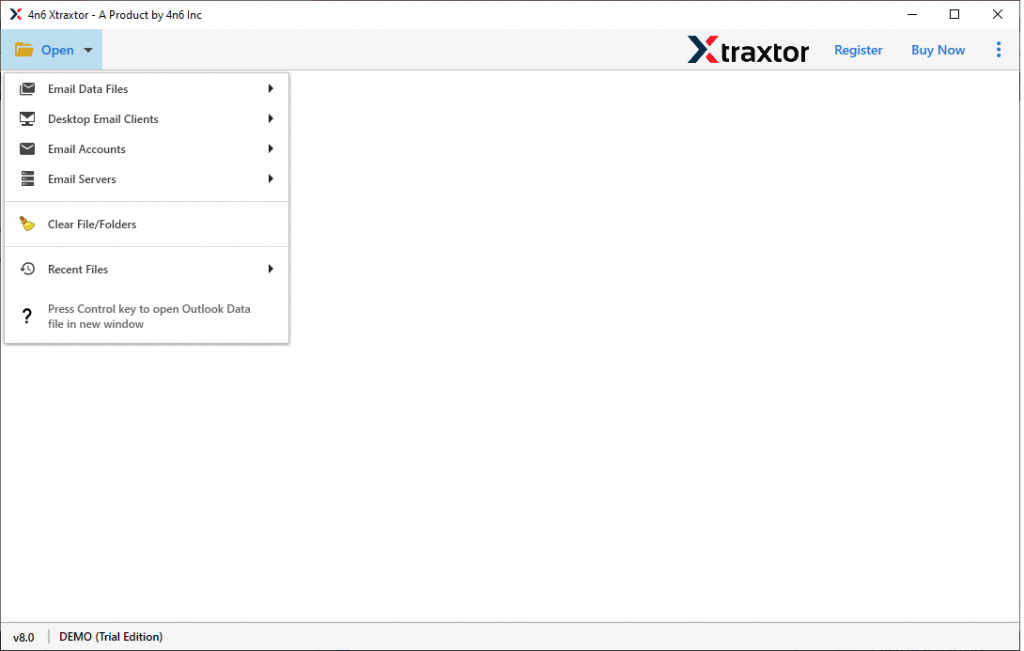
- Click on Open and choose the required options from the drop-down menu.
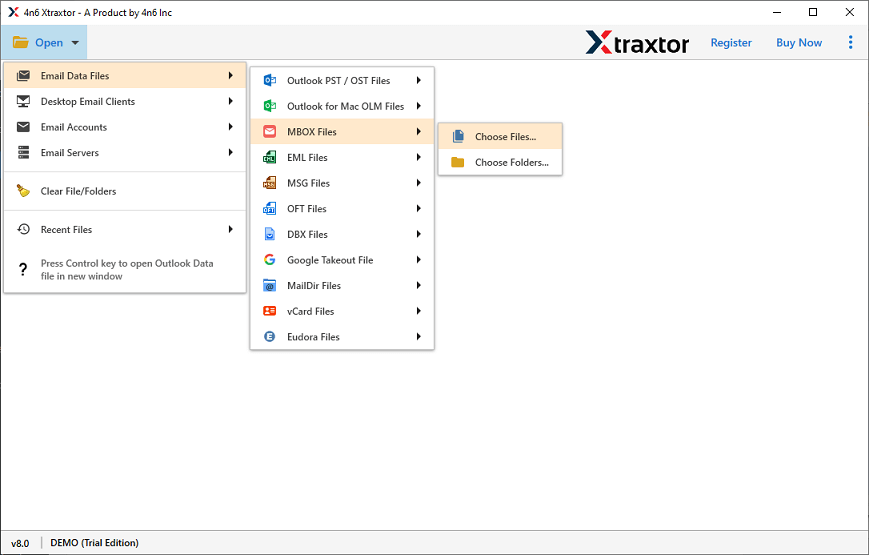
- Select Email Data File >> MBOX File >> Select File or Folder.
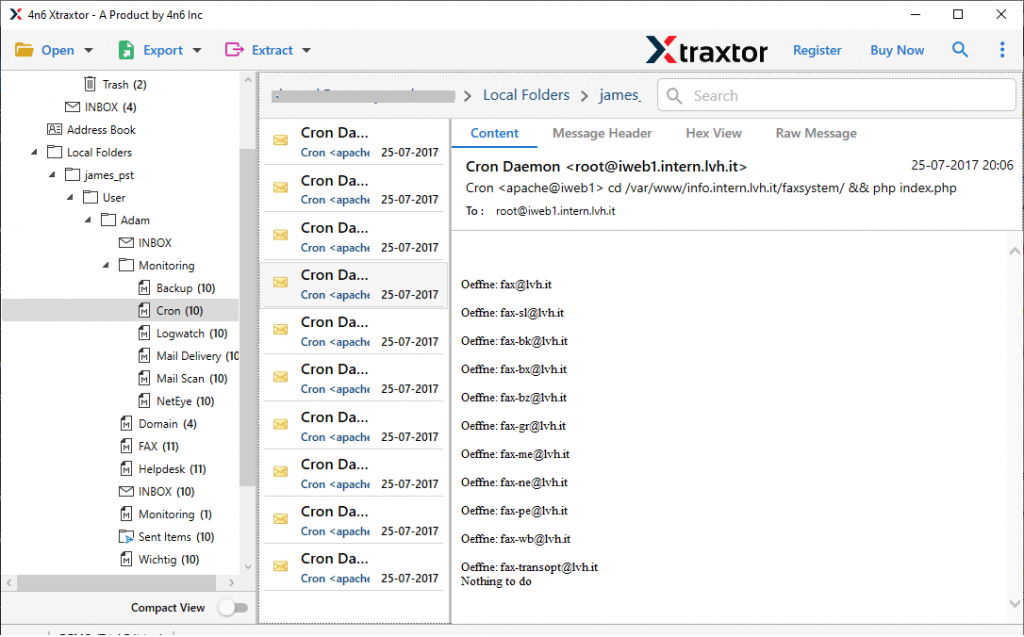
- Here you will find your mailbox emails. select the email folder that is important and needs to transfer.
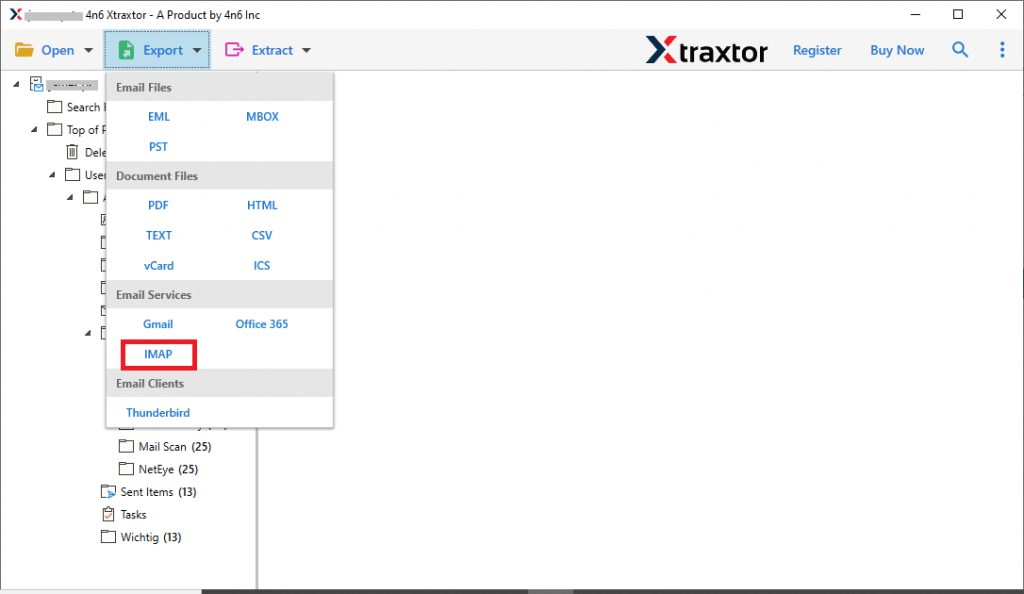
- Click on Export and choose IMAP as a saving option.
- At last, enter your AOL Mail login details and hit on the Save button.
(Server Address – imap.aol.com Server Port No. – 993)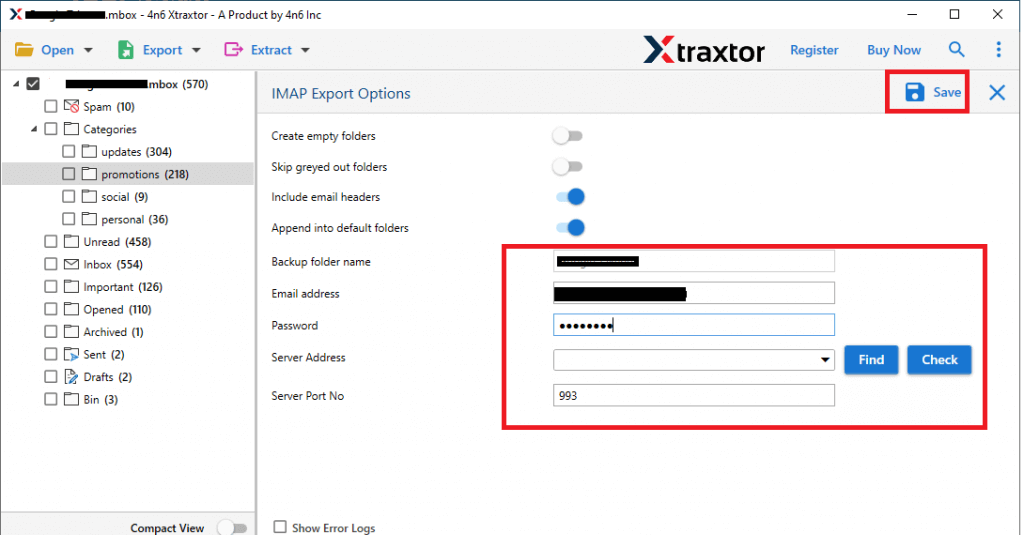
All Done! Here you import MBOX to AOL Mail with complete attachments. Now you can access emails from .mbox file into AOL webmail account with unrestraint.
Why Use MBOX to AOL Mail Import Tool?
This all-in-one software has many advanced features that make it a standalone entity among others. Some of them are mentioned here;
Advance Email filters: With this tool, you will get a range of filter options. You can choose from various filter options such as To, From, Subject, Name, Content, Attribute ID and Name, Has Attachments, Bcc, Cc, and more.
Preserve Data Integrity: The MBOX to AOL Import Tool is programmed using an advanced algorithm that performs the import process without affecting the data integrity. At the end of the process, you will find your mailbox data without any modification.
Easy to Use Utility: With a simple graphical user interface both technical and non-technical users can operate this tool and import MBOX to AOL Mail easily. Along with that, you can install this tool on Windows 11, 10, 8, and all other previous versions.
Transfer MBOX to Cloud: This importing tool not only transfers .mbox to AOL mail, but to other webmail accounts. Using the software one can import MBOX to Gmail, Yahoo, Office 365 and other cloud-based email server accounts.
Selective Email Import: After loading the MBOX file data into the software interface, it will show them to you. Here you can read and select the email folder that is important and you want them to import. In this way, you can avoid unwanted import processes.
Conclusion
AOL is a free webmail account however, it doesn’t provide any offer to directly upload .mbox file in its interface. In that case, you need an expert solution that is specially designed to import MBOX to AOL Mail account with attachments. In this blog, we describe the proper working of this software with respective screenshots for better understanding. One can use the trial version of this tool and can perform the MBOX to AOL Mail Import process in a few simple steps.