Want to convert iCloud emails to PST file format? If yes then you have landed on the right page. In this write-up, we will discuss how to export emails from iCloud to PST file.
iCloud is one of the most popular email services used by millions of users. You can store various data on iCloud such as photos, music, documents, etc. iCloud also provides an email account facility for managing emails. This account can be accessed via any IMAP-enabled email client. Sometimes users need to export iCloud email to PST format.
Why do Users need to Export iCloud Email to Outlook PST?
There are some situations when users need to save iCloud emails as PST format which are given below-
- iCloud provides only 5GB of storage space to store data. This is the limited storage space to store emails, documents, images, videos, etc. This is the major reason to export iCloud to PST.
- Sometimes, users want to create a local copy of their iCloud emails in PST file format.
- PST provides a password protection facility. No one’s data is safe on the cloud. Once you saved your iCloud emails as PST you can protect them with a password to prevent unauthorized access.
Ways to Export Emails from iCloud to PST File
There are two ways to save iCloud email as PST. One is a manual solution in which MS Outlook is used to perform the process. And, the other one is an automated solution that can directly export iCloud emails to PST. Both methods are explained in detail in the next upcoming section. Let’s start.
How to Convert iCloud Email to PST Manually?
This method works in two phases. First of all, configure iCloud account with Outlook and then export iCloud emails to PST file. Follow the below-given phases to export emails from iCloud to PST file-
Phase 1. Add iCloud Account in Outlook
- Launch the MS Outlook application on your system.
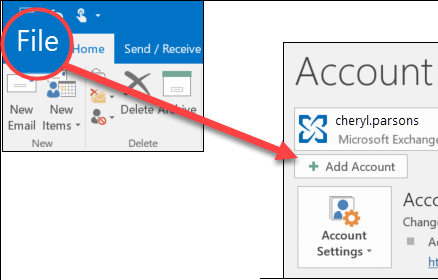
- Now, Go to File and click on Add Account.
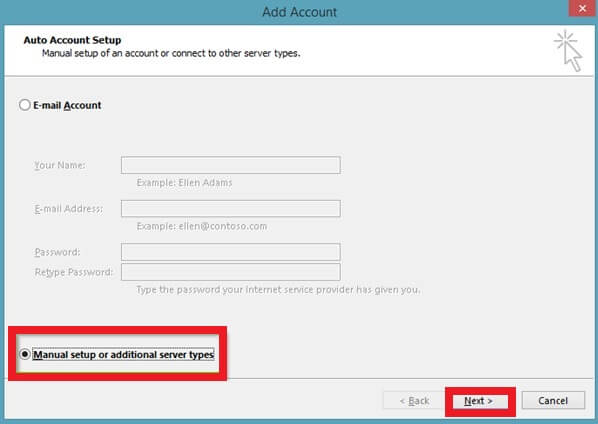
- In the Add Account window, select Manual Setup or additional Server types and then press Next.
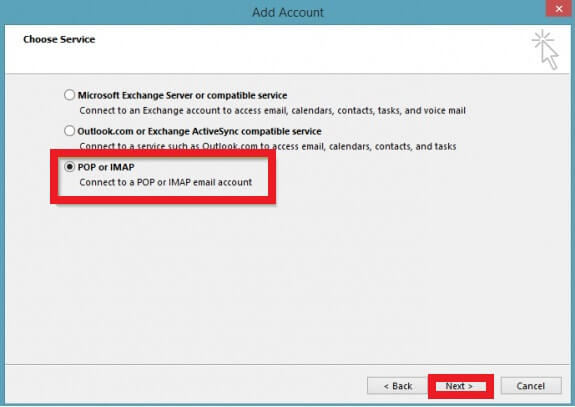
- After that, Choose POP or IMAP from the given options and then click on Next.
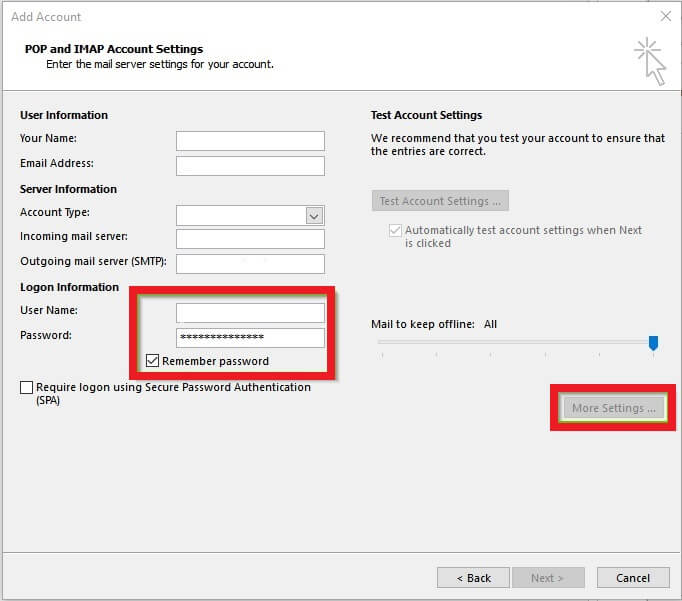
- Now, Enter the following details in the respective field-
Your Name: your name, Email Address: your email address, Account Type: IMAP
Incoming Mail Server: imap.mail.me.com, Outgoing Mail Server: smtp.mail.me.com
In Logon information: enter iCloud username and password - Check the box Remember Password and Require logon using secure password Authentication and then click on More Settings.
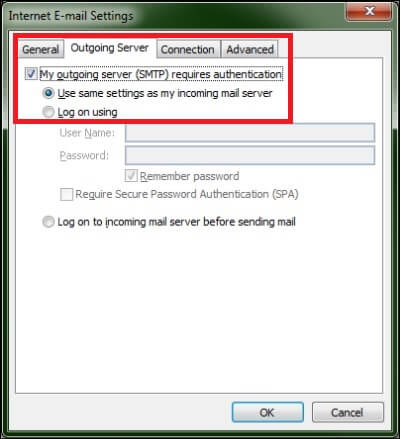
- After that, Navigate to the Outgoing Server tab and check the box My Outgoing server requires authentication and use the same settings as my incoming mail server.
- Enter the Server Port Numbers in the Advanced tab-
Incoming Server- 993 and Encrypted Connection- SSL
Outgoing Server- 587 and encrypted Connection- TLS and then press OK button.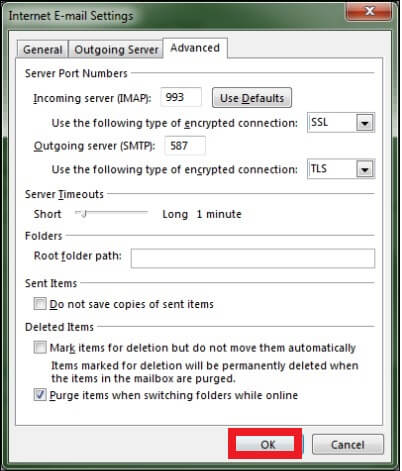
- Once, you are able to login to your account properly then close it and click on the Finish button.
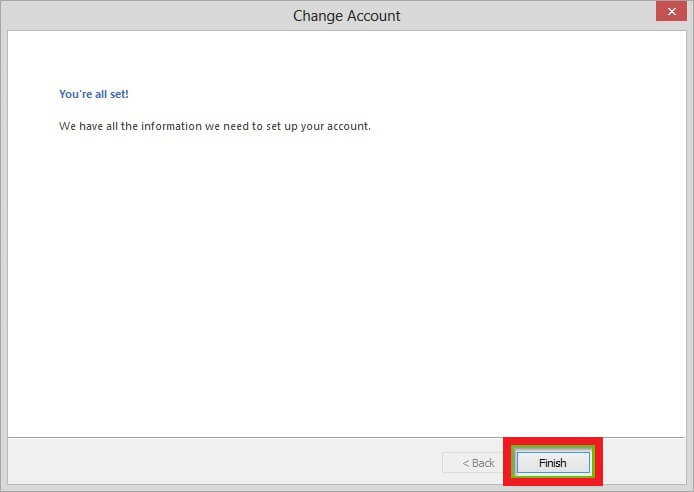
Now, your iCloud account is added to Outlook.
Phase 2. Export iCloud Emails to PST File
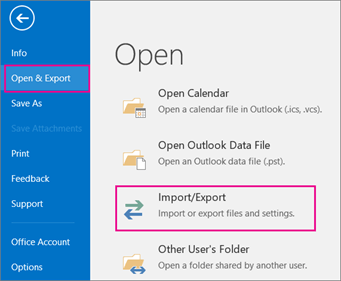
- After completing the first phase, Click on File >> Open & Export >> Import/Export.
- Select Export to a File and then press the Next button.
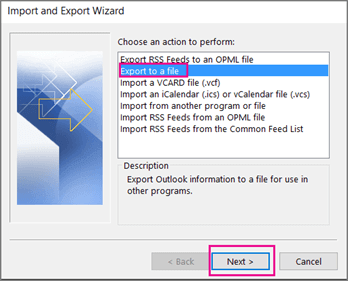
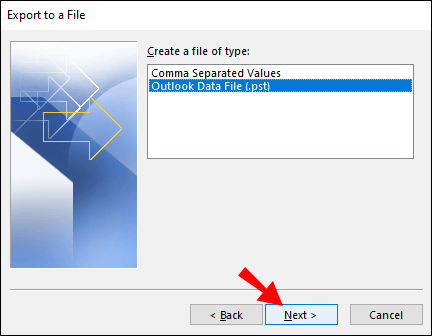
- Choose Outlook Data File (.pst) and then hit on Next.
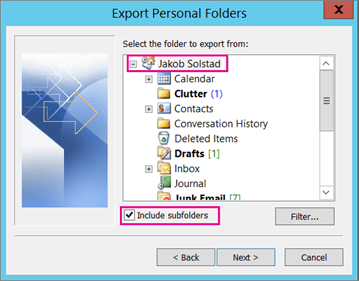
- After that, select iCloud email folders to export into PST file format.
- Browse the location to save the resultant file and then click on the Finish button.
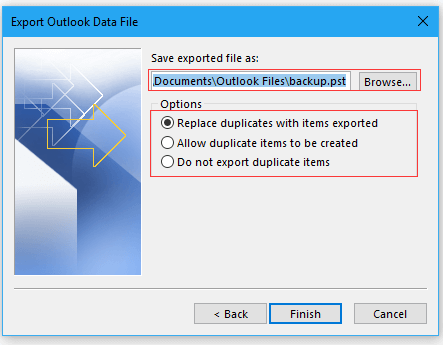
Hence, you can manually export emails from iCloud to PST file.
Limitations of Manual Solution
- It is so lengthy and time-consuming process.
- Outlook must be installed on your system. if Outlook import export is greyed out then this method does not work.
- Users must have the technical knowledge to configure iCloud account with Outlook.
- There are no email filter options to save only selected emails.
How to export Emails from iCloud to PST File Instantly?
Try SysConverter Email Backup Tool on your Windows system to convert iCloud emails to Outlook PST format. The software can export iCloud emails in bulk with complete accuracy. There are various advanced filter options to save only selected iCloud emails as PST.
Apart from this, using this tool, you can export iCloud email to PST without Outlook or any other applications. The interface of this tool is very simple and easy to use. Any novice user can easily convert emails from iCloud to PST file without any assistance. You can download its free demo version to check its work efficiency and accuracy.

Follow the Step-by-Step Guide to Save iCloud Emails to PST File-
- Download and run this software on your system.
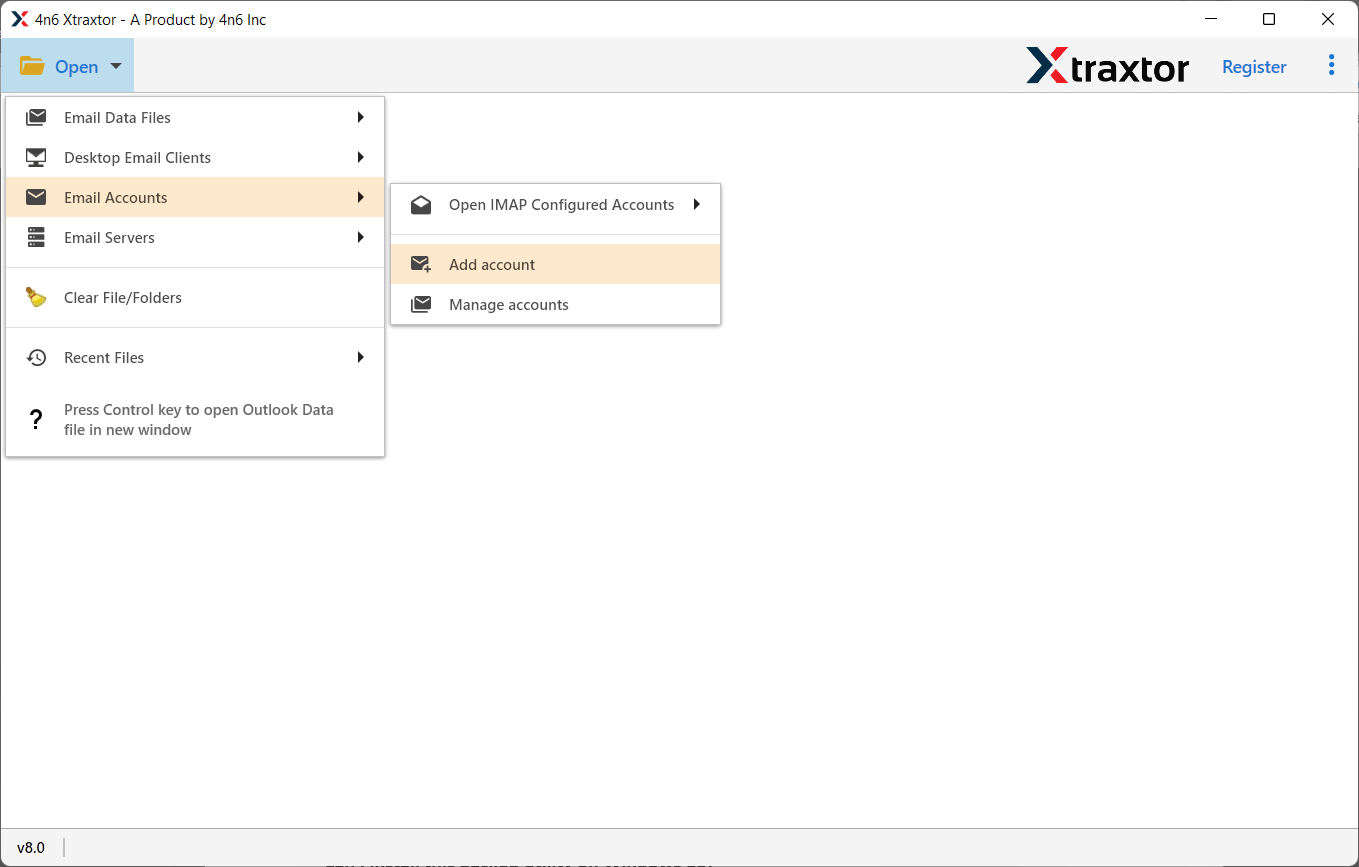
- After that, Navigate to Open >> Email Accounts >> Add Account.
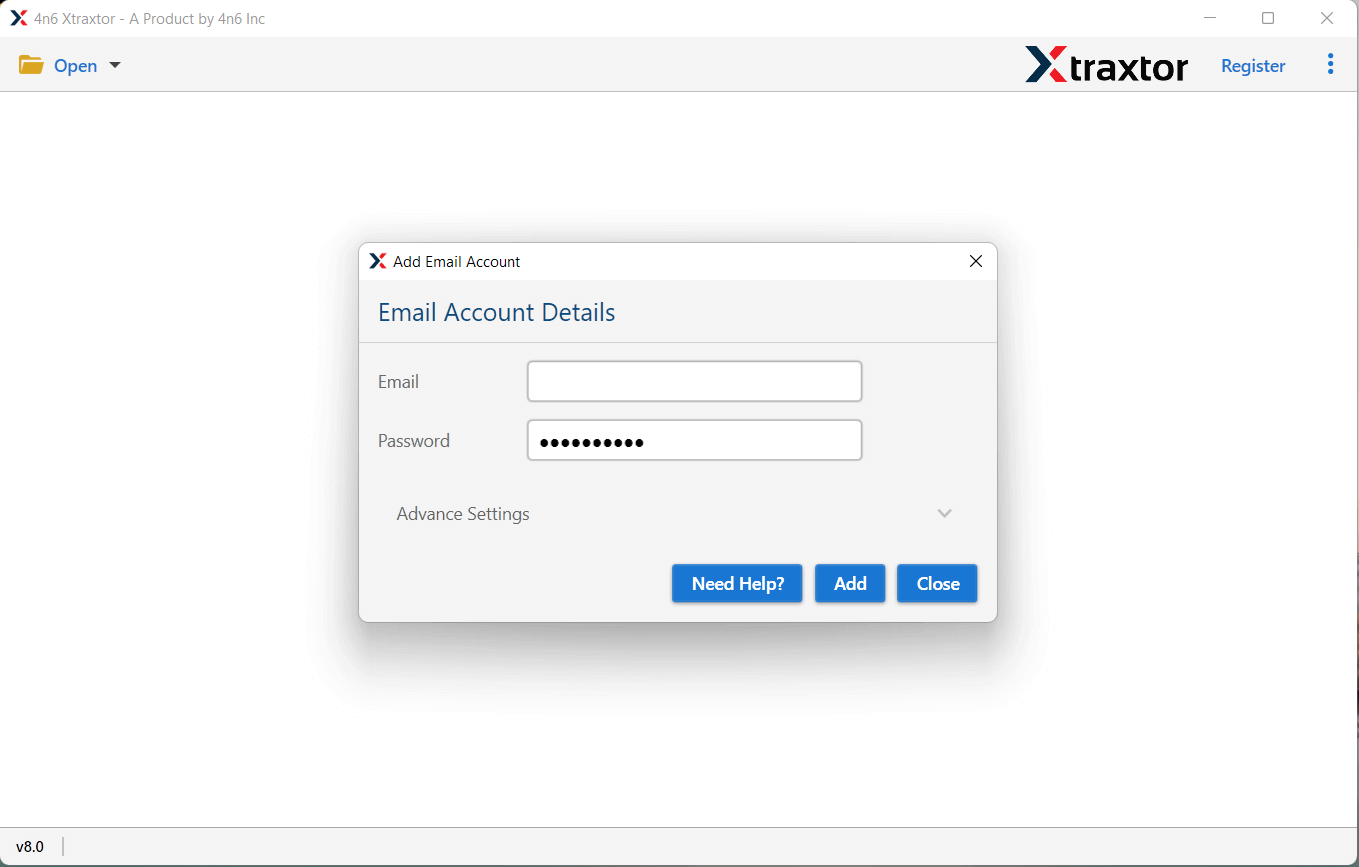
- Now, enter iCloud login details and then click on the Add button.
- Here, you can view iCloud emails before exporting them to PST.

- After that, click on Export and select PST from the given options.

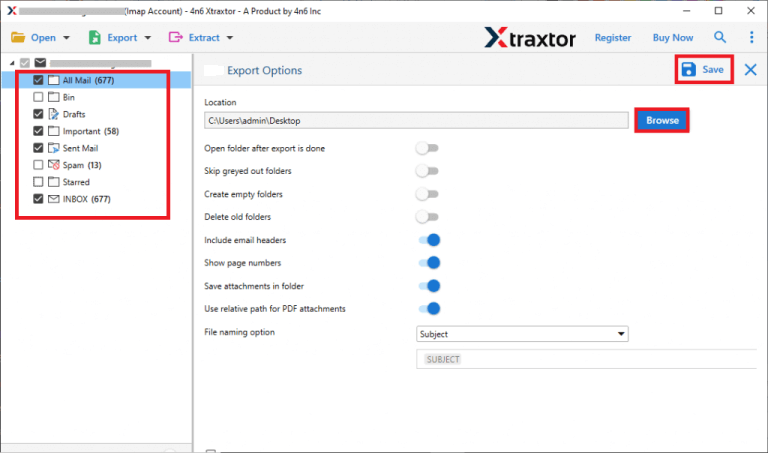
- Select iCloud email folders and subfolders to save in PST file format.
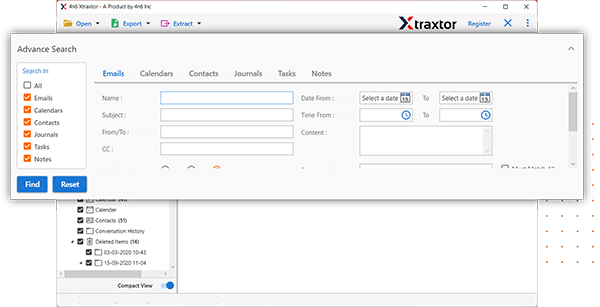
- Apply the Filters to convert only selected emails.
- Click on Browse to set the destination location and then hit on the Save button.
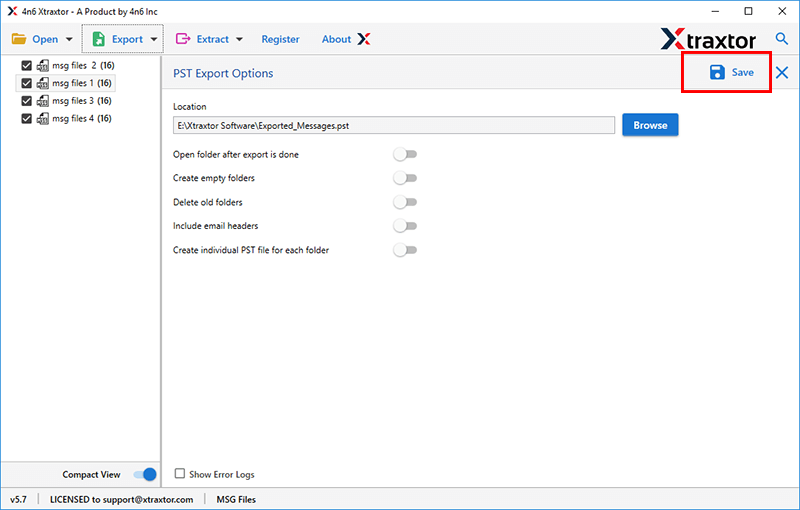
Done! Hence, you can easily export emails from iCloud to PST file in a few simple steps.
Key Features of SysConverter Software
- The software can directly convert iCloud Email to PST without installing Outlook or any other applications.
- It preserves 100% data integrity during the exporting process and saves emails with attachments.
- There are various advanced filter options such as to, from, date, time, cc, bcc, subject, etc.
- Using this tool, you can also export iCloud emails to MBOX, EML, PDF, TXT, HTML, etc.
- It maintains the folder hierarchy throughout the process and preserves metadata properties and other attributes.
- The software can transfer iCloud emails to Gmail, Office 365, Yahoo Mail, and many more email accounts.
- Due to its simplified interface, any user can easily export iCloud emails to PST without any assistance.
- It supports all the latest and old versions of Windows Operating systems.
- A free demo version is available which allows you to export the first 25 emails per folder.
- A dedicated support team is available 24*7 to solve user’s queries.
Conclusion
In this post, we have discussed how to export emails from iCloud to PST file. Here, we have explained the manual as well as professional methods to save iCloud emails as PST. You can manually convert iCloud emails to Outlook PST but it there are some limitations to this method. However, experts recommend using the automated solution to export iCloud to PST in a simple manner. The above-suggested tool is able to export iCloud emails to PST without any data loss in a few simple clicks.