Calendar data is the important aspect to save important dates and events. However, it is not possible to access the Outlook calendar all the time, thus it is convenient to save your data in Excel file. If you are among those who want to export Calendar from Outlook to Excel Sheet, then this blog is for you. Read the complete article and perform the export process without any hassle. Here we will mention two solutions to export Outlook Calendar to Excel file with step-by-step descriptions.
Table of Content
- Manual Approach to Export Calendar from Outlook to Excel
- Directly Export Outlook Calendar to Excel Sheet
- Why Use Automated Tool for Export
- Conclusion
Outlook, crafted by Microsoft, stands as a popular personal information manager and email client. Included within the Microsoft Office suite, it also offers a standalone application compatible with both Windows and macOS systems.
How to Save Outlook Calendar Events to Excel Sheet Manually?
Follow the steps and save your calendar data –
1. Open your Outlook application.
2. After that, File >> Open& Export >> Import/Export.
3. Then select Export to a file from the given option and click on the Next button.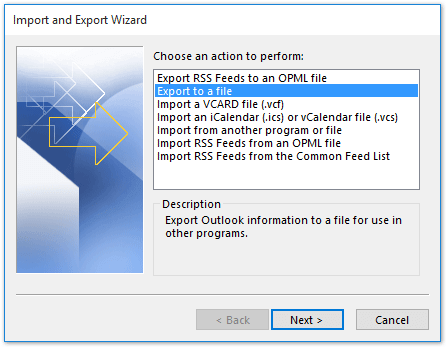
4. Choose the Comma Separated Values option and hit the Next button.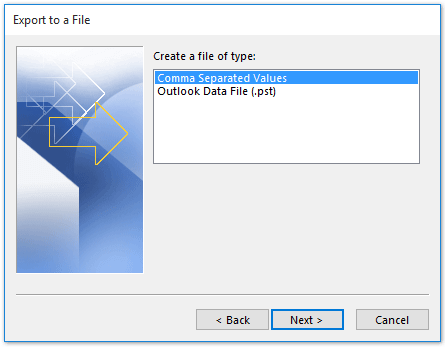
5. Select the calendar folder and click on the Next button.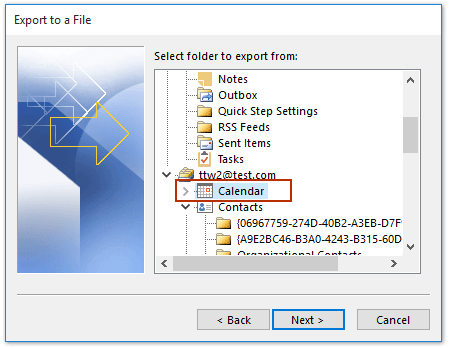
6. Here browse the location to save the exported data file.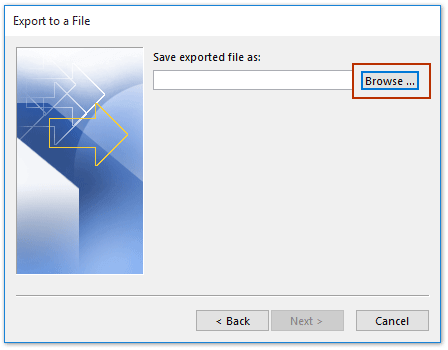
7. At last, hit on the Finish button.
Done! Here you manually export calendar from Outlook to Excel sheet. However, there are some limitations to this approach.
Drawback With Manual Solution
- It will consume time if there are a lot of data in your calendar.
- If your Outlook Import/Export greyed out, then you were not able to export your Outlook data.
- You need to know the technical knowledge to perform the export process.
How to Convert Calendar From Outlook to Excel Sheet?
SysConverter for Outlook provides a secure and effective method for exporting Outlook calendar events into an Excel file. Its user-friendly interface caters to both technical experts and non-technical users. The Outlook Converter tool also offers a range of advanced filters including options like “to,” “from,” “cc,” “bcc,” name, date, and time.
Using this tool you can also export emails and other data from Outlook interface to different file formats. You can use this tool on any Windows OS system without any hassle. With the help of this tool, you can also export Outlook emails to Thunderbird and many other email clients. It offers other advanced features – selective email conversion, maintain data integrity, preserve data integrity and many more.

Steps to Export Calendar From Outlook to Excel
- Launch the software on your system.
- Select, Open >> Desktop Email Client >> Outlook Accounts >> Select File or Configured account.

- Here you can view your mailbox data before exporting them.
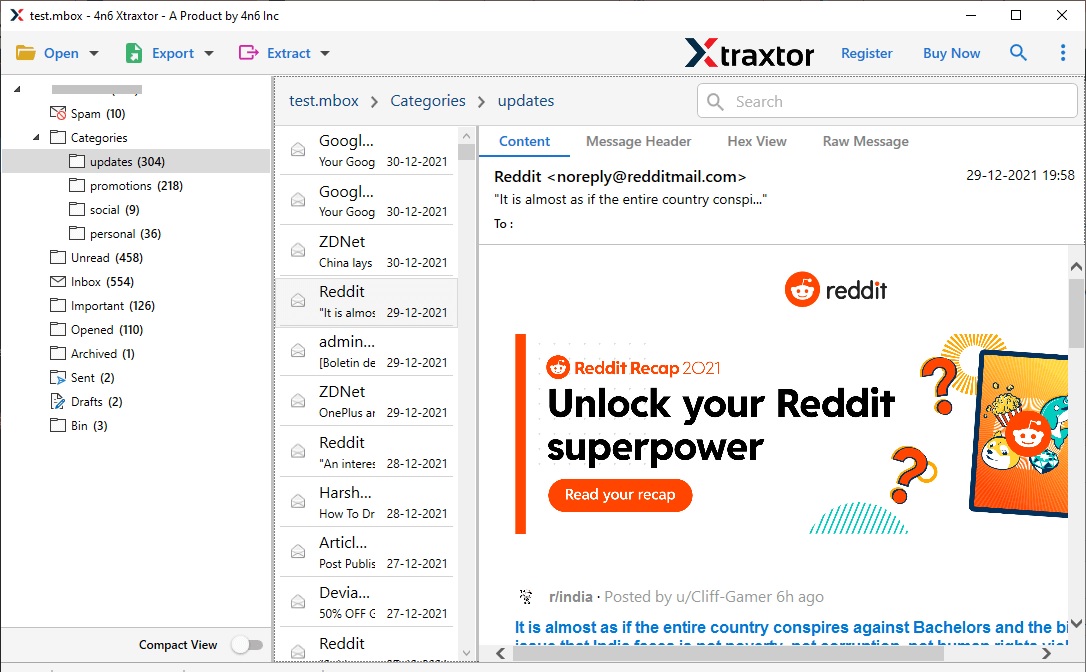
- Then, click on Export and choose the CSV option.

- Select the email folders (calendar) that you want to export.
- Browse the location to save the data file and hit the Save button.

Done! Here complete the exporting process. Now your calendar data is saved in Excel file that can be accessed without using the Outlook application.
Highlighted Features of SysConverter
- Directly export calendar data from Outlook profile to Excel sheet.
- Advance email filter to export selective data.
- It also export Outlook calendar to PDF file.
- Preserve data integrity while convert Outlook calendar to Excel sheet.
- Save Outlook mailbox data in various file formats.
- User-friendly interface for novice users to perform export processes without any hassle.
- Works on Windows 11, 10, 7, Vista, XP and all other older versions.
- Offers a demo version of the software to know it’s working.
Conclusion
Within this blog, we present two practical methods to effortlessly export calendar from Outlook to Excel file. You have the option to manually execute the export or leverage the automated approach. opt for the solution that aligns most effectively with your preferences.