Summary: This article provides a safe and reliable solution to transfer your Opera emails to Outlook. If you are among those who want to switch from Opera Mail to Outlook and convert your data, then you are at right place. Read the entire article and understand the procedure to convert Opera Mail to Outlook with attachments.
Nearly all business organisations use email clients for email management.
As a desktop-based email application, it is easy to use and organizes emails offline, which is why many businesses use it to send and receive emails.
One such email client is Opera Mail. It offers many features such as spam filtering, managing emails, contacts, newsgroups, and many more. Most importantly it saves its email message and other components in MBS format. his file format is similar to the MBOX format.
Although Opera Mail is lightweight and configures multiple email accounts. However, due to no updated features, many users switch it to another feature-rich email application.
What is the best option other than Microsoft Outlook?
Now the question is How to Convert Opera Mail to Outlook interface with complete mailbox data.
Ley’s find out.
How to Export Opera Mail to Outlook Instantly?
Email conversion is a tricky process, if not done with precision you may lose your important data. That’s why it is best to rely on a professional tool that is designed for this Opera Mail to Outlook conversion.
One such tool is the Opera Mail Converter by SysConverter With its user-friendly interface, it smoothly converts emails from Opera Mail to Outlook without any data loss. It supports batch mode conversion to export multiple Opera Mail MBS files into MS Outlook. Most importantly, this converting wizard export emails messages along with attachments.
In addition to these features, it also offers advanced search options, email filters, information extraction, multiple platforms to export emails, and many more. Along with that, you can also migrate Opera Mail emails to Office 365 and many other webmail accounts.

Simple Steps to Convert Opera Mail to Outlook
- Install and run this Opera Mail to Outlook Converter tool on your system.
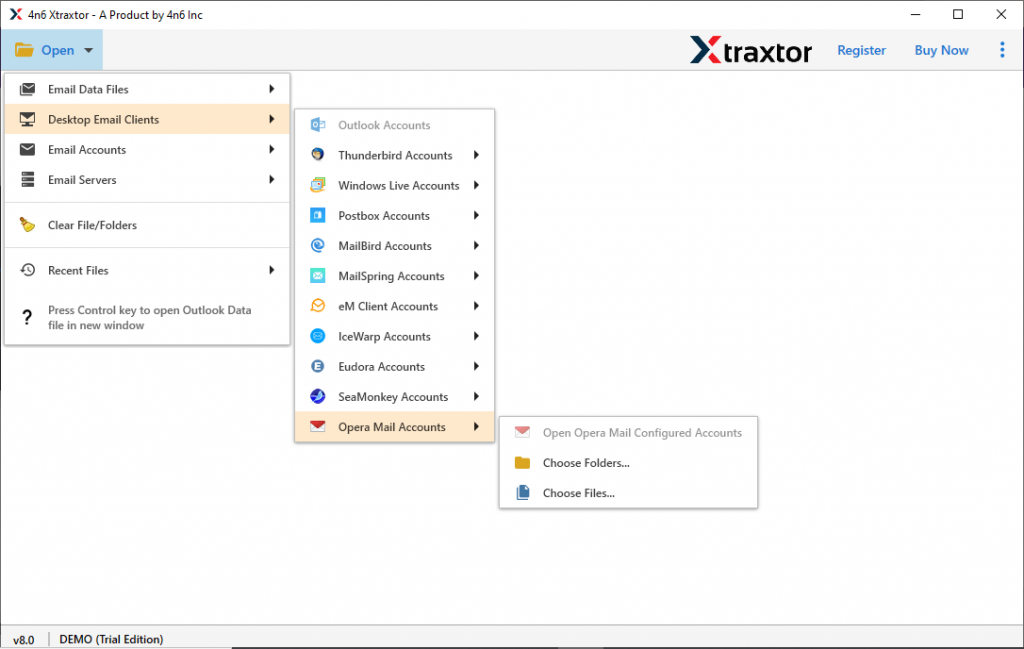
- After that click on the Open button and choose the required options.

- Now select Desktop Email Client >> Opera Mail Account >> Open Configured Account or Select Folder/File.
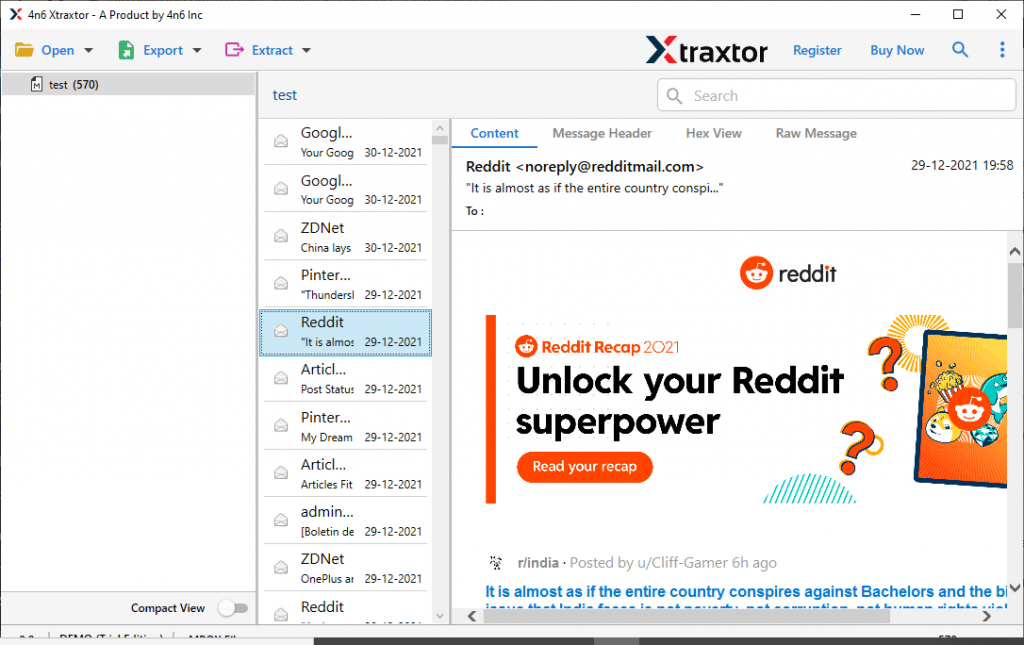
- Here you can read your emails and decide which email folder is needed to export.
- At this point, click on the Export and opt from PST format.

- At last, browse the saving location and click on the Save button.

- Import the PST file into Outlook using Import/Export tool.

Here completes the Opera Mail to Outlook conversion with complete attachments. Now let’s check the reasons to use this automated tool.
Why Choose Opera Mail to Outlook Converter?
This email converter has various outstanding features, some of which are mentioned here,
- Various Saving Options: With this converting wizard, users can save emails from the Opera Mail account into various file formats. Using this you can convert Opera Mail to PST, PDF, MOX, CSV, and other file formats.
- Automatically Load Mailbox Data: This Opera Mail to Outlook Converter automatically detects the configured email client account and uploads emails in its interface for conversion.
- Extract Information: Using this converter users can extract attachments from Opera Mail along with email addresses, phone numbers, and associated email addresses and phone numbers. All this information is saved in a single text file at the desired saving location.
- Export Emails to Cloud: It smartly transfers the emails from the Opera Mail account to a web-based email account. Using this you can convert Opera Mail to Gmail, Office 365, and other accounts with no data loss.
- Simple GUI: The software is designed with easy to user interface for both technical and non-technical users. one can simply select the configured OPera Mail account and choose saving option and rest of teh work will be done by this tool.
Conclusion
Converting Opera Mail to Outlook is not a complicated task if use right technique. One such tool is mentioned in this write-up. If you also want to Convert Opera Mail to Outlook, then try the demo version of this software and export Opera Mail to Outlook interface with attachments.