There are many workspaces where Outlook Express is still in use. But this service is discontinued by Microsoft, so there are no updates and new advanced features available in Outlook Express. That is the main reason many users want to move to more rich-featured email clients. Everybody knows that Outlook is the most popular email client used at the corporate as well as personal level.
Before we move further, let get to know about Outlook Express and what it is used for. So let’s begin.
Outlook Express vs Outlook
Outlook Express also called Microsoft Internet Mail and News Utility is a desktop-based email client developed by Microsoft in 1996. This email client is developed to send or receive emails, news, information, and other features. Now it is a discontinued email client after the launch of the Outlook series. It saves emails data in .dbx file formats. Also, this email client saves each folder of the mailbox separately i.e inbox.dbx, sent.dbx, etc.
Whereas Outlook is a more advanced email client application as compared to Outlook Express. Both the applications are different codebases but they share a common architectural philosophy. Outlook provides a better interface, advanced features to manage emails, contacts, calendars, tasks, journals and importantly wort with accuracy.
Why Outlook Express Users Switch to MS Outlook
There are multiple reasons to due to which many Outlook Express users attracting to Outlook. Let’s understand those reasons through some user queries.
“My office management recently upgrade Windows Operating System and switch from Outlook Express to Windows Outlook email clients. Before moving we save our all data in the .dbx file format. But there is an issue as after installing the Outlook email client, it can’t access .dbx files as this email client doesn’t support this file format. Outlook support PST file format, now we need a way to do this conversion. So if anyone knows the secure and reliable method to convert DBX files in PST format, then please share it? “
This user query tells us about the purpose of this conversion. But there are some other reasons to choose Outlook over Outlook Express, some of them mention here;
- Outlook Express is a discontinued service means no advanced feature to manage emails. On the other hand, MS Outlook offers various advanced features that include calendars, journals, tasks, contacts, notes, etc.
- In outlook, there is a filter option for sending/receiving emails messages while in Outlook Express there is a filter on receiving messages.
- With Outlook there comes an advanced contact management feature whereas Outlook Express has an address book to save contacts.
- In Outlook Express each folder of the mailbox are saved in a separate .dbx file, but with MS Outlook all mailbox data is stored in a single .pst file.
Method To Convert DBX to PST
There are numerous applications available on the market that perform the conversion. One such utility is DBX File Converter which performs the conversion with precision. This tool is designed to convert DBX to PST file format which can be accessed on Outlook 2019, 2016, 2013 and other older versions. This wizard also exports selective emails from the Outlook Express DBX file without any problems. Most importantly it does not impose any restrictions on the file size.

Step 1. Click on the start button and search Control Panel.
step 2. There click on the Appearance and Personalization option under Accounts and Family Safety.
Step 3. Click on the View button and hit on Show Hidden Files or Folder.
Step 4. After that go to this location – C: \ Documents and Settings \ your user name \ Local Settings \ Application Data \ Identities \ {your Windows user identification number} \ Microsoft \ Outlook Express
Step 5. There you get all the email files of Outlook Express.
Steps To Export Emails From Outlook Express DBX File into PST Format
Follow the below steps to save all emails from .dbx file in a format that is supported by Microsoft Outlook.
Step 1. Install and launch DBX to MBOX Converter on your system.
Step 2. Click on the Open drop-down option to select the email data file.

Step 3. Now here, Select Email Data File >> Select DBX File >> Select Files or Folder.

Step 4. Here users can view their emails from the Outlook Express DBX file and select the emails that need to convert.

Step 5. After that click on the Export button and select PST file format.

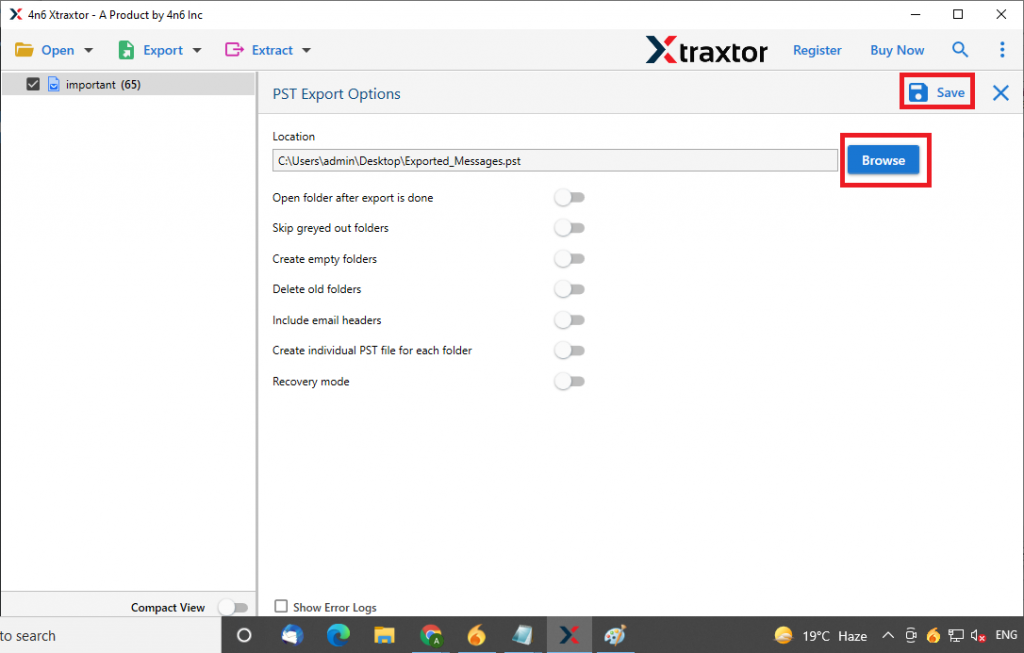
Step 6. In the end, browse the targeted location and click on the Save button.
Some Highlighted Features of DBX to PST Converter Wizard
- Batch Export Outlook Express Emails
With this utility, users can export multiple Outlook Express Emails with complete email data. Users can perform batch conversion of emails from DBX files into multiple file formats without any glitches. - Dula Option to Select Email File
In this wizard, there is a dual option to select the DBX file. The user either select a single Outlook Express email file or select the entire folder that contains several email folder from different mailbox. - Transfer Emails To Cloud
Using this DBX to MBOX Converter, one can transfer emails from Outlook Express DBX files to cloud-based emails servers. It exports DBX file emails to Office 365, Yahoo, Yandex, Gmail, and other web-based email service provider account. - Extract Information
This utility offers a function to extract information from selected email files. Using this users can save email addresses, phone numbers, attachments and associated email addresses and phone numbers from DBX files. - Simple User Interface
DBX to MBOX converter is designed with a simple interface so that novice users can perform the conversion without facing any technical issues. With its self-explanatory features, this wizard operates fastly with a high conversion ratio. - Support All Outlook Express Version
This email converter is programmed in a way that supports Outlook Express all version DBX files. Users can convert DBX files from Outlook Express 6.0, 5.5, 5.01, 5.0, 4.0, and other previous versions. User can perform the conversion without worrying about the version of Outlook Express that create the .dbx file.
Conclusion
Here in this write-up, we learn about an automated solution to convert DBX to PST format. With the help of this tool, you can perform multiple Outlook Express emails conversion with complete email components. Users can try the demo version of this wizard and perform DBX to PST conversion as well as convert DBX to MBOX, EML, PDF, and another file format also without data loss.