Want to learn about an instant and secure way to import emails from Yahoo Mail to rich TXT format? If you are sure about Yahoo email importing, then this article is for you. Read the complete blog and export Yahoo Mail to TXT format in a few simple steps.
In this write up we will discuss an instant solution to transfer emails from Yahoo webmail account to TXT format without any error. Before we dive in and export Yahoo emails to TXT format, let’s get to know the two main keywords of this blog.
Overview – Yahoo & TXT File Format
Yahoo Mail is an email service launched by American Company Yahoo. Inc. It is a free service for personal use with a monthly fee for additional features. One can access their emails on the system using any web browser. While on the other hand, TXT is a file format that is used to save data in a simple editor.
Sometimes, due to some requirements depending on the user’s needs they want to export Yahoo Mail to TXT format. Let without any further delay, let’s move ahead and know the process of moving Yahoo emails to TXT file format.
How to Import Yahoo Mail to TXT File
To save Yahoo emails to TXT format, you can use the SysConverter Email Backup Tool for Windows. Using this tool you can instantly transfer emails from Yahoo account and save them into .txt files without any error. With its easy-to-use interface, any user can run this software and export Yahoo to TXT format in a few simple steps.
Additionally, you can also export Yahoo Mail to EML, MBOX, PST, CSV and many other file formats. Along with these, the software offers various filter options to export selective or important emails only.

Process to Export Yahoo Emails to TXT Format
Follow the given instructions and export Yahoo Mail to TXT format without any data loss.
Step 1. Downlaod and launch SysConverter Email Backup Tool on your Windows.
Step 2. After that, choose Open >> Email Accounts >> Add Account.

Step 3. Enter your Yahoo Mail email id and passwords and hit on the Add button.
(Note: You need to create App Password in your Yahoo account and use it here).

Step 4. Here you can view your mailbox data and read them before exporting.

Step 5. Then, click on Export and choose TXT format from the given list.

Step 6. If you want to move a few email folders only, then you can select the email folders here.
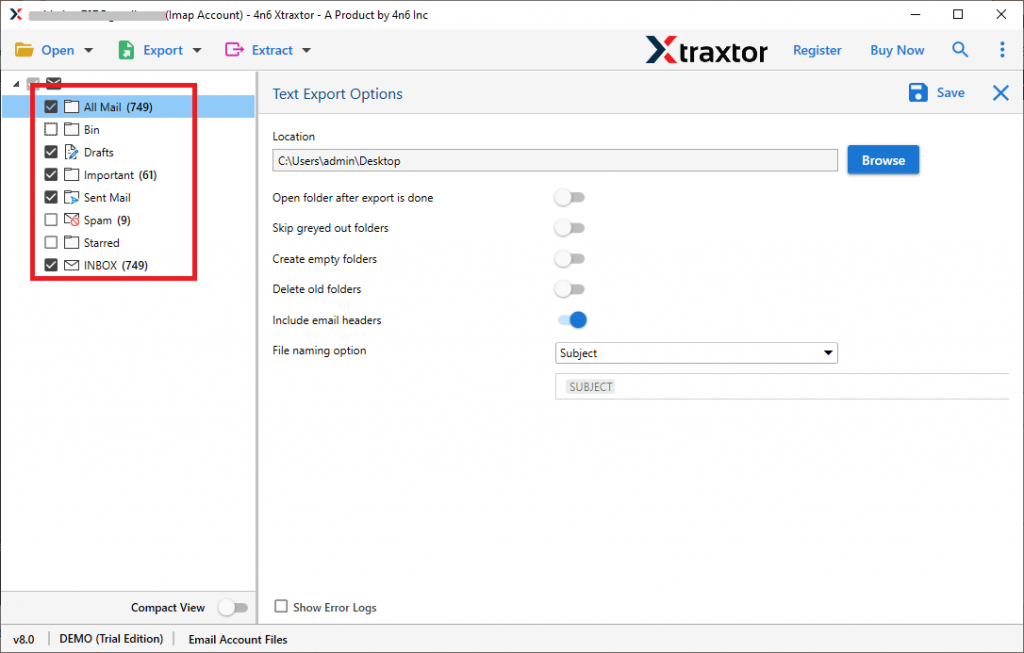
Step 7. At last, browse the location to save the exported data file and hit the Save button.

Done! Here completes the process and you export Yahoo Mail to TXT files without facing any glitches. You can use the demo version of the software and transfer Yahoo emails to .txt files.
Why Use Yahoo to TXT Import Tool
There are various outstanding benefits of using this automated tool, some of the features are mentioned here –
Email Filter Options: With this utility, there are various advanced filter options that will help to export selective emails from the entire mailbox. You can apply filters such as – to, from, cc, bcc, name, content, date range, time, has attachments, subject, etc.
Maintain Folder Hierarchy: The software preserves the email folder and sub-folder structure while you export Yahoo Mail to TXT format. There will be no changes in the formatting of emails in the exported data file.
Save Yahoo Emails to Different Formats: With this tool, you can also import Yhaoo Mail to PST, CSV, MBOX, PDF and many other file formats. All the saving options are present in a single interface, thus making the importing easy.
Extract Information: Using the utility, you can extract email addresses, phone numbers, profile photos, attachments and associated email addresses and phone numbers from your mailbox. All these extracted data will be saved in a separate text file.
Move Emails to Cloud-Server: The software smartly transfers emails from Yahoo Mail to various other webmail accounts as well. Use the tool and import Yahoo Mail to Office 365, Gmail, Google Workspace and various other cloud-based email accounts.
Windows-Based Utility: The software is designed in such a way that it will run on all Windows OS systems. You can open this program in Windows 11, 10, 7, Vista, XP and all other previous Operating Systems.
Conclusion
If you want to export Yahoo Mail to TXT format, then using a secure method makes the process effective. One expert solution we mention in this blog along with the complete step-by-step process. Hope this article will help you to import Yahoo emails to TXT files without any data loss.