Here in this blog, we will discuss the secure and efficient way to export Yahoo Mail to EML files. If you are looking for a secure way to export your mailbox data, then this blog is for you. Read the blog and export emails from Yahoo Mail account in .eml files with attachments.
Ever noticed that your Yahoo mailbox doesn’t receive new emails? If yes, then your mailbox is full and needs to free up space. To avoid such a situation it is best to export Yahoo Mail to EML files on your system. Read the complete article and export Yahoo emails to EML format with attachments.
Over the past few years, there are various updates made in Yahoo Mail that helps the user to send/receive emails in a secure environment. However, it does not still guarantee data security, thus it is necessary to save Yahoo emails as EML files and secure them on the local devices.
Everyone wants to secure their crucial data, that’s why they are looking for a way for Yahoo Mail export to EML format. In this write up we will discuss the instant solution to export Yahoo Mail to EML files in a few simple steps. Read the complete article and save your webmail data.
How to Export Yahoo Emails to EML Files?
To save Yahoo emails to EML file, use the SysConverter Email Backup Tool for Windows. Using this software you can directly export emails from Yahoo Mail account to EML format without any data loss. If you want to export emails from a specific date and time you can use the filter options offered by this utility. Along with that, you can also apply various other filters for selective email export.

Procedure to Export Yahoo Mail to EML Format
Step 1. Install and Run the software on your Windows OS.
Step 2. After that, select Open >> Email Accounts >> Add Account.
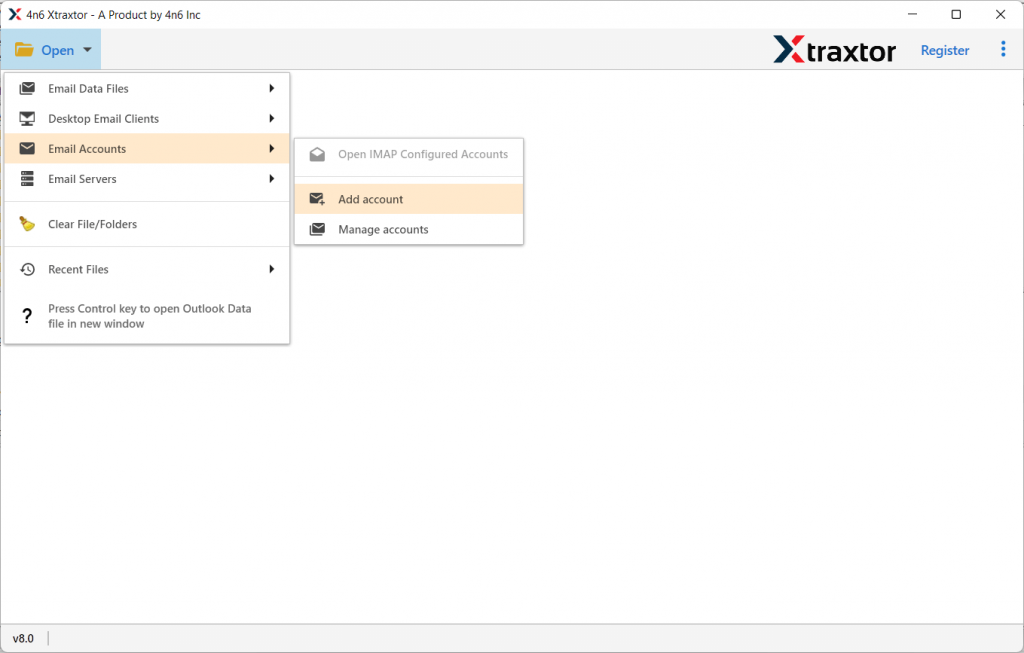
Step 3. Now enter your Yahoo Mail login details and hit on the Add button.
(Note: Create App Password and use it here)

Step 4. Here you can view your Yahoo mailbox data before exporting it.

Step 5. Click on Export and choose EML format.

Step 6. At last, browse the location to save the exported data file and hit the Save button.
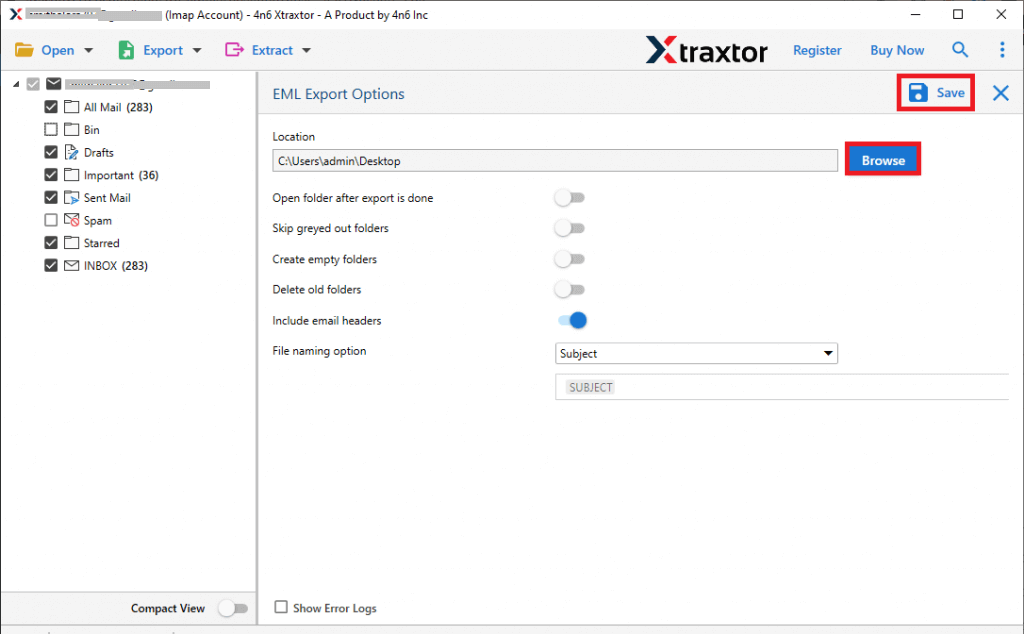
Finish! Here you export Yahoo Mail to EML files in a few simple steps without any error and data loss.
Why Need to Use Expert Tool to Save Yahoo Emails?
There are various advantages of using Yahoo Mail to EML Converter tool. Some of them mention here in this blog section.
- Direct Email Export: The software allow to instantly export emails from Yahoo Mailbox to EML format with ease. You just need to enter your Yahoo email id & password and choose EML as a saving option. The rest of the work will be done by the software.
- Maintain Data Integrity: While exporting emails from Yahoo Mail to EML format there will be no effect on email integrity. The emails in the exported data file will be the same as the original without a single change.
- Preserve Email Attributes: The automated tool is smart enough to export Yahoo Mail to EML along with their properties. It will save emails with sense info, subject, content, inline images, hyperlinks, attachments, etc.
- Export Yahoo Mail to Cloud: Using this utility, you can also transfer Yahoo emails to other webmail accounts in a few simple clicks. Using this too you can move Yahoo Mail to Office 365, Gmail, iCloud and various cloud servers without any error.
- Multiple Saving Options: With this software, you will get various file formats to save Yahoo emails. Use the software and export Yahoo Mail to MBOX and other various formats.
- Advance Filters: The Yahoo Backup Tool comes with various filter options that will make the export process selective and efficient. You can apply filters such as – to, from, cc, bcc, time, date, has attachments, name, content, etc.
Conclusion
There are various queries – How to Export Yahoo Mail to EML files? In this write-up, we discuss it in-depth. We mention a step-by-step process to save Yahoo emails as EML format with attachments. Use the demo version of the software and experience the export process and save your Yahoo emails.