“I work for a management company and we use Outlook email clients for email. Recently one of our customers asked for information and is using the Thunderbird email client. Now I’m looking for a method to convert MSG files to MBOX so clients can access that email through their email client?”
“Can anyone tell me a reliable and effective solution to export MSG files to MBOX instantly?”
How to convert MSG to MBOX format? Unfortuently, there is no direct manual way to export MSG files to MBOX format. Therefore, to complete the process you will need a secure and efficient MSG to MBOX Converter tool.
Alos Read: How to Import MSG to Office 365?
What IS MSG & MBOX?
MSG is a file extension supported by MS Outlook. This file format typically contains emails created in an Outlook email client. It stores email information such as sender and recipient names, date, email subject, text, attachments, inline images and hypertext.
On the other hand, the MBOX file format saves the entire email in a single text file. This format is supported by many email clients such as Mozilla Thunderbird, Eudora, Entourage, Apple Mail, etc.
How to Convert MSG Files to MBOX Instantly?
MSG to MBOX Converter is a professional tool for efficiently and safely creating .mbox files from .msg file format. This software has been programmed by experts to provide accurate and robust results with a high conversion ratio. It has a simple user interface so anyone can use it without any technical assistance. This tool is capable to export large MSG message files without data loss.
Additionally, using this tool, you can also convert MSG to PST, PDF, CSV and other file formats. There are various filters – to, from, cc, bcc, name, date, time, etc. Using this tool you can also import MSG to Gmail, Office 365 and many other webmail accounts.

Follow the steps to save Outlook messages into MBOX format?
- Install and open MSG to MBOX Converter on the system.
- Go to the Open option present on the screen.

- Now, Select Email Data Files >> Select MSG Files >> Select files or folders.

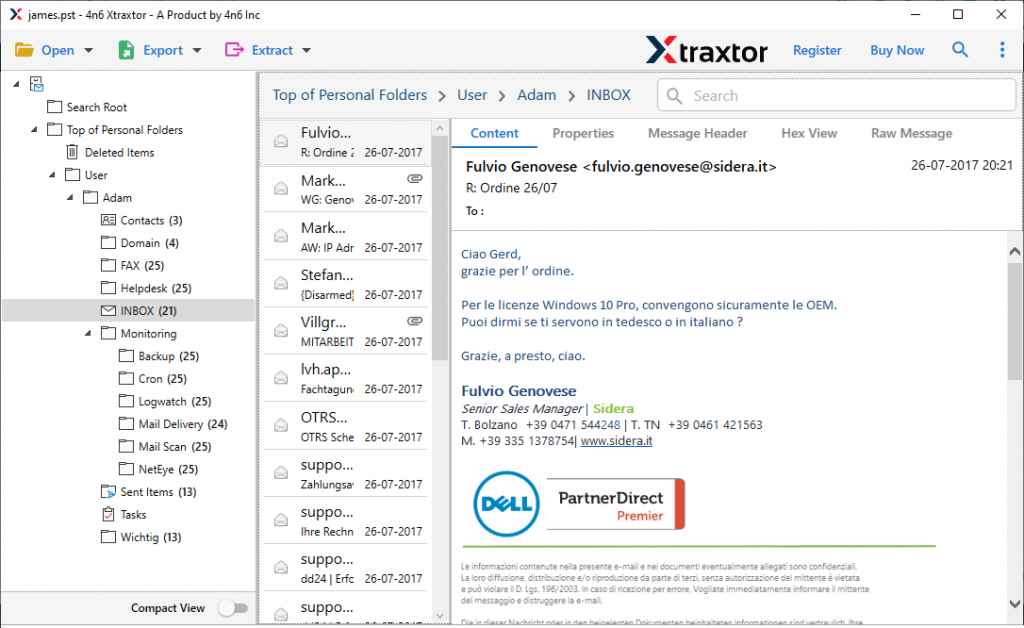
- All emails present on the file will be shown on the screen. Users can read/view their emails.
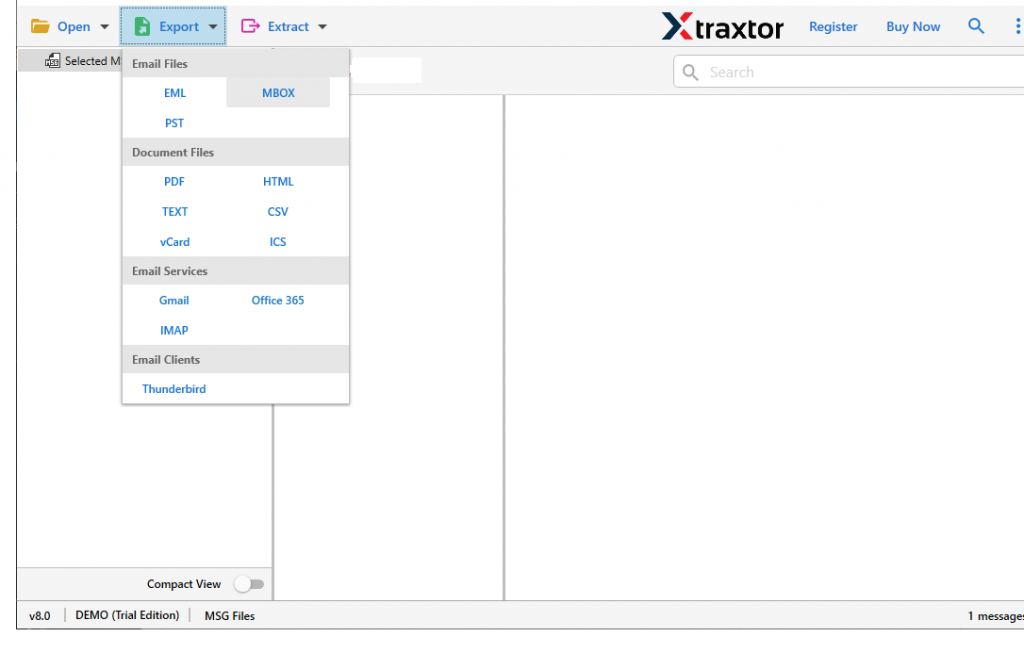
- after this, navigate to the Export option and select MBOX format from various given formats.
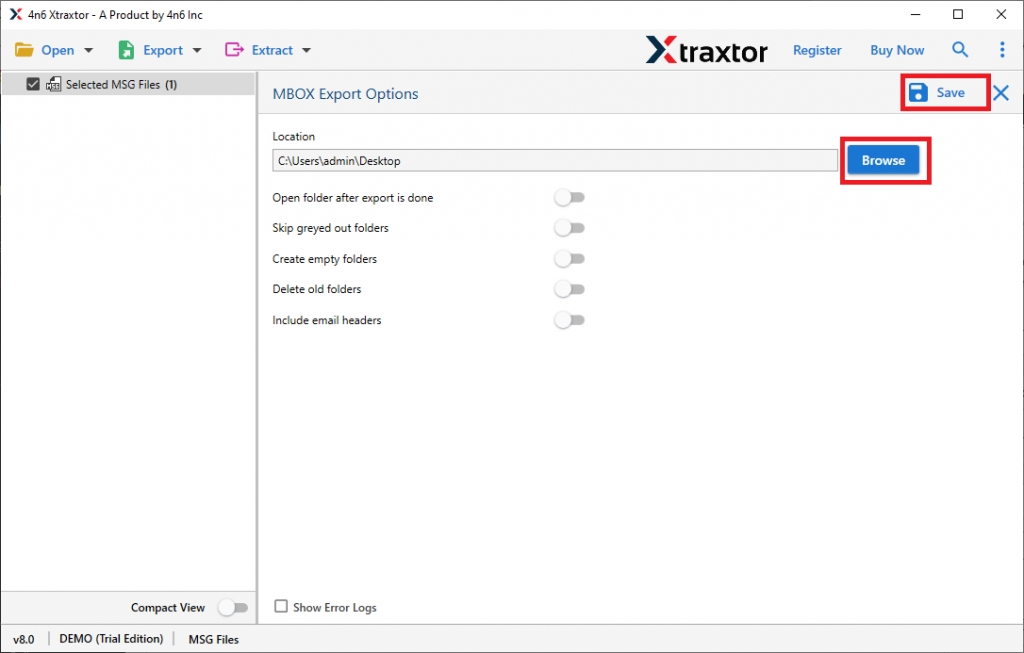
- After completing all steps, browse the location to save the converted file and then hit on Save button.
Here this tool successfully completes the MSG to MBOX conversion in just simple few steps. This tool has some interesting features that make it standalone among other tools. Some of the key features are mention below;
Key Feature of MSG to MBOX Converter
This tool has outstanding characteristics that make it unique among other software. Some of them are mentioned below.
- Convert Outlook messages into MBOX file format without altering email properties and messages.
- Directly Export MSG files into Mozilla Thunderbird without facing any technical errors.
- It makes sure to uphold the email attributes and properties while the conversion process.
- This tool gives the dual option to upload MSG files i.e. Select files or select folders.
- Most importantly, this tool doesn’t require any external application to complete the conversion process.
- MSG to MBOX converter support all Outlook versions such as 2019, 2016, 2013, 2007, and other previous versions.
- Allow to convert MSG to PDF, CSV, EML and many other file formats.
- Freedom to choose the location to save email files after the conversion process is completed.
- Extract certain information from emails such as email addresses, phone numbers, attachments, contact photos, etc.
- Option to convert selected emails from the entire folder to avoid unwanted conversion.
- Convert MSG files to MBOX with attachments in few simple clicks.
Conclusion
Here in this article, we mention the best solution for your conversion problem. There is no safe manual method to convert MSG files to MBOX format. To do the conversion, the suggested tool in this article is the best option. It can easily export MSG files to MBOX and also export multiple Outlook messages to another file format without any data loss.
Frequently Asked Questions
Question 1. Can this software works on Windows operating system?
Answer. Yes, this tool is smartly designed in a way that it supports all Windows OS.
Question 2. Can I use this software to export multiple MSG files at the same time?
Answer. Yes, you can convert multiple MSG files by simply selecting the entire folder that contains .msg files.
Question 3. Can I transfer Outlook messages directly to Thunderbird?
Answer. Yes, this tool provides the option to directly export MSG files to Thunderbird.