Are you a Kerio Connect user and want to export Kerio mailbox to Zimbra account? If yes, then here is the perfect solution for you. Read the complete article to know the process to migrate Kerio emails to Zimbra account.
Kerio to Zimbra migration can be a challenging task to perform. To perform this process with accuracy one required a reliable approach.
Before you try to migrate Kerio emails to Zimbra account, you should know that you are trying to export emails from a Kerio mail server to Zimbra desktop. Thus you should not risk your crucial data by using a manual approach.
To perform simplified Kerio to Zimbra migration, it is recommended to use an automated tool and migrate Kerio to Zimbra with complete mailbox data. One such tool we will discuss in the coming section of this blog.
Before that let’s know a little bit about Zimbra Mail.
Zimbra is a desktop and collaboration server used by many organizations and individuals. With its user-friendly interface and simplified data management capabilities, it is preferred by many users. In addition to these, it offers its service at a very low cost. Being a desktop app, it can be an easily accessible platform for daily communication.
Now let’s discuss the way to migrate Kerio emails to Zimbra mail account without any data loss.
Secure Way to Migrate Kerio Mailbox to Zimbra Desktop
For better and more accurate migration results, use the Kerio Migrator tool on your Windows OS. Using this utility you can do the Kerio to Zimbra migration with all the complete mailbox data. If you have multiple data files, then you can use this software and migrate multiple Kerio emails to Zimbra Mail account. Most importantly you will not lose a single bit of your data during the migration process.
Along with that, this tool also migrate Kerio emails to Office 365, Gmail, Exchange, and other webmail accounts in a few simple clicks. In addition, this tool also performs selective email migration, maintain mailbox hierarchy and many other.

How to Migrate Kerio Emails to Zimbra Mail
Follow the below-mentioned instructions and perform Kerio to Zimbra migration without any data loss.
Step 1. Download and run this stool on your system.
Step 2. After that click on the Open drop-down button.
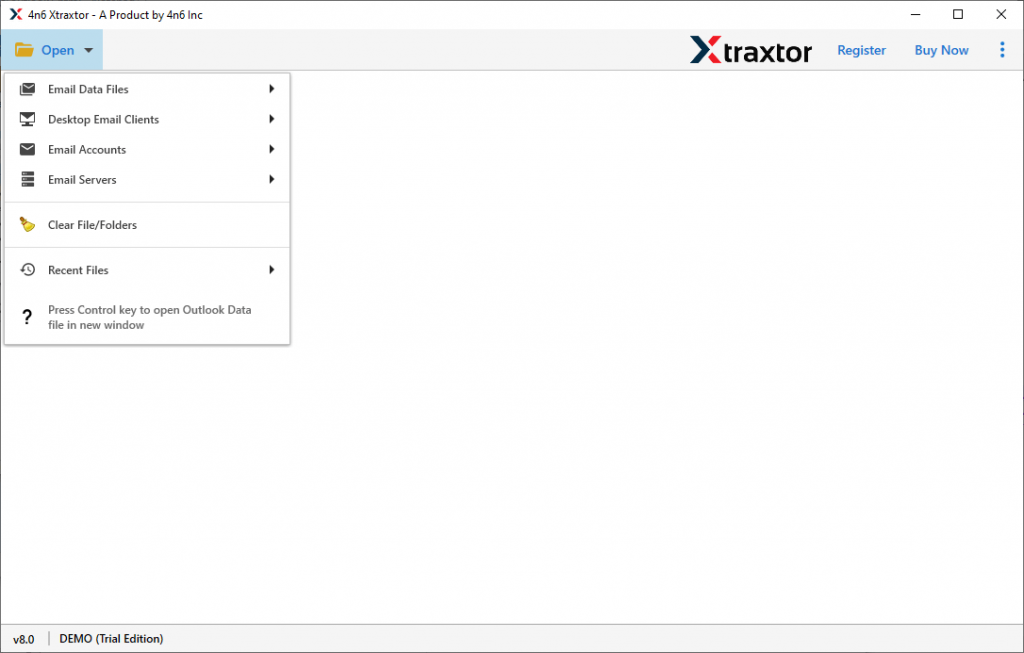
Step 3. Now click on Email Server >> Kerio File >> Choose from given options.

Step 4. Here you can read your Kerio emails and select the email folder that you want to migrate.

Step 5. Click on the Export and choose IMAP as a saving option.
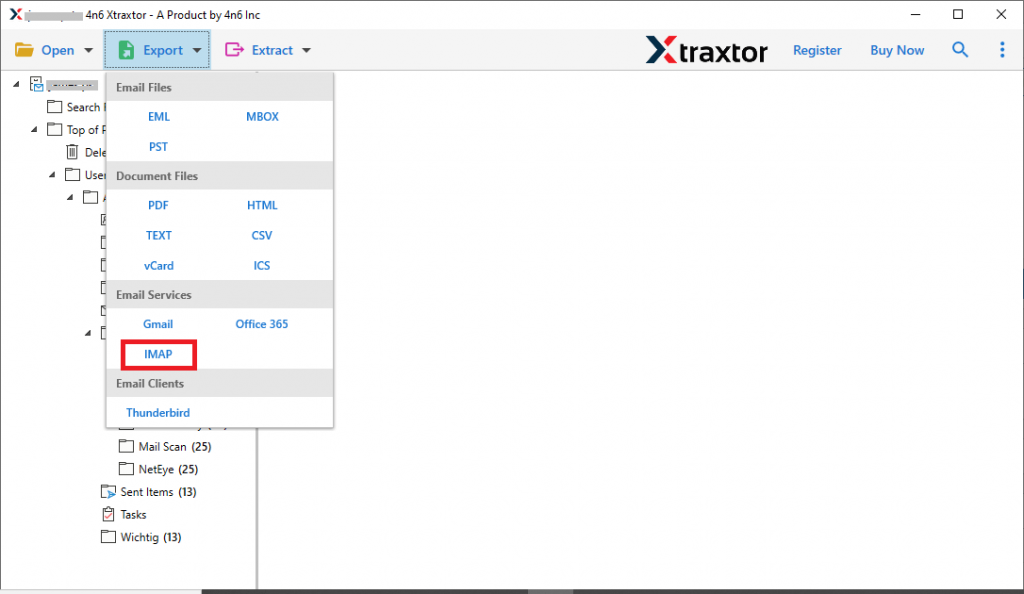
Step 6. At last, enter your Zimbra login details and hit on the Save button.

Al Done! Here is the complete Kerio to Zimbra migration process in simple six steps. You can use the demo version of this utility and export Kerio mailbox to Zimbra account with complete mailbox data.
Benefits Of Using Kerio to Zimbra Migration tool
This automated tool has various outstanding features, some of them mention here. Check it out;
Export Kerio Emails in Bulk: This migrator gives an option to select the folder of Kerio data file. By selecting the entire file, you can migrate multiple Kerio mailbox data into Zimbra account in a single attempt. Most importantly you will not lose a single bit of your data.
Maintain Mailbox Structure: The Kerio to Zimbra Migrator make sure to export emails with their key elements and formatting. This tool preserves the mailbox folder or sub-folder structure during the migration process.
Selective Email Migration: With the help of this utility, you can export some selective emails and avoid unwanted migration. After uploading Kerio emails in this tool, it allows to select the email folders and migrate them into the Zimbra mail account.
Extarct Email Data: Using this tool you can extract email addresses, phone numbers, attachments and associated email addresses and phone numbers. All the extracted data will be saved in a separate text file at the desired location.
Windows OS Based Application: This Migration tool is designed for Windows OS systems. You can use this tool on your Windows 11, 10, 8, Vista, XP, and other previous versions without facing any errors.
Conclusion
The guide talks about the Kerio to Zimbra Migration process. Using this tool both technical as well as non-technical users migrate Kerio emails to Zimbra account within a few simple steps. Most importantly, you will not lose a single bit of your data. You can try the process using the step by step instructions we mention in the above sections.