This blog will guide you to Migrate emails from Windows Live Mail to Thunderbird 102, 6.1, 91 and all other versions. Thus if you are looking for a way to import Windows Live Mail to Thunderbird, then this blog is for you. Read the complete post and transfer emails from Windows Live Mail to Thunderbird 102 profile.
Why Users Want to Transfer Windows Live Mail to Thunderbird?
There could be several reasons why users want to migrate emails from Windows Live Mail to Thunderbird. Some of the common reasons are:
- Enhanced Features: Thunderbird offers a wide range of features and customization options that are not available in Windows Live Mail. Users may prefer Thunderbird for its advanced email management features, better organization tools, and improved user interface.
- Platform Migration: If you are switching from one mailing platform to different platform, you may need to move their Windows Live Mail emails to a compatible email client like Thunderbird.
- End of Support: Windows Live Mail has been discontinued by Microsoft, and with the end of support, users may feel the need to switch to a more actively developed email client like Thunderbird, which receives regular updates and security patches.
- Consolidation: Some users want to consolidate all their email accounts into a single email client. Thunderbird supports multiple email accounts, making it easier to manage and access all emails from different providers in one place.
- Open Source and Customization: Thunderbird is an open-source email client, which means it is actively developed and supported by a community of developers. This allows users to benefit from regular updates, and bug fixes, and enjoy a wide range of customization options to personalize their email experience.
Now, let’s discuss how to import Windows Live Mail to Thunderbird.
How to Transfer Windows Live Mail to Thunderbird?
SysConverter offers a wide range of software that allows you to convert Windows Live Mail to Thunderbird without any hassle. Using this Email Converter tool you can easily migrate emails from Windows Live Mail to Thunderbird along with attachments. There are various filter options to import selective emails. With the help of this software, you can also transfer Windows Live Mail to Office 365, Gmail, Yahoo and many other webmail accounts.
The tool boasts a straightforward and intuitive interface, making it accessible to both technical experts and those without technical backgrounds. A demo version of the software is available, providing a comprehensive understanding of its functionality.

Steps to Import Windows Live Mail to Thunderbird
- Launch the software on your system.
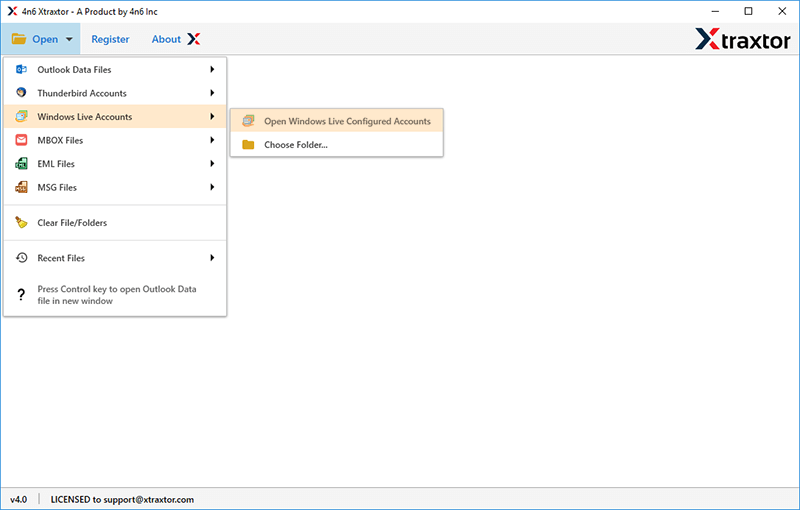
- After that select Open >> Desktop Email Client >> Windows Live Mail >> Select File or Configured Account.
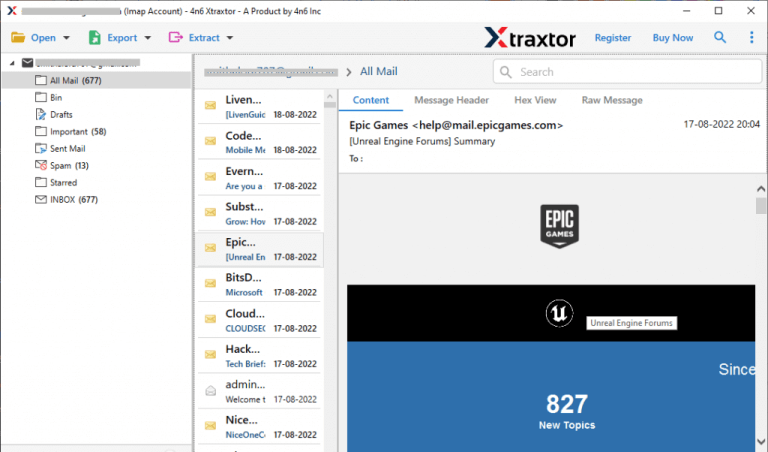
- Here you can view your mailbox data before importing them.
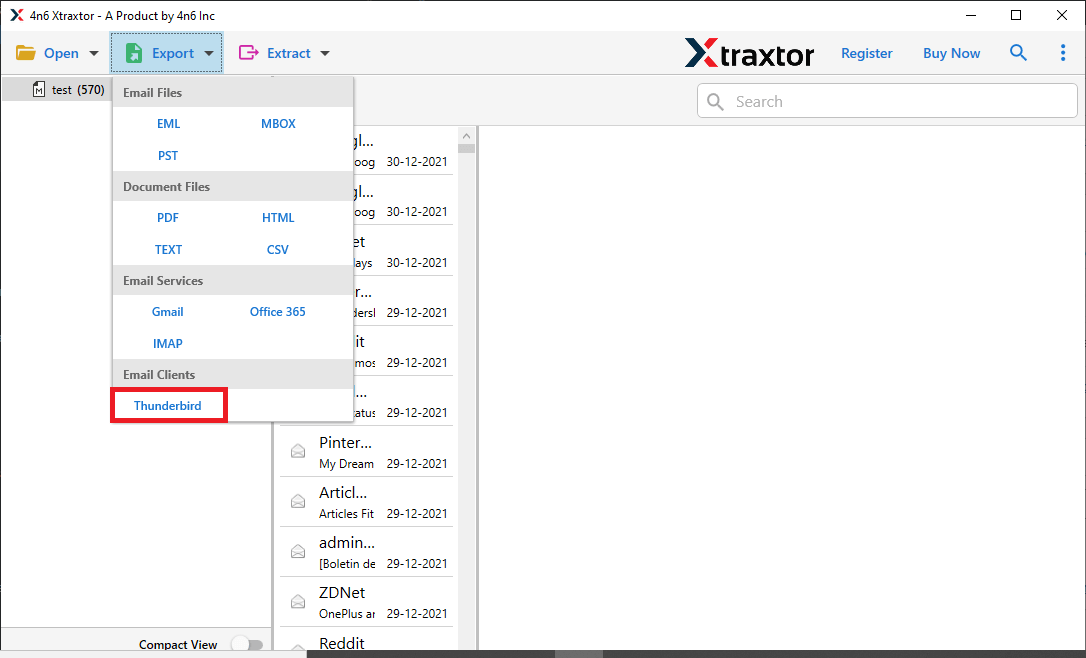
- Then, click on Export and choose the Thunderbird option.
- Here select the email folders you want to transfer.

- Check the location and hit on the Save button.

Note: The default location corresponds to the directory where your Thunderbird database is stored within your system.
Why Use Sysconverter Software?
There are various promi9nent features that help in the efficient and secure WLM to Thunderbird import process. Some common reasons for choosing the software –
- Time-Saving: It directly transfer emails from Windows Live Mail to Thunderbird with ease. If you have a large number of emails in the WML mailbox, then this tool will efficiently transfer them without any data loss.
- Ease of Use: With its simple and user-friendly interface, it can be operatable without any hassle. It is also operatable by non-technical users without any hassle.
- Maintain Folder Hierarchy: It ensures that the folder structure and sub-structure are preserved while import Windows Live Mail to Thunderbird account.
- Advance Filters: With this software, there are various advanced filters that help in selective import. You can apply various filters – to, from, cc, bcc, name, date, time, has attachments and many more to choose from.
- Windows-Based Software: This tool is compatible with a range of Windows operating systems, including Windows 11, 10, 7, Vista, and XP, as well as earlier versions. It functions seamlessly across all Windows systems, eliminating any potential complications.
- Data Integrity: This tool will transfer emails from Windows Live Mail to Thunderbird without affecting data integrity. There will no data loss while importing emails.
In short, using an automated tool to import Windows Live Mail to Thunderbird offers various benefits. It simplifies the migration process and ensures no data loss.
Conclusion
Within this blog post, we detail a secure and effective method to transfer folders from Windows Live Mail to a Thunderbird account. We provide a comprehensive step-by-step guide to the import procedure, complete with accompanying screenshots. To understand the tool’s functionality, you can explore the software’s demo version.