Here in this blog we will discuss the automated way to import OST Files to Outlook 2021 with ease. If you are also looking for a way to import emails from OST file to Outllok 2021/2019 and other versions, then this blog is for you.
Importing OST file to Outlook is not possible if you have an orphan OST file. However, with the right approach, you can import the data file in a few simple clicks.
How to Import Orphan OST File to Outlook 2021?
If you have an OST file that is not related to your Outlook 2021 profile and want to import its emails, then it is possible by an automated tool. Try OST Converter tool on your sysetm. This utility is capable enough to import OST files to Outlook 2021 effortlessly. Additionally, it supports orphan, corrupted or inaccessible OST file and import its data without affecting its integrity.

Steps to Import OST to Outlook 2021
- Install and run SysConverter for OST tool on your system and run it.
- After that click on the Open option and move ahead.
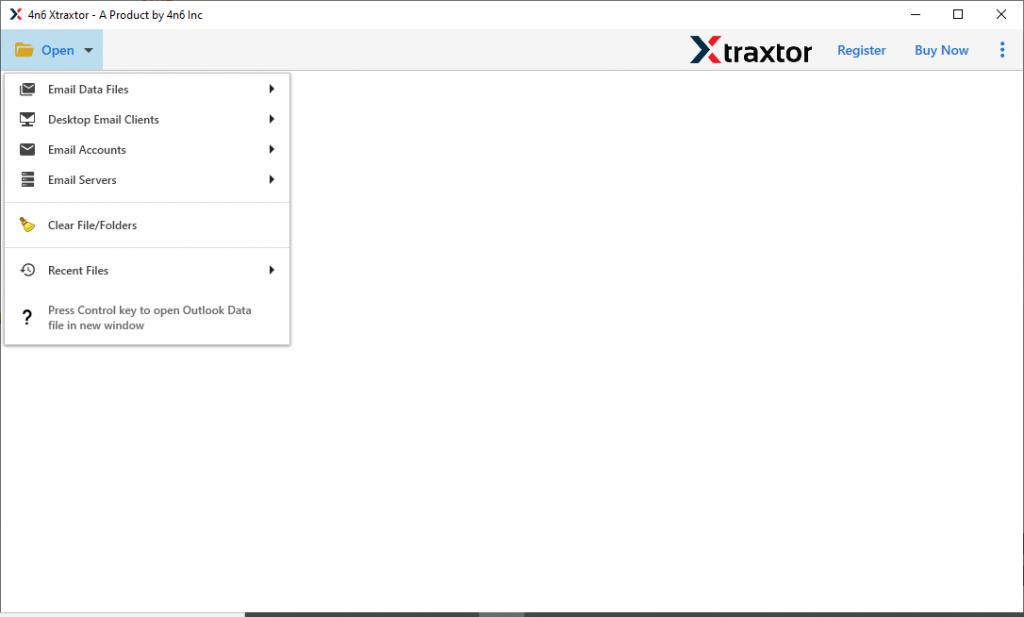
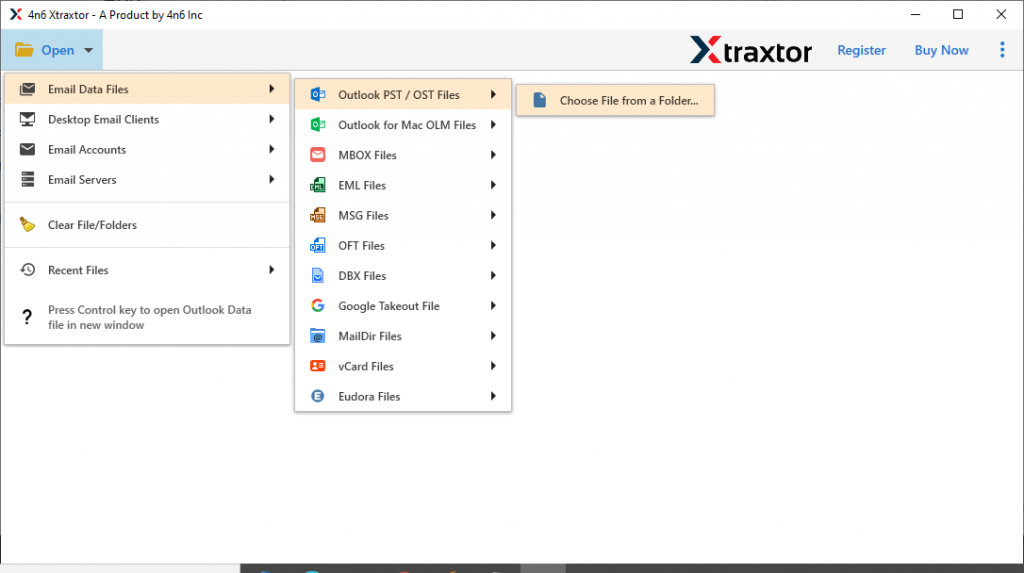
- Now select Email Data File >> OST File >> Select File or Folder.
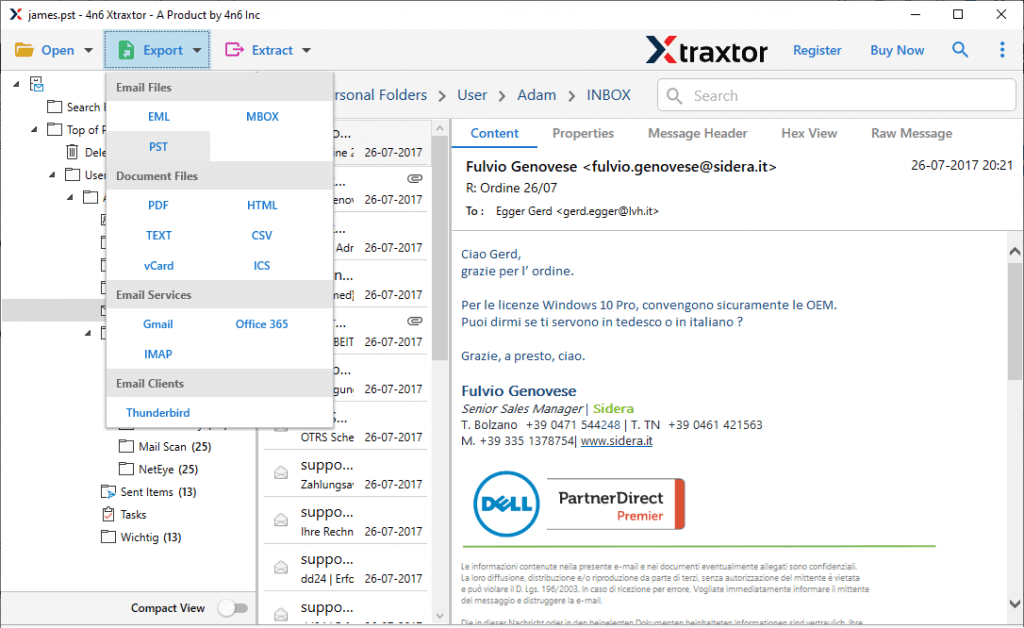
- Here read your OST file data and select the important folder to import.

- > Click on the Export button and choose PST format.
- At last, browse the targeted location and click on the Save button.

Here you convert OST to PST without Outlook, you need to import this file into Outlook 2021 interface. To perform this operation follow the given instructions.
7. Open the Outlook 2021 application on your Windows OS. 8. After that, click on File >> Open & Export >> Import/Export.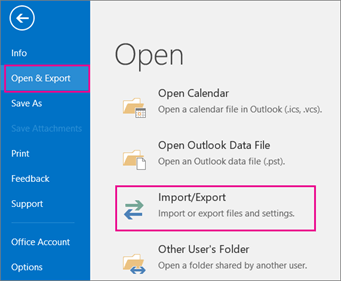
9. In the new window select Import from another program or file and select Outlook Data File (.pst).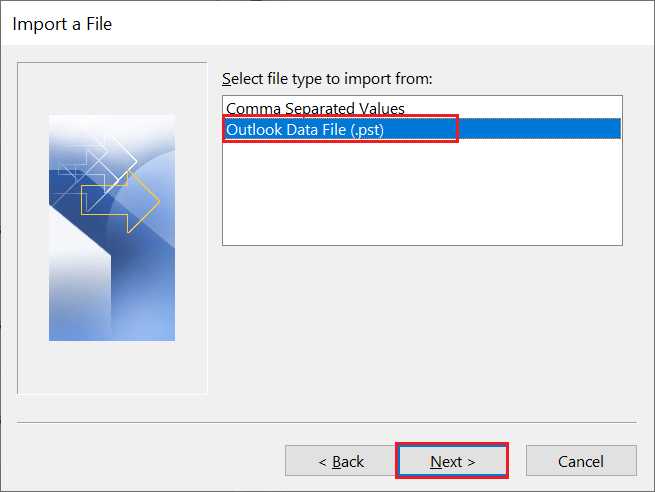
10. At last, browse the PST file from the saved location and then click on the Finish button.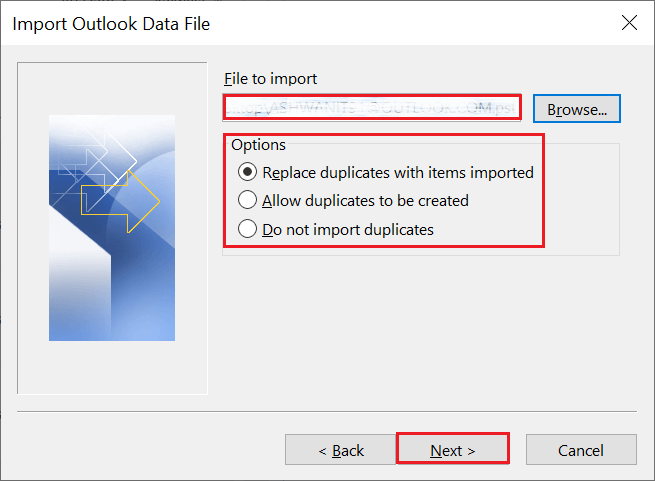
Here complete the process, now you can read OST files in Outlook 2021 without facing any issues.
Why Choose OST to Outlook 2021 Import Tool?
This software offers various outstanding features, some of them mention here. Have a look and after that, you can also use the software and try to import OST files to Outlook 2021 with complete mailbox data.
- Multiple OST Files Import: This tool can easily transfer several OST files into Outlook 2021 account without any glitches. Most importantly while performing this import you will not lose your single bit of data.
- Maintain Mailbox Data Structure: While using this OST to Outlook 2021 Import tool, you will get your data without affecting its integrity. This software upholds email folder or sub-folder hierarchy and structure during the import process.
- Simple User Interface: It is an easy-to-use utility with self-explanatory working. This tool is designed in such a way that technical as well as non-technical users can operate it without any assistance.
- Import Selective Email: While uploading the OST file in its interface this tool previews them. Here users can read the emails and select the folder that has important data and needs to be imported. In this way, users can only import required emails and avoid an unwanted transfer.
Conclusion
Reading OST file data into Outlook 2021 is not an easy task to do. In this post, we simplify the process for you and mention the best secure way to import OST files to Outlook 2021. We describe the step-by-step process to read multiple OST files into Outlook 2021 interface with respective screenshots. You can use the demo version of this tool and try to import OST to Outlook 2021 and learn the efficiency and accuracy of this tool.