Summary: This writes up is all about a secure and instant solution to transfer EML files into Rackspace Webmail account. If you also want to import EML to Rackspace, then read this complete article to the end. At the end of the blog, you were able to swiftly import multiple EML files into Rackspace account without any data loss.
Rackspace is an American cloud computing that provides a large number of services across the world including web hosting. It is one of the popular subscription-based email services that is used by many small and large businesses.
Due to its wide range of services and security measures, most of the users want to import EML to Rackspace webmail account. In the coming section of this blog, we will discuss the process of importing EML files into Rackspace mailbox in an efficient manner.
Without any delay, let’s discuss one of the reliable solution to move EML files into Rackspace with ease.
How to Import EML Files into Rackspace Mailbox
Use EML Converter to directly transfer EML files into Rackspace mailbox. It is the all-in solution that import EML files into a webmail account without compromising the data integrity. Along with that, you can also transfer unlimited .eml files into Rackspace without any data loss. Apart for that, you can also use this converter and import EML to Office 365, iCloud, Roundcube, Exchange, and many other webmail accounts.
In addition to all these, this utility also convert EML to CSV, PDF, HTML, Txt, and other file formats in a single interface. If you want to import specific emails from any particular date, then in that case this software offer email filter options to search and transfer particular email.

Simple Procedure to Import EML to Rackspace Webmail
Follow the mentioned steps to transfer EML files into Rackspace mailbox account with complete email properties and attributes.
1. Download SysConverter for EML on your system and then run it.
2. Select Open >> Email Data File >> EML Files >> Select File or Folder.
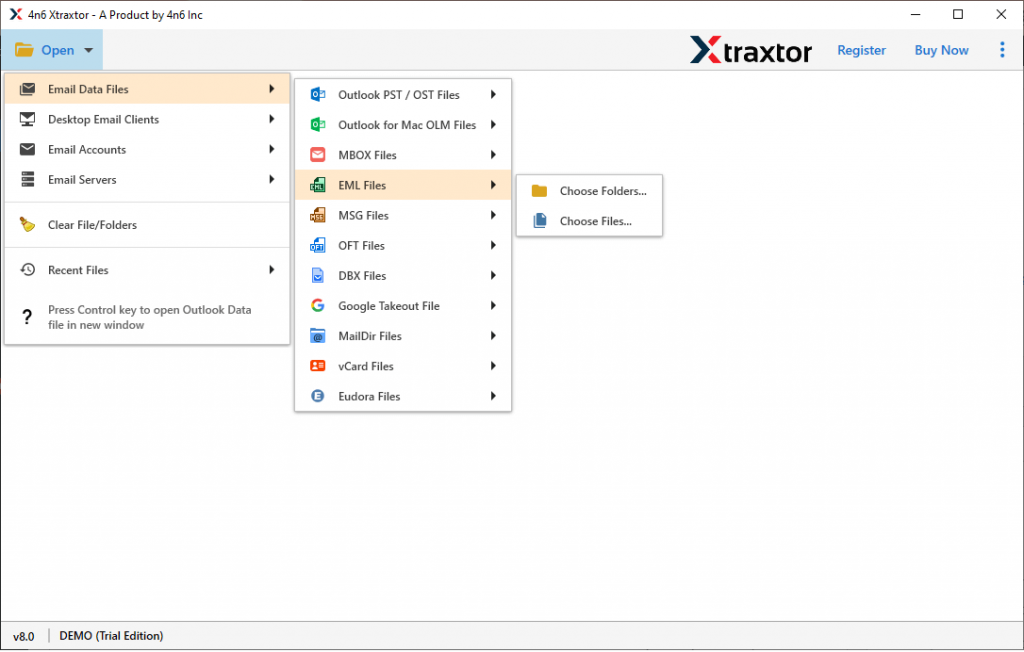
3. Here you will find all the emails from the EML file that you uploaded into the software interface.

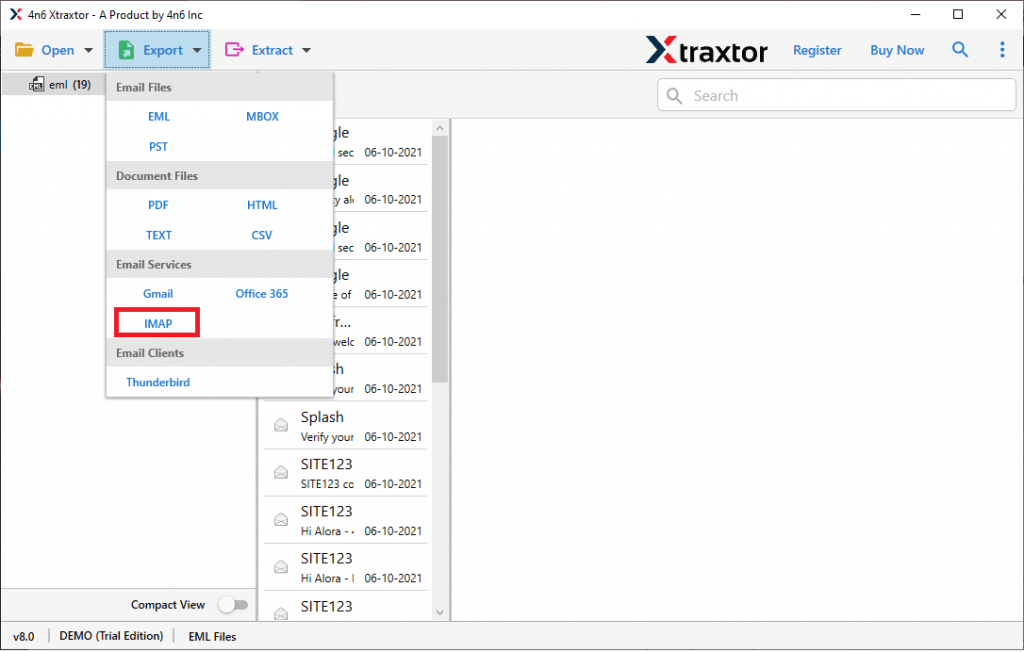
4. Click on Export and select IMAP from the given options.
5. In the last step, enter your Rackspace email id and password and at last hit on the Save button.
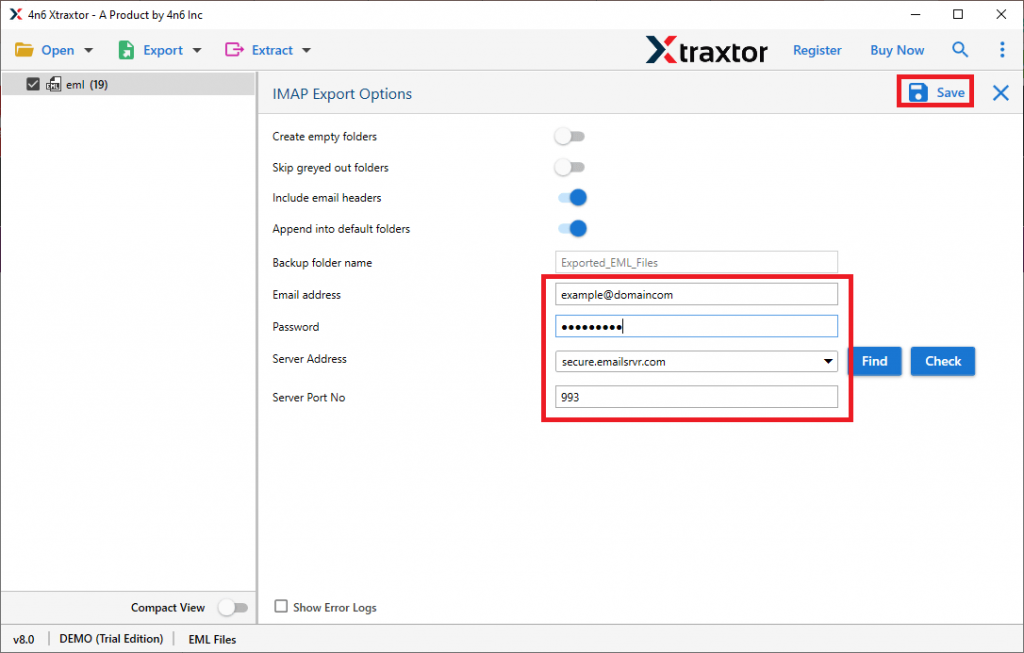
All Done! Here you import EML files into Rackspace mailbox in a few simple steps. Along with EML to Rackspace Import, this tool provides many advanced features and other import options.
Features of EML top Rackspace Import Tool
This automated tool has several prominent features that you will benefit from while performing the import process.
Advance Email Filter: This software has an inbuilt filter that helps you to search and import only selected emails. You can use the various filter options such as – to, from, subject, cc, bcc, name, content, has attachments, date range, time, property id & name, and many others. One can apply the filter and import only selective EML files into Rackspace
Windows Compatibility: The tool is designed in such a way that it will work on all the Windows OS systems. One can install and run this tool on your Windows 11, 10, 8, Vista, XP, and all other previous Windows OS versions.
Import EML to Webmail Accounts: This all in one software can perform various import processes to another platform in a single interface. It will import EML to Exchange, iCloud, Office 365, Google Workspace, Yahoo, Gmail, AOL Mail, and other cloud-based email accounts.
Directly Transfer EML to Mailbox: Using this utility you will be able to directly Import EML to Rackspace mailbox account without facing any issues. This is a direct way to perform the import process without any interruption.
Save EML Into File Formats: This software not only transfers emails to webmail accounts but saves them into other file formats as well. You can use this utility and convert EML to PDF, PST, MBOX, CSV, HTML, and other file formats in a single interface.
Conclusion
To import EML to Rackspace mailbox it is best to use the automated tool mentioned in this write-up. The tool very efficiently transfers multiple EML files into webmail account without any data loss. You can also try the demo version of this tool and save your EML files into Rackspace account.