Yahoo Mail is one of the oldest and free email services used for decades. Till date, many use this mailing service for their personal and professional use. Although Yahoo updates its features and services, still there is a risk of cyber attacks and malware intrusion. Thus arise the question – How to export Yahoo Mail to PDF format with attachments?
In this blog, we will discuss a secure and workable solution to convert Yahoo emails to PDF format. Along with that, we will describe the step-by-step process to export Yahoo emails to PDF format. Before that, let’s get to know why users wants to save Yahoo Mail to PDF format only.
Reasons to Save Yahoo Emails as PDF Format
Since we know that PDF format is considered as a secure format to save important data and also it is a transferable file as well. Some of the common reasons to export Yahoo Mail to PDF format are –
- PDF is a secure way to backup Yahoo emails to hard drive or other storage devices.
- The PDF file is quite difficult to alter as you can’t make any changes thus there are fewer chances of affecting your data integrity.
- Since you can put the password in a PDF file, thus it makes it secure from cyber attacks.
- A PDF file is a preferable document used as legal evidence.
- Additionally, you can access your webmail emails on the system without any network connectivity.
Now without any further delay, let’s move to the solution for the secure and instant Yahoo to PDF export process.
How to Export Yahoo Mail to PDF With Attachments?
To securely print Yahoo emails to PDF format you can use SysConverter Email Backup Tool for Windows. Using this utility you can instantly export all emails and other mailbox data from Yahoo to PDF file format. Most importantly, this tool will save all attachments along with emails. With its advanced filter options, you can export specific or selective Yahoo emails into a portable file format.
Additionally, using this tool you can also export Yahoo to PST, CSV, HTML, and many other file formats. Along with that, you can also transfer your Yahoo emails to other webmail accounts without any data loss. With its simple user interface, it is easy for a novice user to export Yahoo Mail to PDF format without any assistance.

Follow the Simple Process to Export Yahoo Emails to PDF File With Attachments –


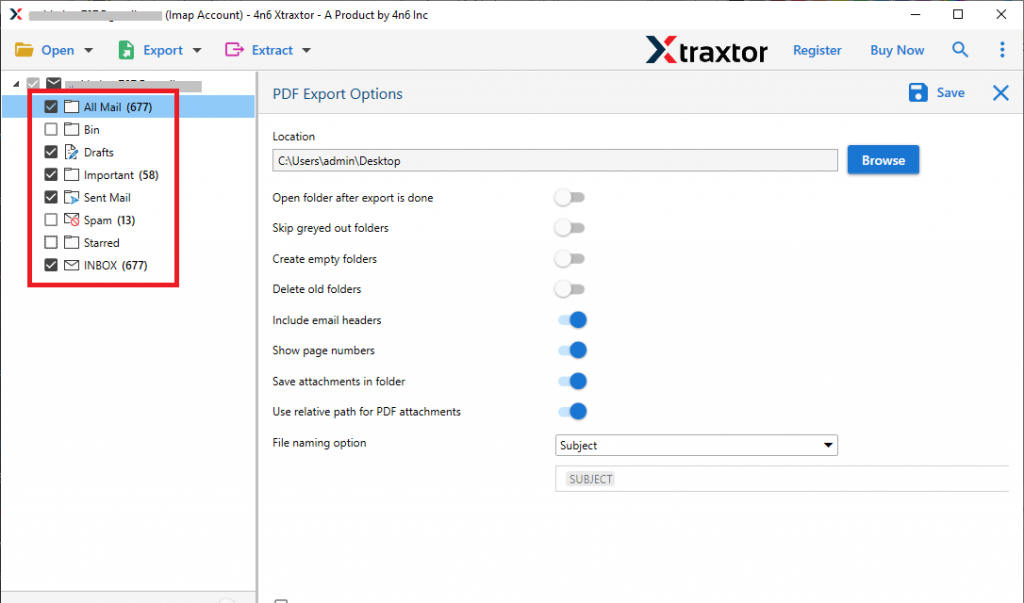

Here complete the process and you export Yahoo Mail to PDF format along with attachments. You can use the demo version of this utility and save Yahoo emails as PDF file without any errors.
Benefits OF Using Expert Tool
While exporting Yahoo email to portable file format using this tool, you will get various advanced features that will help you to save emails with efficiency. Some of them mention here-
Email Filters: With this utility, there are various filter options that can be use and export Yahoo emails from specific fields. You can apply various filters such as – to, from, cc, bcc, subject, has attachments, name, time, date, etc.
Various Saving Options: Using this tool you can save Yahoo emails in various file formats. Use this tool and export Yahoo Mail to MBOX, CSV, PST, HTML and various other file formats. Surprisingly all these saving options are present in a single interface.
Maintain Folder Hierarchy: While transferring Yahoo email to PDF format, this utility preserves the email folder and sub-folder hierarchy and structure. There will be no changes in the formatting of the emails in the exported file format.
Support Windows OS: This Email Backup Tool is designed for Windows Operating Systems. You can install and run this tool on Windows 11, 10, 8, Vista, XP and all other older editions of OS.
Preserve Email Attributes: While using this software to export Yahoo emails to PDF format, there will be no alteration in its properties. It will save emails with their properties (sender info, subject, content, inline image, hypertext, attachments, signatures, etc).
Conclusion
In this blog post, we talk about how to export Yahoo Mail to PDF format with attachments. Along with that, we talk about the step-by-step process of saving Yahoo emails to PDF file in a few simple clicks. You can use the demo version of this tool and export emails from Yahoo to PDF with attachments.