If you are using the Icewarp email client and want to transfer mailbox data to a Gmail account, then this article is all about – How to export IceWarp to Gmail account with complete data.
Gmail with an interactive interface, excellent junk email control, various integrated services, has become a popular email service among 2.3 billion users. It is a web-based email server, due to which it can be accessed on the browser of any machine (phone, laptop, notebook, etc).
Due to the feature-rich and safe service of Gmail, many users opt for this email server. One such scenario we are going to discuss in this blog is where users need to import IceWarp to a Gmail account.
How to Transfer IceWarp Emails to Gmail Account?
To perform the IceWarp to Gmail export process, we recommend that you use a trusted third-party solution. One such program is IceWarp Converter, a reliable and accurate solution to export IceWarp to Gmail with attachments. Along with that, you can also use this tool for selective email conversion without any modification or data loss.
Other than that, you can also transfer IceWarp to Office 365, Yahoo, Thunderbird, Windows Live Mail and many more in one interface. In addition to that, you can also extract mail addresses, phone numbers, attachments, and associated email addresses and phone numbers from the mailbox. All this information will be saved in a separate text file.

Follow the Simple Steps to Export IceWarp to Gmail With Attachments –
- Install and launch the software on your Windows OS.
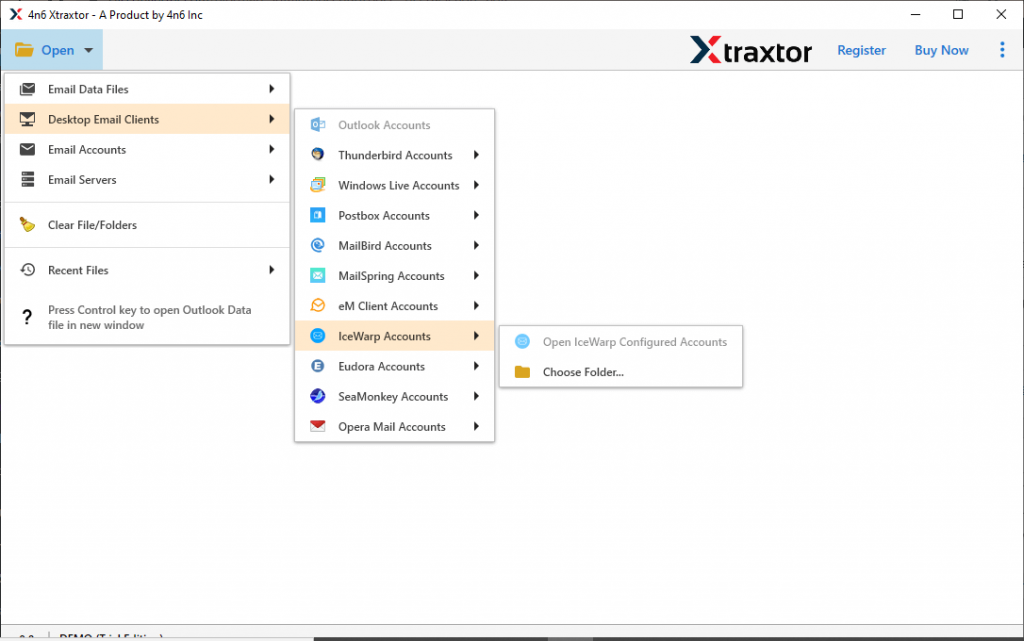
- After that click on the Open button and choose the required field.

- Here select Desktop Email Client >> IceWarp Account >> Select Configured Account or Select folder.
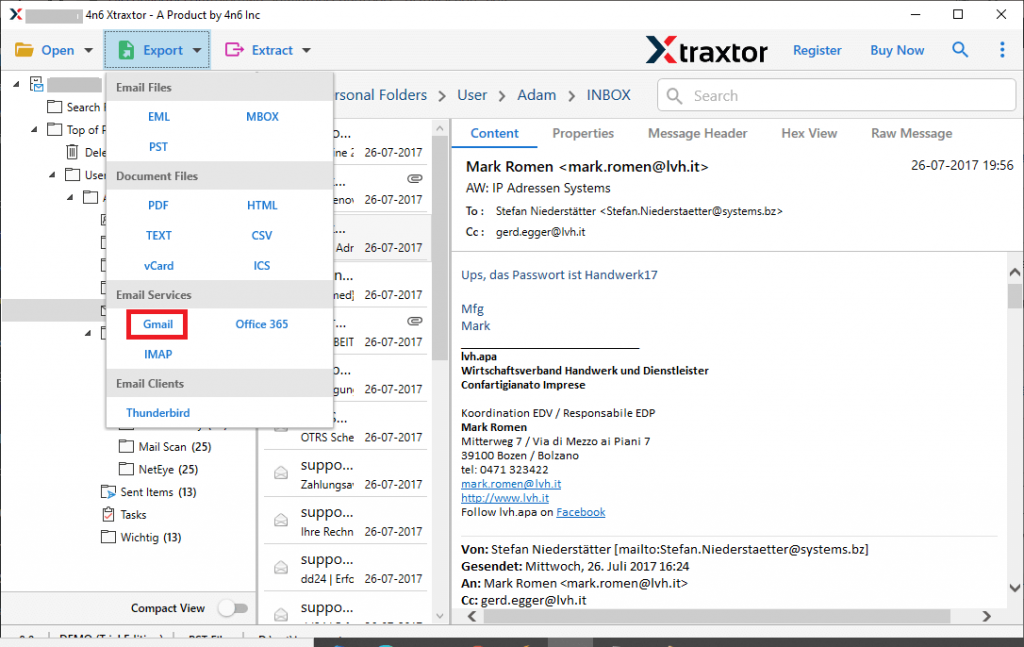
- After uploading emails, you can view them on its interface and choose the folder form conversion.

- Now click on Export and opt for the Gmail option from the given list.
- At last, enter the login details of your Gmail account and after that click on the Save button.
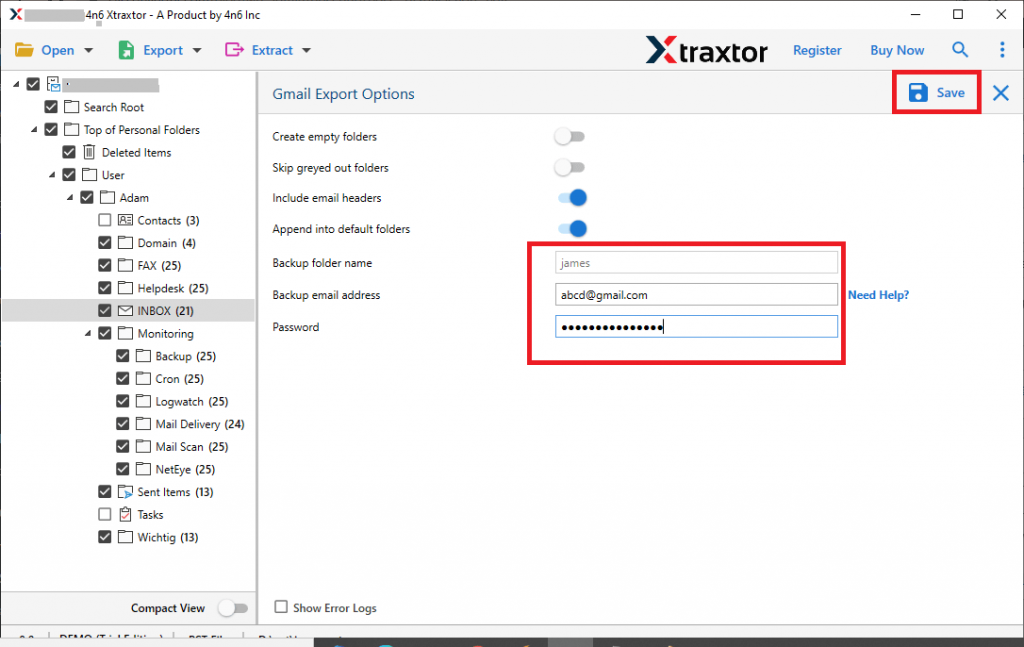
All Done Here! here you export IceWarp to Gmail with attachments. You can check your Gmail account to see your Icewarp emails on its interface.
Why IceWarp to Gmail Export Tool?
This tool has various outstanding features, some of them are mentioned here,
- Directly Export IceWarp Emails to Gmail
This software has an option to directly transfer emails from the IceWarp account to the Gmail account. along with that while transferring emails to Gmail, it makes sure to maintain data integrity and consistency. - Transfer Selective IceWarp Email
The IceWarp to Gmail Export tool offers a feature to save seme selective mailbox folder to Gmail account. The feature of this tool is helpful when there are unlimited emails in the account and want to avoid unnecessary export. - Preserve Email Structure
While exporting IceWarp emails to Gmail, this tool maintains the formatting of emails. It transfers email with their key attributes and properties intake. - Multiple Saving Option
Using this utility users can also convert IceWarp emails to PST, MBOX, EML, CSV, PDF, HTML, and other file formats. - Advanced Search Option
This software has an advanced search option that helps to find emails from mailboxes from specific fields. Users can search emails on the basis of the category such as email, contacts, calendar, journals, tasks, and many more.
Conclusion
In this write-up we learn an effective and secure way to export IceWarp to Gmail account with attachments. However as there is no manual way to perform this task, we recommend an automated tool. You can try to transfer emails from IceWarp to Gmail using the demo version of this utility.