Here in this blog, we will discuss the different ways to backup Hotmail emails to hard drive. If you are also looking for the same, then read the blog till the end and download emails from Hotmail to hard drive with ease.
Hotmail now is a part of Outlook.com and is on the commonly use webmail service by personal as well as professional users. It offers plenty of storage space to save your important data, however, it is best to save emails from Hotmail to hard drive. There can be various reasons to download your data depending on the user’s need. Here in this blog, we will discuss the reasons and solutions to export emails from Hotmail to hard drive.
Why Need to Backup Hotmail Emails to Hard Drive?
There can be various reasons to backup Hotmail emails to hard drive, some of the common reasons are –
- Email accounts are a common target of cyberattacks that cause data loss. Having a downloaded copy of your mailbox data provides extra security for your valuable information.
- After you download emails from Hotmail to hard drive, you can access your email offline. You will not need any internet connection to read/view your information.
- If you decide to switch to any other webmail account, then the backup copy of your data will come in handy. You can easily migrate the data file without any hassle.
- Hotmail or any other webmail account have limited storage space. Regularly downloading emails to your local hard drive can free up your space.
Method 1: How to Export Email from Hotmail to Hard Drive Manually?
- Login to your Hotmail account (use Hotmail.com).
- After that, click on the gear icon and choose View all Outlook Setting option.
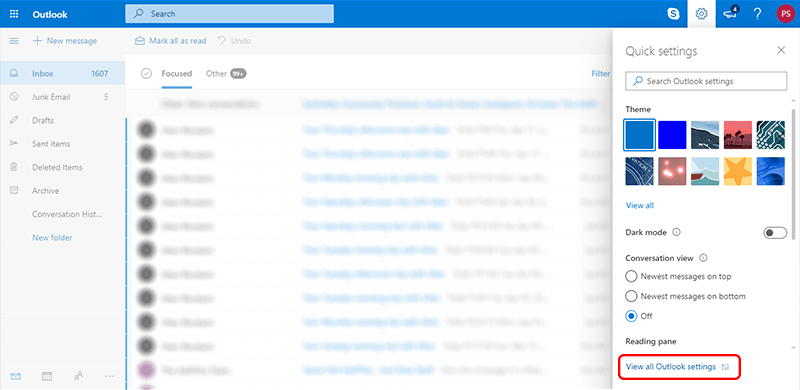
- Then, under the General label click on Privacy and Data.

- Here click on the Export mailbox option.

- After that, you will receive an email with the download link that contains all your data. Click it and download emails from Hotmail to hard drive.

Note: The process will take a few days to complete. After that, you will receive an email with the download link.
Limitation of Manual Approach
- It will take 3 to 4 days to complete the backup process.
- There is no option to choose any particular folder to download.
- No filter option to export only selected emails.
- No assurance of data integrity and maintenance of folder hierarchy and structure.
Method 2: How to Backup Hotmail to Hard Drive Instantly?
SysConverter Email Backup Tool is a secure and efficient way to download emails from Hotmail to hard drive in a few simple clicks. With its simple and easy-to-use interface, it can be used by any beginner without any hassle. There are various advance filter options offered by this tool – to, from, cc, bcc, name, date, time, etc.
Additionally, using this tool you can also export Hotmail emails to Office 365, Gmail, Yahoo Mail and all other webmail accounts. Some other benefits of using this tool include – selecting email folders, maintaining folder hierarchy, preserving data integrity, creating email key attributes. etc. A free demo version of the software is also accessible to evaluate its full functionality.

Follow the Steps to Download Emails from Hotmail to Hard Drive with Attachments –
- Launch the software on your system.
- Then, select Open >> Email Accounts >> Add Account.

- Enter your Hotmail login details and hit on the Add button.

- Here you can view your emails before exporting them.

- Click on Export and choose any file format from the given options.

- Browse the location (your hard drive) and hit the Save button.

Done! Here you download emails from Hotmail to hard drive in a few simple clicks.
Why Use SysConverter Email Backup tool?
There are various outstanding features offered by this tool, some of them are –
- It will directly downlaod emails from Hotmail to hard drive in a fe simple clicks.
- Advance filter options – to, from, cc, bcc, name, date, time, etc.
- Offer various options to save Hotmail emails. You can easily export Hotmail emails to PST, PDF, CSV, EML and many other file formats.
- Maintain email folder and sub-folder hierarchy and structure.
- User-friendly interface for both technical and non-technical users.
- Preserve data integrity while backup Hotmail emails to hard drive.
- Works on Windows 11, 10, 7, Vista, XP and all other previous OSt versions.
- Allow to migrate emails from Hotmail account to Gmail, Office 365 and all other webmail accounts.
- A free demo version of the software is available to analyse its working.
Conclusion
It is concluded that after you download emails from Hotmail to hard drive, it provides safety to your important data. Here in this blog, we mention two workable solutions to save emails from Hotmail to hard drive. You can try any of the given solutions and perform the backup process without any hassle.