There are multiple email clients present there and users often switch from one email client to another. If a user switches their email client, then they also search for a different secure method to convert the file formats. Here in this write-up, we are going to address one such scenario to convert OLM to EML.
Many Mac users wish to export all emails from OLM files into EML file format. As this format is widely supported by many email clients it is mostly searched by many.
This operation can be performed by certain manual and professional methods. In this article, we deeply discuss these file formats and learn the working of this method and convert OLM files into EML format.
Know About OLM & EML
If a file has a .olm extension, then it is a Microsoft Outlook file for Mac Operating System. An OLM file saves all email messages, contacts, calendars, journals, tasks, and many other email properties. This file is similar to the PST file created by Windows Outlook. However, the OLM file can’t be accessed on Windows Outlook but the PST file can be imported into the Mac Outlook interface. A single OLM file can contain multiple mailbox data in an organized folder and sub-folder structure.
On the other hand, EML is a file format that saves single email messages from many email clients. This file format is supported by almost all email clients. It saves email messages along with the date, subjects, receiver/sender details, and attachments.
As we get to know about these file formats, here a question arises – why do we need to convert OLM emails as EML?
Reasons to Export OLM to EML format
There can be various reasons behind OLM to EML conversion, some prime causes to save their email data from OLM file to EML format are mentioned below.
- Sharing Email Data
OLM files can’t be open or read apart from the Mac Outlook interface. Whereas EML files can easily be transferred over the internet or system.Due to which file transfer become smooth and fast. - Switching Email Client
As we mention in the above section about the common practice of switching email clients. And also the compatibility of EML file format with nearly all email clients. The conversion between OLM to EML is required.
After knowing the reason behind OLM to EML conversion, let’s move ahead and learn the different methods to do this conversion process.
How To Convert OLM in EML Format?
There are various methods to do the conversion, but finding an effective and secure method to save emails from the Mac Outlook OLM file is a tricky process. But don’t worry we will provide the best solution to solve your email conversion issues.
#1. Manual Method Via Mac Outlook
#2. Automated Method By Expert Tool
Now Let’s know the working of these methods in a descriptive manner. So let’s begin.
Method 1: Export OLM file to EML format via Drag & Drop
In this method, a user needs to access the Mac Outlook interface and save emails from the OLM file into EML file format. Below is the step-by-step process of the conversion process.
Step 1. Open Outlook email client on Mac system.
Step 2. Now move your cursor to the email file that needs to convert.
Step 3. Afterwards, drag that email file and drop it on the system desktop.
Step 4. Repeat steps 2 and 3 for all emails that you want to save as .eml.
This process creates a .eml file on the desktop. After that user can access this email file on any text editor or import it to any email client.
But with this method there is a certain limitation, some of them mention below.
This method saves a single email from the OLM file. If users have thousand of emails then it is a painful task to perform this process a thousand times. It will take lots of time and patience to perform multiple email conversions using the drag and drop method.
To overcome this limitation, it is recommended to use an expert solution to convert OLm to EML with complete data. One such tool is mentioned in the next section of this blog post.
Method 2: Convert OLM to EML Using Professional Tool
OLM File Converter is one such tool that provides secure and effective file conversion results. This powerful tool is able to convert OLM files into different file formats in just a few simple clicks. Apart from this, it is able to export ema8ils from Mac Outlook email files into cloud-based email service providers or email clients without data loss. This email file converter can perform single as well as multiple email conversions while maintaining data integrity.
Steps To Save Emails from OLM file into EML format
Follow the given steps for smooth and fast OLM to EML conversion. Make sure to perform the process in an exact given manner.
Step 1. Install and launch this OLM to EML Converter on the system.
Step 2. Click on the Open button to select the email data file.

Step 3. Now, Select Email Data File >> Select OLM File >> Select File or Folder.
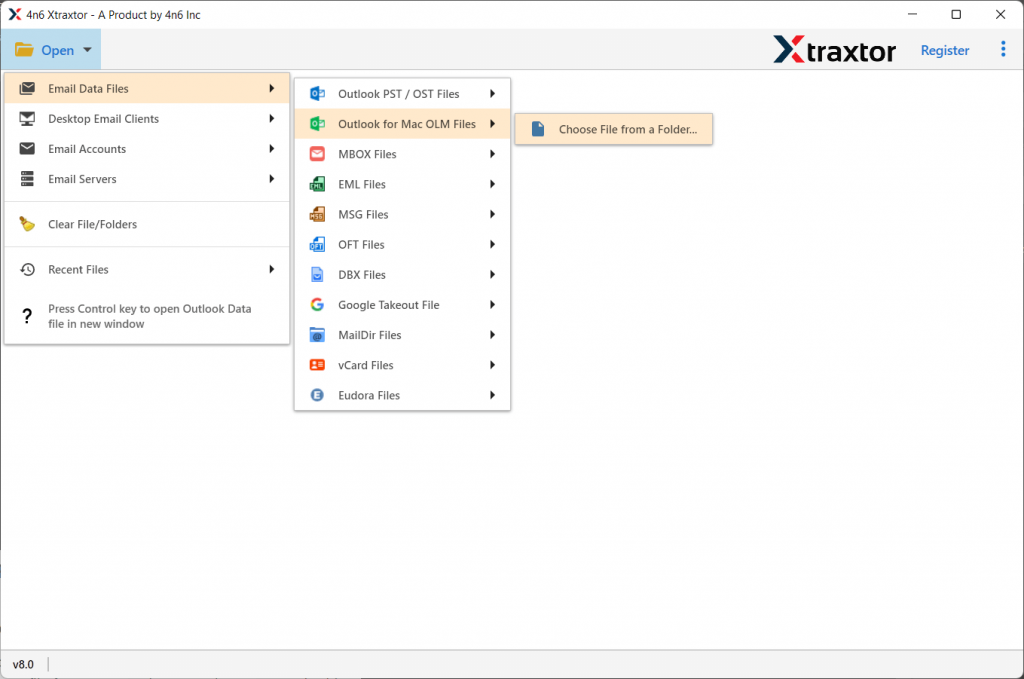
Step 4. Here this tool shows all emails from the OLM files in its interface to read/view them.

Step 5. After that, click on the Export button and select EML format.
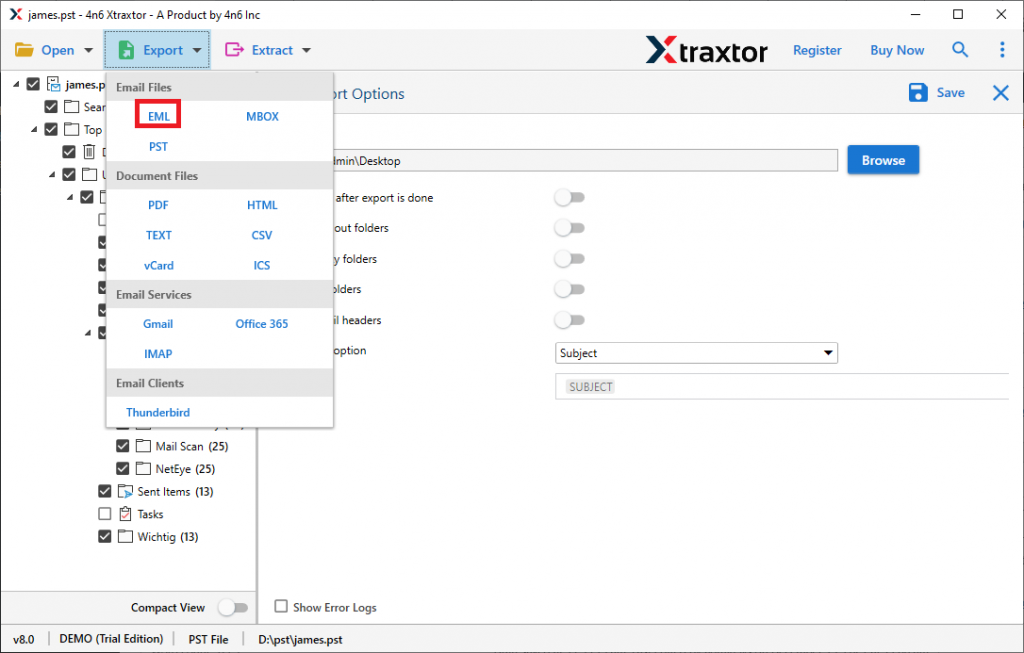
Step 6. At last, browse the saving location on the system and hit the Save button.
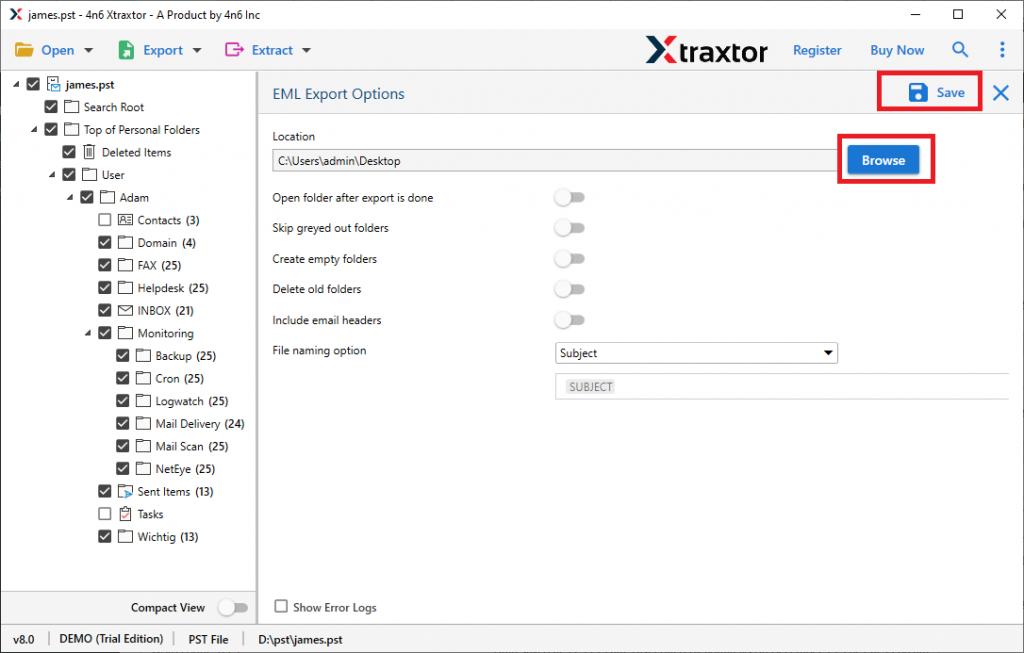
Here, using this tool we successfully complete the OLM To EML conversion with complete data. now move to the next section and get to know the reasons to choose this tool.
Benefits Of Using OLM to EML Converter
This utility has certain key features that make it a standalone entity among other tools. Some of them are listed below.
- Batch File Conversion
With this tool, users can easily convert emails from multiple OLM files into PST, PDF, HTML, and file formats without losing any data. While conversing, this tool ensures data integrity and security. - Extract Information
Using OLM to EML converter it is possible to export contacts from OLM file into vCard, as well as extract attachments, contact photos, email addresses from OLM file in a single file with complete information. - Multiple File Saving option
This utility offers multiple file formats to save OLM emails in a single interface. With this utility, you can convert OLM to PDF, HTML, vCard, CSV and other file formats without losing a single bit of data. - Directly Export OLM file to Desktop-based Email Clients
It has the ability to transfer all emails from OLM files into multiple email clients without any glitches. Using this tool users can convert OLM to MBOX which is supported by most email clients. - Email Filter Option
This utility provides a filter option that can help to export some selective email data. Using this stool users can export calendar data from the OLM file, as well as journal, tasks, contacts, emails messages, etc. Also, users can convert emails from a particular date range, from, to, subject, etc. from OLM files.
Conclusion
Here in this write up we discuss the two different methods to convert OLM to EML. Both manuals, as well as automated tool, is capable to do the conversion. Now users can perform the process using any of these given methods as per their needs. We hope we are able to resolve the issue and answer the question – “How to Convert OLM to EML?”