Summary: If you are looking for a way to save your Eudora mail account data, then your best option is to export it in PDF format. Today in this blog, we will discuss how to Convert Eudora Mails to PDF With Attachments?.
Eudora is a desktop email client that offers a lightning-fast search function. It is now a discontinued application, but still has a large number of users who still manage their emails through Eudora Mail.
However, sometimes users want to save their emails in a secure format. If we talk about security and data integrity, the PDF file format is undoubtedly the best option.
Why save Eudora Mails in PDF format?
As we already know, Eudora is a discontinued email client, which means no new updates or advanced features. In that case, it is beneficial to save your mailbox data in PDF format. The reasons why you do that, are mentioned below;
1. Exporting Eudora Mails to PDF increases the accessibility of your emails on any platform.
2. The PDF file is easy to transfer and can be accessed anywhere.
3. As PDF is a universal format that has the quality of saving your data along with its key attributes without changing its structure.
4. Along with that, it provides security to your mailbox data in the form of password protection.
5. Most importantly, the PDF file format is recognized as a legal document in any legal and government organization.
How to Convert Eudora Mails to PDF With Attachments?
In this write up we will discuss two different methods to export Eudora to PDF format with complete mailbox data.
Method 1: Manually Save Eudora Mails to PDF
Please note that this native method only transfers your emails in PDF format, not attachments. If you only need email to be exported, then go through with this manual approach and convert Eudora mails to PDF format.
This manual method required the installation of the Eudora email client in your system. If not, then it is suggested to use the automated tool mentioned in the other section.
Step 1. Open the Eudora application on your system.
Step 2. Select the message that needs to be converted in PDf format.
Step 3. Now go to “File” at the menu bar and click on the Print option.
Step 4. After that, Print to a file >> Print.
Step 5. At last, browse the location and name the converted file. After that hit on the Save button.
Carry out these steps for each email you want to export as a PDF file.
However this method is easy to perform, but it will be lengthy and time-consuming if users have numerous emails to export. Most importantly this approach doesn’t export email attachments along with messages.
Thus, to export Eudora mails to PDF with attachments, we recommend using secure and reliable software that is specially designed to perform this conversion process. To know about it, read the next section of this blog.
Method 2: Convert Eudora Mails to PDF with Attachments
For Eudora to PDF export process, you can use Eudora Converter. If you have unlimited emails in your mailbox, then this utility batch convert Eudora mails to PDF that too without data loss. While transferring mailbox data into a portable format, this software maintains email key attributes, properties, structure and hierarchy. Most importantly, it will directly export emails from your configured email client account to PDF format.
Other than that, this tool also convert Eudora mails to PST, HTML, CSV, EML, MBOX, and other file formats. Along with that, you can also transfer mailbox emails and other components into other email client accounts with no data loss.

Steps to Export Eudora Mailbox data to PDF with Attachments
Follow the instruction to transfer emails and their attachments from the mailbox to PDf format.
Step 1. Install and run this software in your system.
Step 2. Click on the Open button and choose from the given options.

Step 3. Here select Desktop Email Client >> Eudora Account >> Open Configured Account.
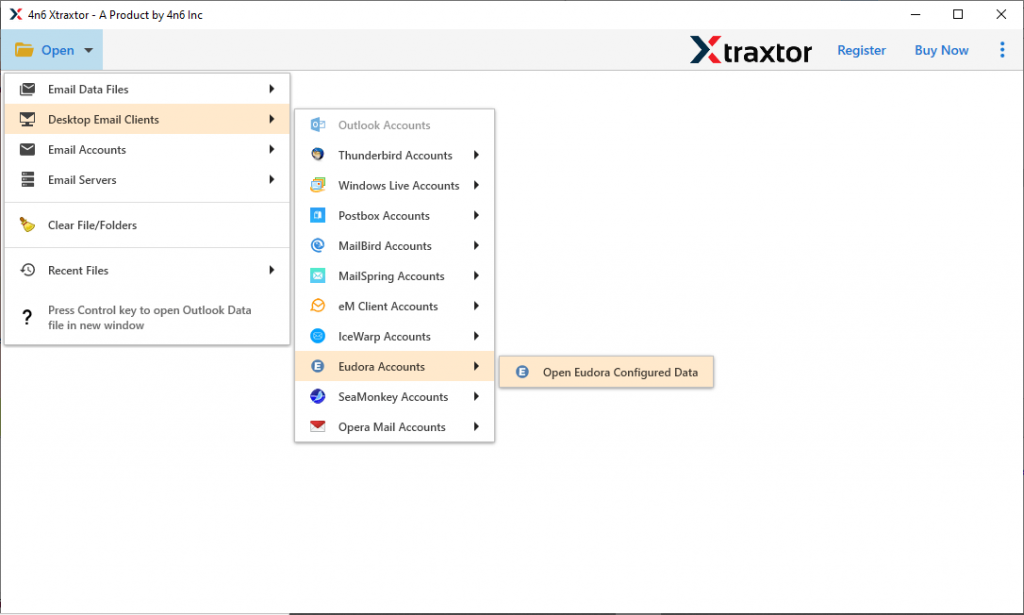
Step 4. Read all the emails from the mailbox and select the folder you need to export. If you want to save the complete data, then select all and process further.

Step 5. At this stage, click on the Export and choose PDF as a saving option,

Step 6. At last, browse the targeted location and click on the Save button.

Complete! Here you convert Eudora mails to PDF with attachments without any data alteration and loss.
Why Need Eudora to PDF Converter
Some of the outstanding features of this converting tool are mentioned here;
1. This tool easily exports Eudora emails to PDF, PST, MBXo, HTML, and other file formats with ease.
2. The Eudora to PDf Converter has an advance search option to convert emails from specific attributes ( to, from, subject, property id, property name, etc).
3. It has a simple user interface that allows any type of user (technical & non-technical) to perform the conversion without any assistance.
4. A extraction option to save email addresses, attachments, phone numbers, and associated email addresses and phone numbers in a single text file.
5. Automatically detect the configured Eudora mail account and export its emails to PDF and other file formats.
6. Using this tool users can access their emails in any web browser. To do that you need to convert Eudora mails to HTML format.
7. This Eudora to PDF converter export emails along with their emails without losing their properties.
8. You don’t need to install any other applications to perform this conversion process.
Conclusion – Convert Eudora Mails to PDF With Attachments
Here in this blog, we discuss two different ways to export Eudora emails to PDF. However manual methods only save email messages, not attachments. In response to this situation, we mention an expert solution that export Eudora emails to PDF format with attachments. You can opt for any of the solutions and convert mailbox data into PDF format.