Summary: Are you using the eM Client application on your system for email management? However, due to some reasons want to switch it to MBOX based email client. In this situation, you need to convert eM Client emails to MBOX format. After that, it will be easy to import this data file into any email client that supports .mbox format.
In this digital age, all communication is based on emails, whether personal or professional. Most of the eM Client users want to switch to another email client due to various advanced features. Today we will discuss one such scenario where we discuss the process to export eM Client emails to MBOX format.
However, the question is: Why do users want to save emails from eM Client in MBOX file format?
Reasons for eM Client to MBOX Conversion
eM Client is a Windows-based application used to manage emails from multiple email accounts. However, it is not a free service, so at some point, users tend to use a free email client.
As emails are important to any business, they always need to save their important data in another format or platform. Therefore, most users opt for the .mbox format as it is easily supported by many email clients.
A lot of MBOX formats are supported by email clients, some of them are Thunderbird, Apple Mail, Opera Mail, PocoMail, Eudora and many more.
To export emails from the eM Client account to MBOX format, you must use a reliable and efficient tool. Since there is no direct way to save mailbox emails in .mbox format, you need to use third-party software. One such tool will be discussed in the next section.
How to convert emails from eM clients to MBOX format
eM Client Converter is a complete solution to transfer emails from eM clients to .mbox format with full mailbox data. This smart tool is the only one capable of exporting eM Client to MBOX in bulk without data loss. Along with that, you can also convert emails from all the accounts set up in this email client in a single attempt.
Along with that, this tool can directly export eM Client emails to web-based email accounts. It also offers a selective email conversion option along with a date and time range filter for specific email conversion.
Steps to Export eM Client Emails to MBOX Format
To perform this procedure, follow the given instruction and convert eM Client emails to MBOX format with ease.
Step 1. Download and run this software on your system.
Step 2. After that, a window will appear, click on the Open and choose the required options.

Step 3. Here select Desktop Email Client >> eM Client Account >> Select the Required field.
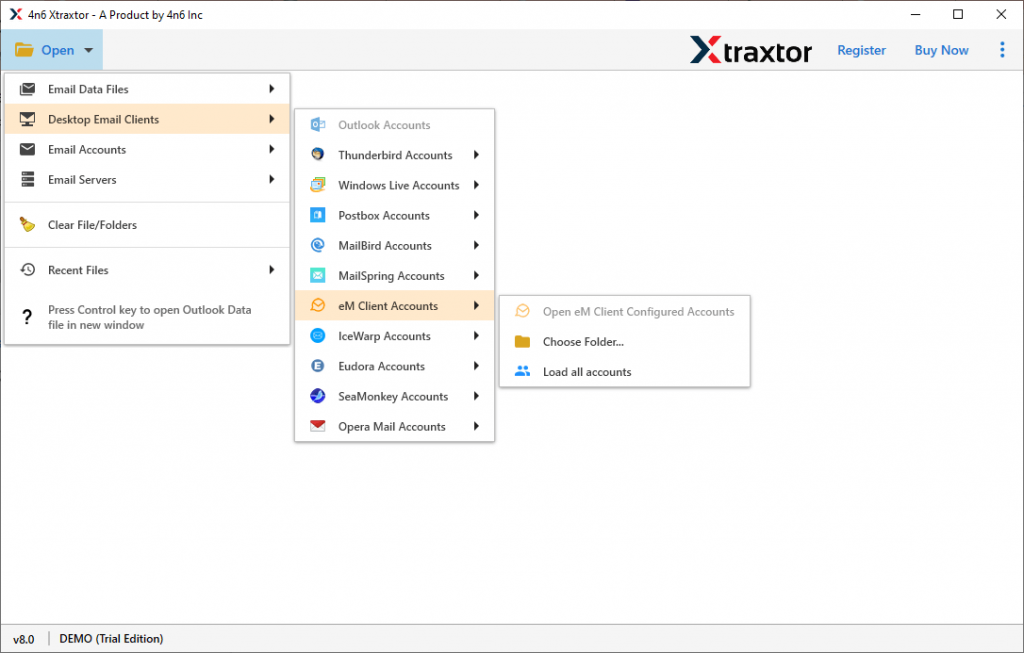
Step 4. After loading the data file, you can view/read emails in its interface.

Step 5. In this step, click on the Export and choose MBOX as a file format to save emails.

Step 6. At last, browse the location to save the converted file (.mbox) and hit on the Save button.

You Are Done! Here complete the eM client to MBOX conversion process. Now you can use the MBOX file as per your requirement.
Why eM Client to MBOX Converter
Some of the key features of this email converter tool are mentioned here,
- Batch conversion of eM customer emails
This utility offers a batch conversion option by which the user can convert multiple data files to MBOX file format in a single attempt. To do this, you must add the folder that contains the email data files. - Multiple savings options
This tool not only exports eM client email to MBOX, but also convert eM Client emails to PST, HTML, EML, PDF and other file formats in one interface. - Preserve mailbox structure
By using this tool for the eM client to MBOX export process, you will not lose the folder or sub-folder structure of your mailbox. It also preserves the key elements of the email, such as to, from, email body, inline images, hyperlinks and many more. - Windows-compatible
This tool is compatible with all versions of the Windows operating system without any problem. You can operate this app on Windows 11, 10, 8, Vista, XP and all previous versions.
Conclusion
We hope this post can solve your query “How to convert eM clients emails to MBOX format?”. In response to this query, we provide a reliable and secure method for this conversion with a pictorial description. This tool easily converts eM Client emails to MBOX format without data loss. Try the demo version of this tool and save your email from eM Client in MBOX file format with ease.