There are many business firms that use eM Client to manage their official emails. At the same time, they search for a way to convert eM Client emails to HTML format. In this article, we address one such scenario and export emails from mailbox to .html format using an expert approach.
Most of the users face such type of situations. To overcome this case, we are going to discuss one of the best approach which instantly saves emails from eM Client in .html format.
How to Convert eM Client Emails to HTML Format
eM Client Converter is a one-stop solution for eM Client to HTML conversion. This tool easily exports eM Client to HTML with precise accuracy and reliability. Along with that this independent software allows to convert multiple emails from various configured accounts to HTML format that to in a single attempt. The .html file exported using this tool is the same as the original without any alteration and change in email format.
In addition to it, this utility also exports eM Client emails to cloud bases email accounts such as Gmail, Yahoo, Zoho Mail, Yandex, GoDaddy, and many more.

Steps to Export eM Client to HTML Using Expert Solution
Follow the instruction to transfer emails from eM Client account to .html format along with attachments.
Step 1. Download and launch this tool on your system.
Step 2. Here click on the Open button to choose the data source.
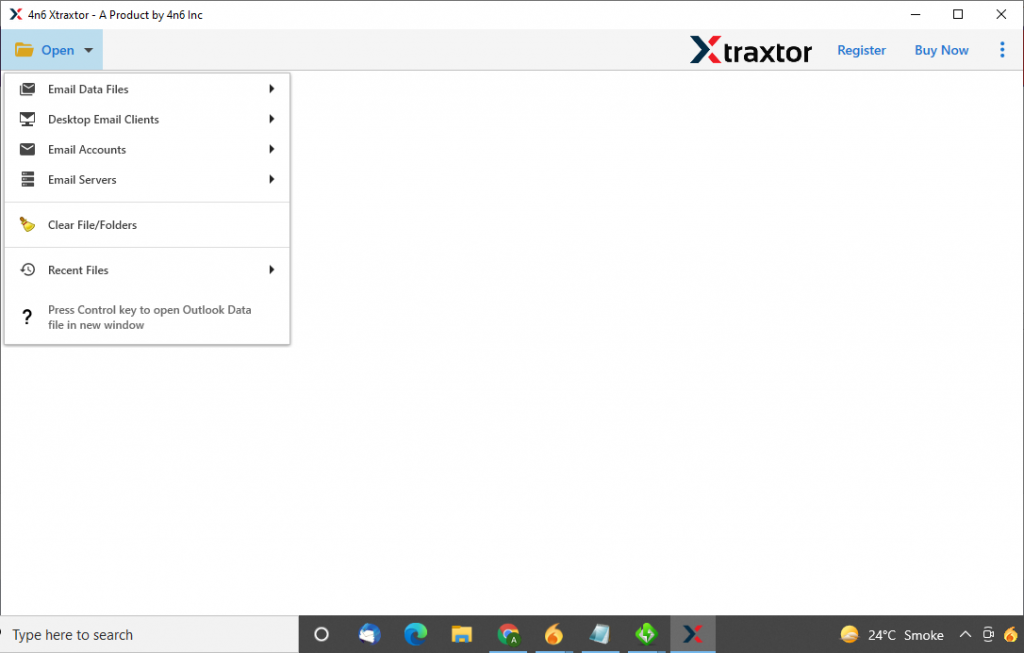
Step 3. After that. select Desktop Email Client >> eM Client Account >> choose from given options.

Step 4. User can read their emails and decide which folder need to be converted.

Step 5. Now click on the Export and opt for the HTML format.

Step 6. At last, choose the location to save the converted .html file and hit on the Save button.
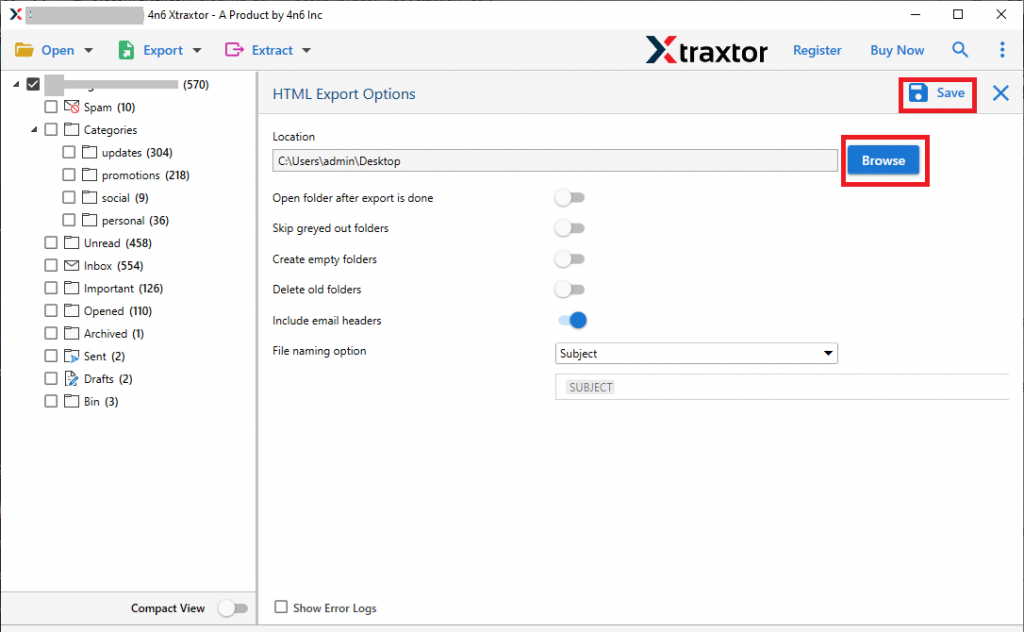
Finish! You convert eM Client emails to HTML format with this automated tool. Now after that let’s check some of the outstanding features of this utility.
Key Feature of eM Client to HTML Converter
Some of the amazing benefits of using this utility to convert eM Client emails;
- Save email into Multiple Format
Using t is the tool you not only export eM Client to HTML but also in other file formats. You can convert eM Client emails to MBOX, PST, CSV, PDF, EML, and other formats. - Different Options to Add eM Client Emails
This tool can easily batch convert eM Client emails to HTML format without data loss. Users can opt for any of the three methods to export emails – Configured email account, Select Folder and load all accounts. - Preserve Email Properties
During eM Client to HTML conversion, this tool upholds all the key attributes of the emails. It smartly preserves email propertioes such as to, from, subject, subject, inline images, hyperlinks, attachments, time, digital signatures, and many more. - Windows Compatibility
eM Clent to HTML Converter is a Windows-based software that can be easily operatable on any OS version. You can run this tool on Windows 11, 10, 8, Vista, XP and all previous versions without facing any technical glitch.
Conclusion
Here in this blog, we discuss an efficient and safe way to convert emails from eM Cleint to HTML format with full data. Along with that, we mention some salient features of this tool. You can try the demo version of this tool and export eM Client to HTML with attachments. We look forward to solving your conversion problem.