Are you looking for a quick solution to save emails from Outlook Express DBX file in HTML format? Well, then you landed on the right page. In this write -up we will learn about an efficient and secure tool that easily convert DBX to HTML in bulk. So stay with us and read this article to the end.
At present time, many users still using Outlook Express to manage their emails. This email client is outdated as well as discontinued, which implies no new updates. Due to which users left with DBX file with them. And in this case, users really need to switch their email clients. And for that user needs to convert DBX to HTML and another file format that is supported by their new email client.
Instant Solution
If you are looking for the finest expert approach to export all emails from Outlook Express DBX files into HTML format with complete email data, Then DBX Converter is all you need. This tool efficiently converts multiple .dbx files in a few simple clicks. Above that, this wizard offers multiple formats to save Outlook Express emails. Users can try the demo version of this tool can convert DBX to HTML and another file format as well.

There are various solutions to perform this conversion, one of them is mentioned in this blog post. But before let’s get to know the reasons for this process through user query.
User Query Related to DBX to HTML Conversion
“I exported the mailbox data from Outlook Express to a DBX file and upgraded my operating system. Now I urgently want to send some important data from that .dbx file, but now it is impossible to access Outlook Express. So after searching, I realize that it is possible to save those emails in HTML format and send them over the internet. But I don’t know how it is possible. Can anyone tell me an instant solution to convert DBX to HTML?”
If this situation seems similar to you, then read the next section and get to know the instant solution to solve the email file conversion issue.
How to Convert DBX to HTML
There is no manual method to directly export emails from Outlook Express DBX file in HTML format. The user must use a third-party solution to perform this conversion process. Here in this blog, we discuss one such tool, called the DBX Converter Wizard. This tool offers various advanced and unique features. It has the ability to convert multiple DBX emails to HTML without data loss. To experience hassle-free and efficient conversion users can try the demo version of this utility and convert the DBX files to other file formats.
Steps to Export Emails from Outlook Express to HTML Format
Before the user starts the conversion process using this DBX to HTML Converter, it is necessary to locate the DBX file in the system. When the users have .dbx file, then only it is possible to convert DBX file to HTML format. So first of all we learn how to locate Outlook Express DBX files in the system.
How To Find DBX File in System
- First of all, move your cursor to the Start button and open My Computer.
- After that click on Tools >> Folders and click on the View tab at the top of Window.
- Now in Advance Settings, choose the Hidden File & Folder option to find hidden files and folders.
- At last, go to this location – C: \ Documents and Settings \ your user name \ Local Settings \ Application Data \ Identities \ {your Windows user identification number} \ Microsoft \ Outlook Express.
Now, after locating the Outlook Express email file, let’s go ahead and perform the DBX to HTML conversion using this professional tool. Follow the steps below for a smooth and accurate conversion process.
Step 1. Download and run this application on your machines.
Step 2. Click on the Open button to select the email file.

Step 3. Here, Select Email Data File >> Select DBX file >> Select Files or Folder.

Step 4. After that, this tool scans the .dbx file and preview all emails that are saved on this email file.

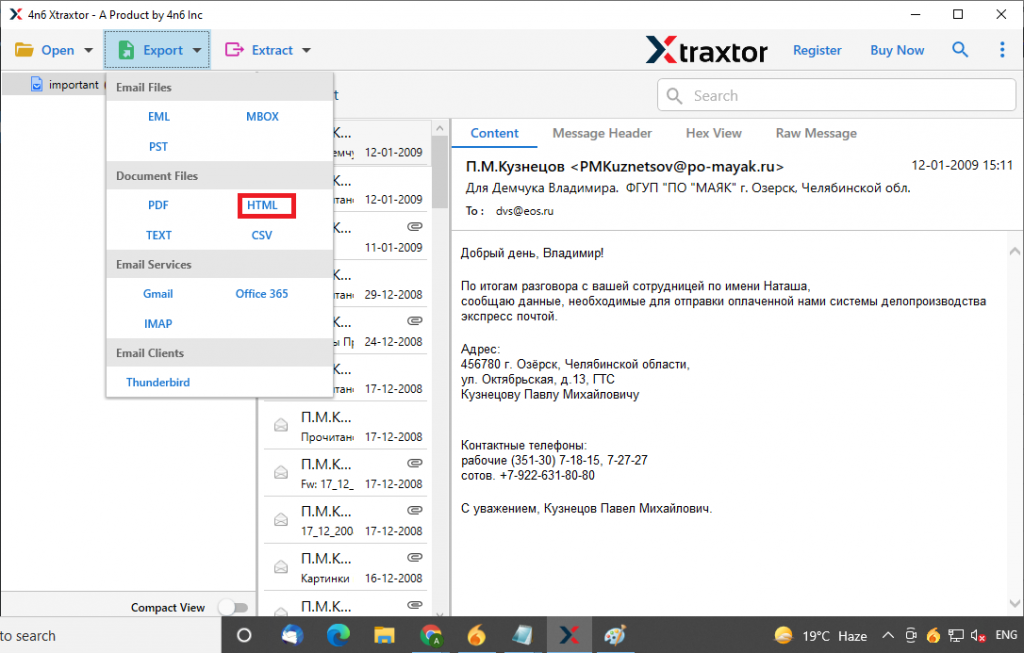
Step 5. Now click on the Export button and select HTML format.
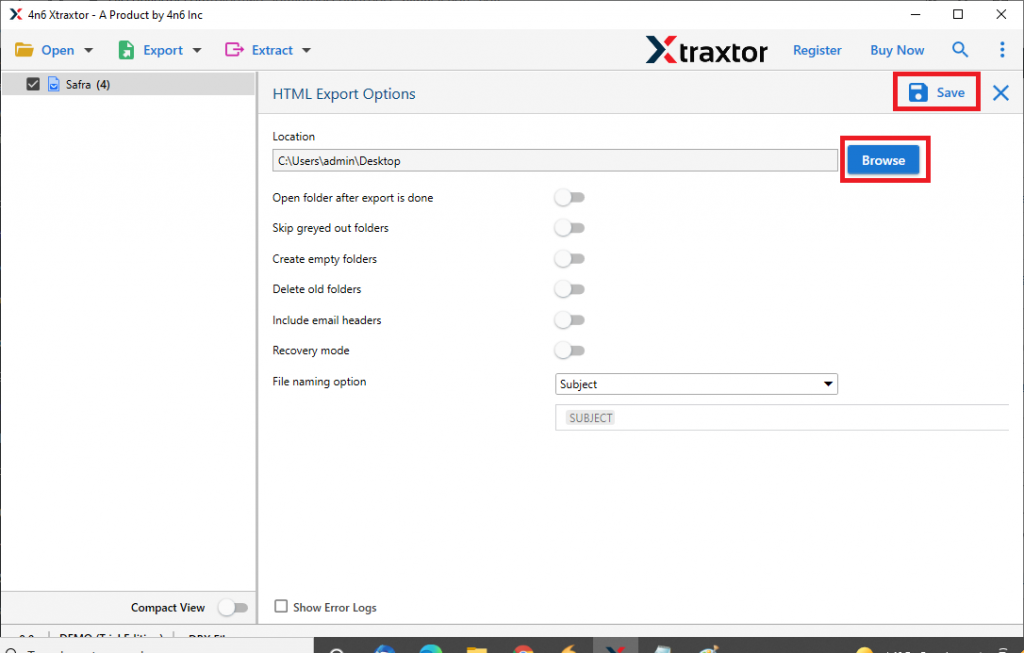
Step 6. In the last step, select the location to save the .html file and click on the Save button.
Outstanding Features of DBX to HTML Converter
- Multiple File Formats
This DBX to HTML Converter can export DBX files into HTML and multiple file-formats with complete email data. With this tool, users can also convert DBX to MBOX, PDF, HTML, CSV, TXT and PST in a single interface. - Export DBX file to Outlook
With this wizard, users can export all emails from Outlook Express to Microsoft Outlook. This tool smartly converts DBX to PST without changing the email internal structure. - Dual Email File Selection
With DBX to HTML Converter, user can select individual .dbx file for conversion. As well as this tool gives an option to select the entire folder that contains multiple .dbx files and convert it without any delay. - Export Outlook Express Emails to Email Client
This utility smartly exports all emails from Outlook Express DBX files to different desktop clients. You can transfer emails to office 365, Windows Live Mail, Thunderbird, Eudora, and other email clients. - Maintain folder Hierarchy
This wizard ensures to preserve the email hierarchy while email conversion. This email converter maintains the email folder or sub-folder structure the same as the original.
Conclusion
Here we cover the secure and effective approach of DBX Converter, to convert DBX files to HTML with 100% accuracy. It has a user-friendly interface that can be easily operated by novice users also. Users can use the trial version of this tool and export emails from Outlook Express into HTML and other file formats without data loss.