Conversion from one file format to another format is a complicated process. As Outlook Express is a discontinued service, many users want to save their emails so that they can be used later. In that case, it is better to save Outlook Express emails in CSV format. This file is supported by all email clients as well as it can be accessed on any OS application.
Let’s get to know more about this situation through user queries. And see why a user wants to convert DBX files in CSV format.
“I was using Outlook Express form manage my emails. But from the past few months, it stop working and sometimes its interface automatically closed. So I decide to uninstall this email client from my system. But before that, I saved all my email data in .dbx format. I am still looking for a new email client. But I tried to open this file about it showing an error, so I make my mind and want to save all emails from the DBX file in CSV format. Can anyone suggest to me a direct solution to convert DBX file to CSV format with ease?”
This is the user query asked in a forum. Here w will address this query and try to provide workable as well as accurate solutions to save emails from Outlook Express emails into CSV file format. Before moving ahead let’s know the causes for this conversion.
Reasons to Export DBX files into CSV Format
DBX file is a data file that saves Outlook Express emails. This file cannot be accessed in applications other than Outlook Express. So to open emails from the .dbx file, it is better to save DBX emails in CSV format.
Whereas, the CSV file is flexible in that it can be transferable and is also compatible with many applications. That is the main reason why users want to convert DBX files to CSV format. In this file, each record data is saved in a single line separated by a comma.
How to Convert DBX files to CSV Format
There are various solutions to save all emails from the Outlook Express DBX file into CSV format, but finding a trouble-free solution is a painful process. But to save you from all hassle we are going to discuss a professional software, DBX Converter Wizard in this blog section. This tool is smartly transferred multiple .dbx files to another file format in a single attempt. With this tool, users can also export Outlook Express emails to web-based email service provider accounts without data loss.

Steps to Export DBX file into CSV Format
Follow the given steps to perform DBX to CSV conversion process using this DBX to CSV converter with mailbox complete data.
Step 1. Download and run this software on your Windows OS.
Step 2. Click on the Open button to select the email data file.

Step 3. Now, Select Email Data File >> Select DBX File >> Select File or Folder.

Step 4. A preview of all your emails will be shown here. You can read/view them and decide which emails are needed to convert.

Step 5. After that click on the Export button and select CSV format.
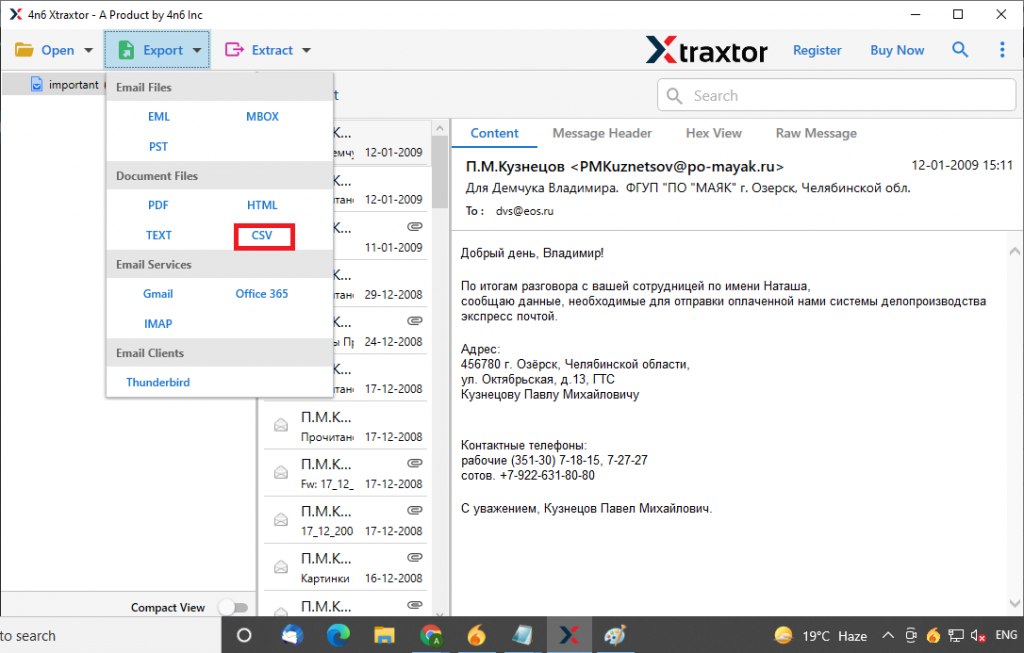
Step 6. At this last stage, browse the location to save the email file and hit on Save button.

Here complete the DBX to CSV conversion with complete email information using this automated tool. Users can locate the converted file at the selected location.
Reasons to Choose this Wizard
There are several amazing features that this software possesses. Some of the outstanding features of this utility is mentioned in this section.
- Dual File Selection Option
This utility provides two different options to select Outlook Express data files. Users can select an individual DBX file as well as select the entire folder that contains multiple emails from Outlook Express. - Email Filter Option
With this wizard, users have the ability to convert some selective emails as per their requirements. This tool has an inbuilt email filter that can export emails from any particular date range. - Convert DBX file in Bulk
This DBX to CSV Converter, user can export multiple email files in a single attempt. It can easily transfer unlimited .dbx file into .csv format without any data loss. It can be helpful when there are numerous amounts of email data to convert. - Multiple File Saving Option
The utility also offers various file formats to save emails from Outlook Express DBX files. With this tool, users not only export DBX to PDF, but can convert DBX to PDF, PST, MBOX, and many other file formats in a single interface. - Maintain Email Folder Structure
While using this DBX to CSV converter, the user can perform the conversion with accuracy. It makes sure to hold all email structures or attribute after conversion is completed. Also, make sure to preserve the email folder or sub-folder hierarchy. - Support All Windows OS
This tool is designed in such a manner that it can operate on Windows all Operating systems without facing any technical issues. Users can operate this tool to convert DBX files to CSV format without worrying about their Windows compatibility with this tool.
Conclusion
This DBX Converter Wizard is a specially designed tool that can export emails from Outlook Express DBX files into CSV format with attachments. Also with this tool, users can batch convert DBX files into CSV and also export multiple DBX files into EML. TEXT, PDF, MBOX, and other file formats. Users can try the demo version of this tool and export all emails from Outlook Express into CSV format with ease.