Learn the secure and efficient way to backup Network Solutions email to PC with complete data. Read the complete post and know the complete process to download emails from Network Solutions without any hassle.
Since email is an important part of every business and personal communication, it is required to backup them. Although Network Solutions is an email service that stores data on the cloud, it is not prone to hacking or virus attacks. Therefore it is best to backup Network Solutions email to PC and access them without any hassle. Now without any further delay, let’s move ahead and save emails from Network Solutions locally.
How to Download Emails from Network Solutions Webmail?
Try SysConverter Email Backup Tool on your Windows. The software will backup emails directly from your Network Solutions mailbox along with attachments. The software allows to export Network Solutions emails to PST, PDF, CSV and many other file formats. One can also apply the filters and download selective emails from their Network Solutions email account.

Steps to Backup Network Solutions Email
1. Run the software on your system.
2. Select Open >> Email Accounts >> Add Account.

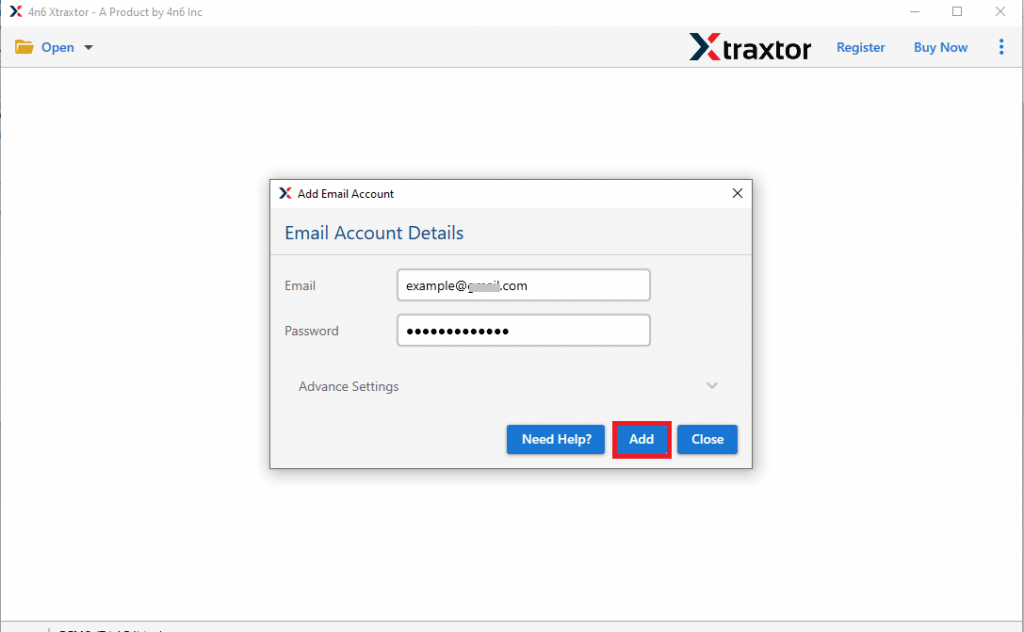
3. Enter your Network Solutions login details and hit the Add button.
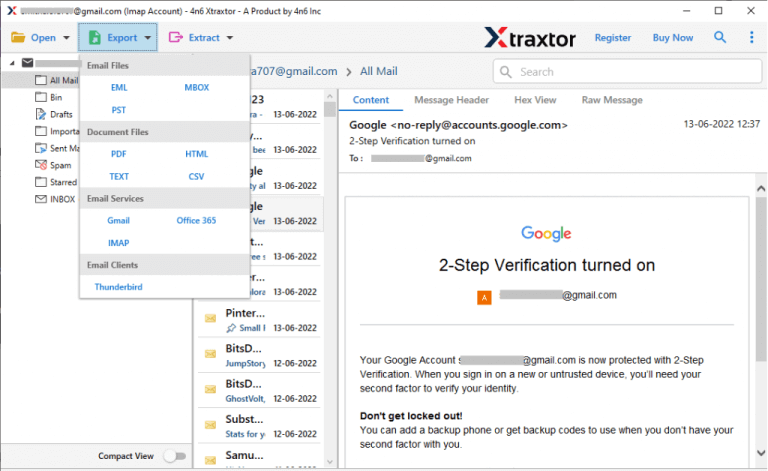
4. Click Export and choose from different saving options.
5. Browse the targeted location and hit the Save button.

Done! Here you download Network Solutions emails to system in a few simple clicks.
Key Features of Network Solutions Backup Tool
With this tool, there are various attributes, that help in efficient backup, some of them includes –
- Maintain email folder and sub-folder hierarchy and structure.
- Preserve email key elements and attributes.
- Advanced filters to backup selective emails.
- Preview mode to read emails before downloading them.
- Allow to select email folders for backup.
- Allow to export Network Solution emails to other email accounts.
- Simple and user-friendly interface for easy email backup.
Conclusion
Here in this blog, we discuss one secure and efficient way to backup Network Solutions email to system. Along with that, we also mention the step-by-step guide to download emails from Network Solution with attachments. Try the given solution and save your emails.