In this article, we will discuss the easy and instant solution to download emails from cPanel account with complete data. Read the complete blog and backup cPanel emails with attachments.
In this digital era, all businesses or individuals depend on emails for their day-to-day communication. There are various emails that have crucial data that you can’t lose, in that case, it is important to backup your emails. Here in this article, we will discuss the easy and secure way to download emails from cPanel account. Read the complete post and backup emails from cPanel in a file format.
cPanel is a control panel your Web hosting provider provides to manage your data. It is designed to manage your website, email account, database and other web-hosting-related service. However, it is important to backup emails from cPanel account for future use or if you face uncertain situations.
How do I backup all my emails from cPanel? Then you can save the emails using File Manager or cPanel inbuilt export features. Read the complete blog to know the complete downloading process. Before that, let’s know the reasons for the download.
There can be various reasons to download the mailbox data depending on the user’s needs. They either want to backup their data or transfer it. Some of the common scenarios are –
- After downloading the emails to your local system, you have a copy of your mailbox data with you.
- If user backup cPanel emails to hard drive or system, then they can access their emails offline.
- There are chances that your mail account got hacked or attacked by some viruses, then a backup copy helps in restoration.
- After you download cPanel emails, you can easily transfer them to other mailing platforms with ease.
How to Download Emails from cPanel Account Manually?
cPanel offers two ways to download its mailbox data. Here we will discuss both approaches one by one. note that, these solutions will backup your mailbox data in .mbox file only.
Method 1: Backup cPanel Emails via File Manager
- First, sign in to your cPanel interface.
- Then go to the File tab and click on the File Manager option.

- Now look for the Mail folders from the given list.
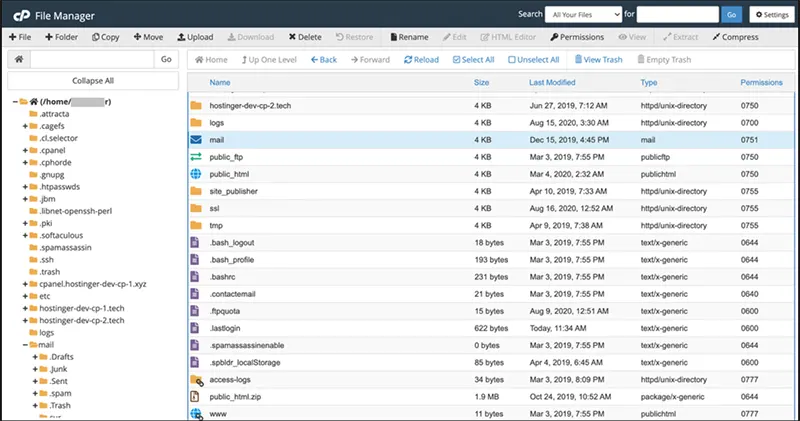
- Right-click on the Mail folder and choose the Compress option. ( You can compress your data in any of the types- .zip, .tar, etc.).
- After that, click on the Compress File button. The file is stored in your cPanel account, now right-click on it and select the download option.

Here you save emails from cPanel account on your local system.
Method 2: Backup Emails from cPanel Using Export Option
cPanel has its own export feature that allows you to download your mailbox data in a standard MBOX file format. Follow the instructions to download emails from cPanel account –
- Login to your cPanel account.
- After that, scroll down and find the Email tab, Here clcik on the Email Account option.
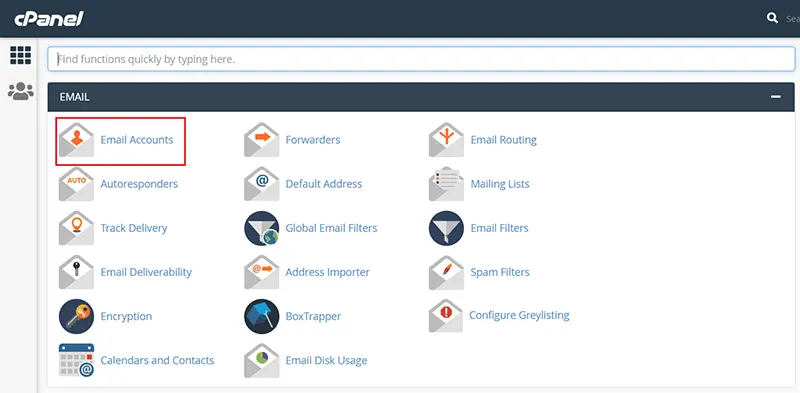
- Here you will find different email accounts associated with your cPanel account. Select the email account and click on the Check Email button.

- Here click on Horde and hit the Open button.
- Your mailbox will open, Right-click on the email folder you want to download and click on the Export option.

- Choose Download into an MBOX file and click on the OK button.

Here you backup cPanel emails to your system in MBOX file. Now using any email application that support this file format, you can access your emails.
How to Backup Emails from cPanel to Different File Formats?
If you want to backup cPanel emails in a file format other than MBOX, then you can use the SysConverter Email Backup Tool on your system. Using this tool you can directly download cPanel emails to PST, PDF, EML, CSV, HTML and other file formats. With it’s simple and easy-to-use interface both technical and non-technical users can perform the backup process instantly.
Additionally, using this tool you can also move emails from cPanel to another cPanel account without any hassle. Moreover, it also migrates emails from cPanel to different webmail accounts including Gmail, Office 365, Yahoo Mail and many others.

Steps to Download Emails from cPanel with Attachments
1. Run the software on your Windows.
2. Select Open >> Emails Accounts >> Add Account.
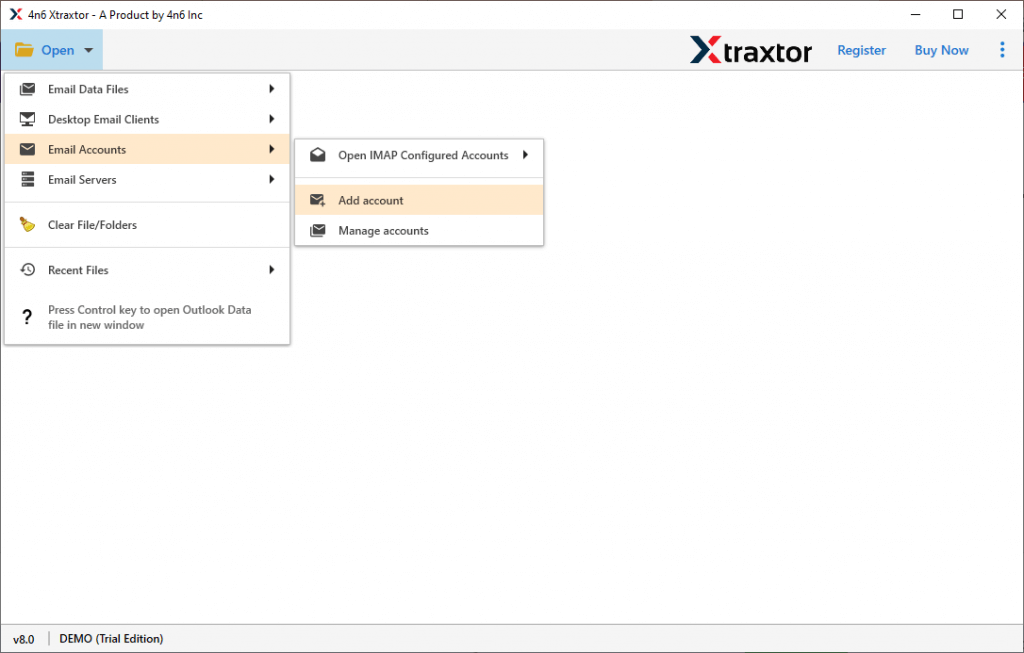
3. Enter your cPanel login details and hit the Add button.

4. Click on Export and choose from the given options.

5. Browse the targeted location and hit the Save button.

Done! Here you download cPanel emails in a few simple clicks without any hassle.
Conclusion
Downloading emails from cPanel is an important step to secure your mailbox data. Follow the steps mentioned in this post and efficiently backup cPanel emails without any hassle. We also mention an advanced approach to download emails from cPanel account in different file formats with attachments.
Frequently Asked Question
1. How often should I download emails from my cPanel account?
Answer. Downloading your data depends on the amount of important emails you receive. If all the receive emails are crucial for you, then backup your emails on a regular basis.
2. What formats are available for downloading emails from cPanel?
Answer. If you manually download emails, then it will be in MBOX file (.zip file). While using automated tool you can backup cPanel emails onto various file formats.