Today in this article we will discuss the complete guide to delete Hotmail email account permanently. Read the complete blog to know the step-by-step guide to permanently delete your Hotmail account.
Hotmail now known as Outlook.com is a free personal email service offered by Microsoft. It includes a webmail interface featuring mail, calendaring, contacts and task services. However, there can be a time when users want to delete Hotmail email account permanently.
Why Users Want to Delete Their Hotmail Account?
There can be various other reasons to delete Hotmail account. Some of the common reasons are-
- If the user switches to another webmail service, then they want to delete their old account.
- Security is the primary concern of all the users. Thus for their piece of mind and security reasons, they want to delete their account.
- If your account has a virus attack and has been compromised, then deleting the account is the secure approach. It will prevent any unauthorized person from accessing your account.
How to Delete Hotmail Email Account Permanently?
Microsoft allows you to delete your Hotmail account, but it will take 60 days period to complete the process. Follow the steps to permanently delete Hotmail account.
Login to your Hotmail account through the given URL –https://account.live.com/closeaccount.aspx.
Enter your Hotmail login details. A new window will appear which asks you that you are ready to close your account. Click on the Next button.

Then in the new Windows, select all the check boxes and mention the reasons to delete Hotmail email account permanently.

At last, click on the Mark account for Closure button.
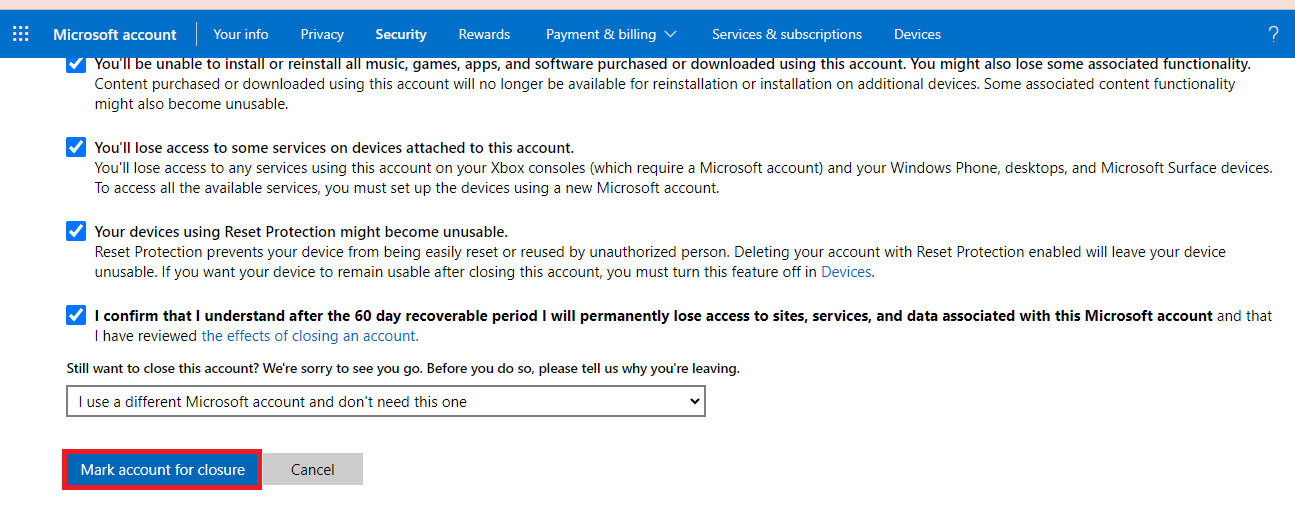
If your account is still active, then use the deletion link provided by Microsoft. By clicking it Microsoft asks for verification and gives notice of 60 days to complete the deletion process.
Conclusion
Permanently deleting your Hotmail accounts is a simple process that involves a few essential steps. However, it is a crucial step to take since it may cause data loss. Thus it is important to backup your mailbox data before deleting your account.
Frequently Asked Questions
1. Will I lose access to other Microsoft Services if I delete my Hotmail account?
Answer. Yes, after deleting your Hotmail account permanently you will lose access to all Microsoft services associated with it.
2. Can I recover my Hotmail account data after deleting it?
Answer. No, once you delete your account, it can’t be recovered. Make sure you backup your data. For that, you can use the SysConverter Email Backup Tool for easy and efficient backup.
3. How much time does it take for a Hotmail account to be permanently deleted?
Answer. After you initiate the process, it will take 60 days for your Hotmail account to be permanently deleted.