Summary: This blog post will guide you to move Yahoo emails to flash drive with complete attachments. This article is for you if you want to make storage space and save Yahoo emails to flash drive. Read the complete article and save all emails from Yahoo Mail to flash drive.
Yahoo Mail is a free webmail service used by every business, individual and many start-ups. Emails are a vital component of communication these days, thus they need to be secure. Sometimes some situations arise that will affect your crucial data which leads to data loss.
Thus to avoid these situations, we must save Yahoo emails to flash drive or any storage system. Today in this post we will discuss a secure and instant way to backup Yahoo emails to hard drive with attachments.
Before we move ahead, let’s know why users want to move their Yahoo emails to flash drive.
Why Save Yahoo Mails to Flash Drive
There can be various reasons to put Yahoo emails on a flash drive depending on user needs. Some of them mention here –
- Saving Yahoo emails in a flash drive helps to secure emails in any outage situations in Yahoo.
- You can secure your data if there is a malware attack in your mailbox.
- Sometimes accidental deletion can cause data loss. If you save the emails on the local device, then you can get back your data.
- You can free up your Yahoo storage space by downloading all emails on the flash drive.
- Allow accessing your Yahoo emails in offline mode without internet connectivity.
Without any further delay, let’s move forward and know the best way to save emails from Yahoo Mail to Flash drive.
How to Save Yahoo Emails to Flash Drive With Attachments
To save multiple emails from Yahoo Mail to flash drive use SysConverter Email Backup Tool for Windows. Using this utility you can put your Yahoo emails on a flash drive with attachments. Along with this utility, there are various filter options to save emails from a specific date, time, name, sender, cc, bcc, etc.
Additionally, you can use this tool and save Yahoo emails folder to USB drive and local storage device without any data loss. With its simple user interface, it is easy for novice users can operate this tool and save their Yahoo emails.

Way to Save Yahoo Mail to Flash Drive Using Automated Tool
Follow the given instructions and save Yahoo emails to flash drive with attachments.
Step 1. Install and run SysConverter Email Backup Tool on your Windows OS.
Step 2. After that, select Open >> Email Accounts >> Add Account.
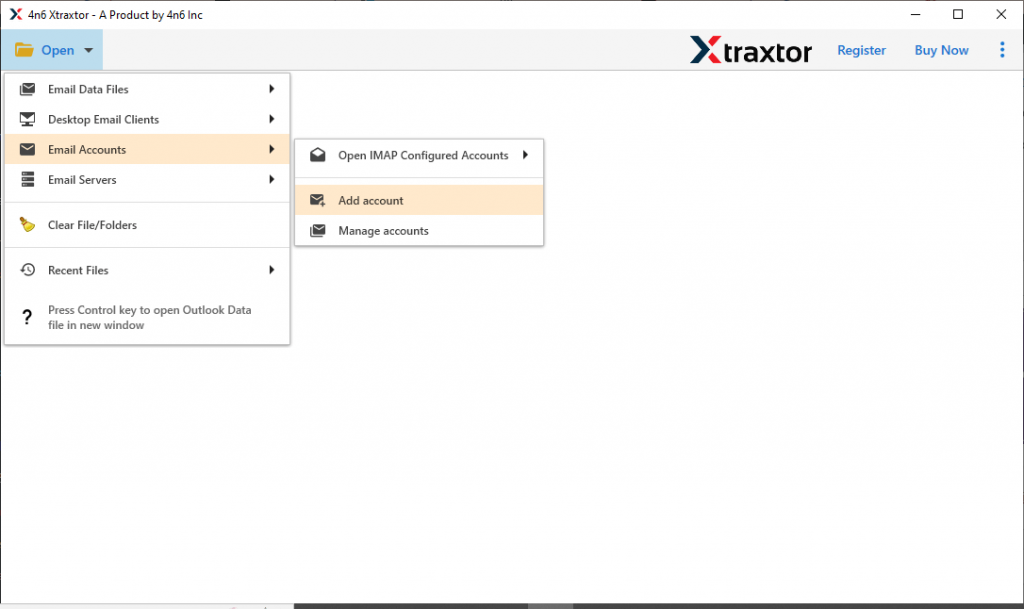
Step 3. Now, enter your Yahoo Mail email id and password (Use App Password instead of the original one).

Step 4. Here you can view your mailbox before saving them on the flash drive.

Step 5. Then, click on Export and choose from the given options.
(Note: Here we choose PDF as a saving option, you can choose any of the file format or IMAP accounts).

Step 6. At last, browse the targeted location and hit on the Save button.
(Note: If you choose a webmail account as a saving option, then you need to enter your email id and password here).

Done! Here complete the process and you save Yahoo emails to flash drive with complete attachments. You can use the trial version of this software and download Yahoo email folders to computer and other storage drives.
Why Choose Automated Approach
There are various benefits of using the email backup solution to secure your Yahoo mailbox data. Some of them mention here –
Maintain Mailbox Hierarchy: This utility will save your webmail emails to flash drive without affecting the email folder and sub-folder structure. While saving emails to a storage device, this utility will not affect the email properties and attributes.
Various Saving Options: With this software, you can export Yahoo Mails to MBOX, PDF, CSV, HTML and other file formats. After conversion, you can transfer these data files into different email clients as well.
Save Selective Yahoo Folders: The tool offers an option to choose file folders and secure only needed Yahoo emails to a storage drive. In this way, you will be able to save your storage space in a flash drive.
Preserve Email Integrity: There will no modification in email data while saving them into flash drive. You will get your emails the same as the original on the flash drive.
Upload Yahoo Emails to Other Cloud Servers: Using this tool you can also transfer Yahoo Mail to Gmail, Office 365 and other various IMAP servers in a single interface.
Save Unlimited Yahoo Emails At Once: The email backup wizard will secure the complete Yahoo mailbox to flash drive in a single attempt. Most importantly, there will be no data loss during this saving process.
Windows-Based Utility: This tool support all Windows OS systems without any hassle. You can install and run this tool on Windows 11, 10, 7, and all other previous OS versions.
Conclusion
In this blog post, we explain the best way to save Yahoo emails to flash drive with attachments. Along with that we also mention the reason for saving emails from Yahoo Mail to flash drive and the benefits of using the automation tool for the email saving process.