Here in this article, we will discuss the instant and free way to convert OLM to ICS format. If you want to save your OLM file calendar data, then this post will guide you. Read the post and convert OLM calendar data to ICS format effortlessly without any data loss.
Choosing the best solution for this conversion is necessary because no one wants to lose their well-planned calendar with event dates, appointments, important meeting dates, specific events, and other important information.
If you are using Mac Outlook and want to save calendar data in ICS format, you should know that Mac Outlook saves all email data including calendar data into an OLM file. Thus, in order to access the calendar information, the user needs to convert OLM to ICS format.
Before we move ahead, let put some light on this file format and get to know its usage. So let’s begin with,
What is ICS and its Use?
ICS is a versatile format for storing calendar data. This format is supported by many email clients and calendaring programs, including MS Outlook, Google Calendar, etc. The best part about saving data in this format is that the ICS format allows users to exchange calendar information online and via email.
It is primarily used to send a meeting request to other users, and that user can import the meeting information into their own calendar.
Here we know about the ICS format and its usage. Now we step ahead and get to know about the different methods to perform OLM to ICS conversion.
Methods To Convert OLM to ICS format
Mac Outlook offers to perform multiple operations in its interface. Among many, the calendars feature is one where we can save important appointments and events. Some time users wish to export calendar data into a standard file format.
After searching a lot, we came up with these two solutions to do OLM to ICS conversion.
#1. Drag and Drop Method
#2. Professional Approach
Now we will discuss both given methods and get to know the working of these approaches. So let’s start the process.
How to Export Calendar Data From OLM file to ICS?
In this method, users can save calendar data into ICS format using the drag and drop method. To perform this users need to use their Mac Outlook interface.
So to export OLM to ICS by manual method, follow the given steps to perform this operation in the given manner.
Step 1. Open a Mac Outlook account on your machines.
Step 2. Click on the Calendar icon on the bottom-left corner of your email client interface.
Step 3. After this, your calendar data will be shown on the screen.
Step 4. Choose the data you want to export and drag that file and drop it on the desktop.
Step 5. After that, you will find the .ics file on your screen.
Step 6. Repeat step 4 for all the calendar events you want to convert.
Here you get all .ics files for all calendar events using the manual method. Apparently, users can face certain restrictions while using this drag and drop method. Some of them are mentioned in the next segment.
Limitation With Manual Method
- Users can convert a single calendar event at a time. If there are several events to save then the user has to perform this method for all of them separately.
- If the user wishes to export the calendar from any particular attribute ( subject, location, event time, etc), then the user has to go through the entire calendar data and read them. After that one can export the required data.
- To save a single event at a time is a very tiring job and time-consuming also. And to perform one need lots of patience.
- Sometimes there can be some attachments with the calendar event, then this method is not assured to convert calendar data with attachments.
To overcome these limitations it is recommended to use an expert approach that performs OLM to ICS conversion with accuracy and efficiency. One such tool is mentioned below section.
How to Convert OLM to ICS Automatically?
If you want to export multiple calendar data in a standard format with attachments, then OLM Converter is the best solution for all your requirements. This tool cleverly converts calendar data to ICS format without compromising data integrity. Users can convert multiple OLM files without data loss.

Steps to Convert OLM File to ICS Format
Step 1. Install and run this software on your system.
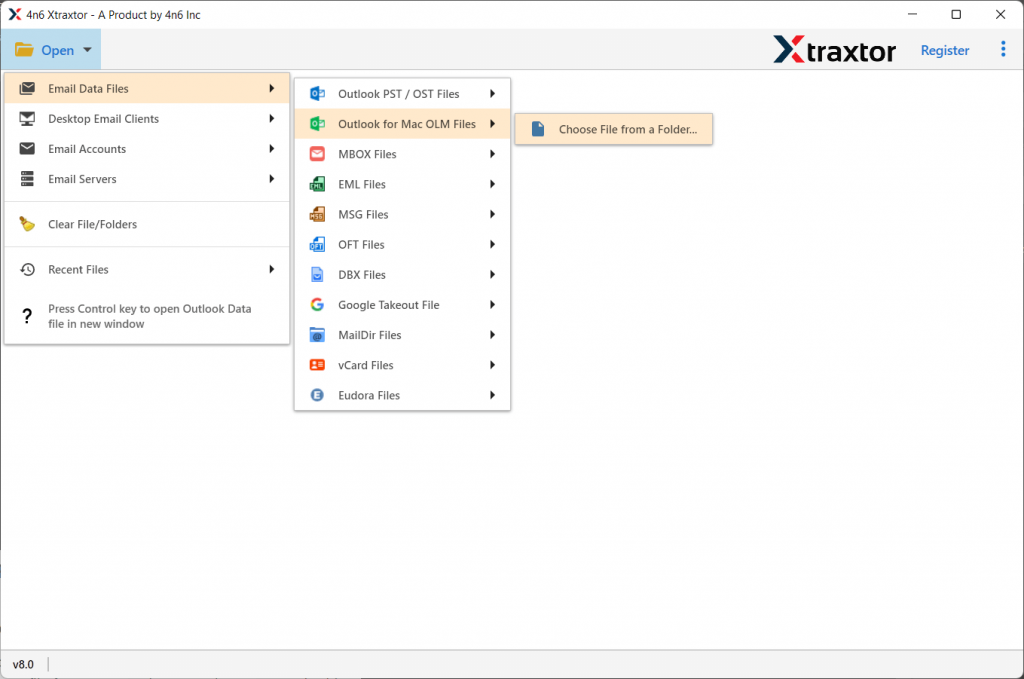
Step 2. Click on the Open button to choose the email file.

Step 3. Now, Select Email Data File >> Select OLM file >> Select Files or Folder.
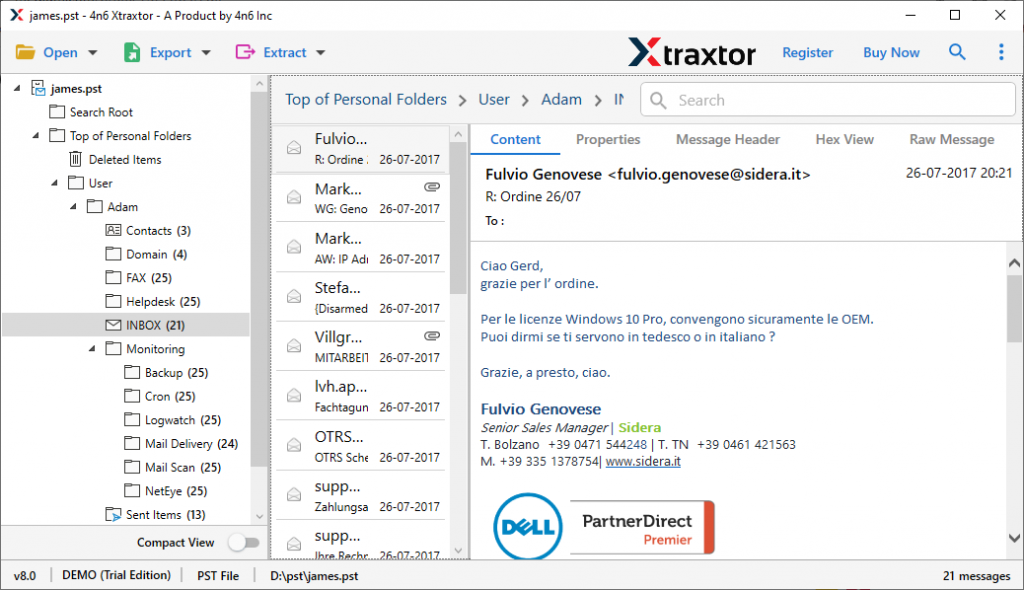
Step 4. You can preview all emails in this software interface and decide which one need to export.
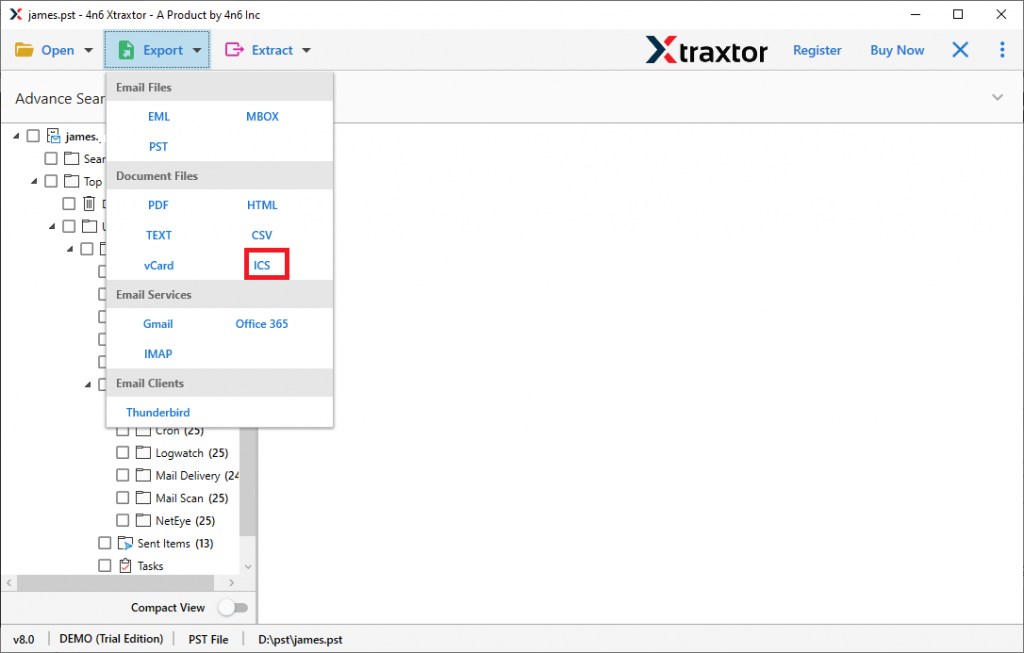
Step 5. After that, click on the Export button and select ICS format.
Step 6. In the last, browse the targeted location and click on the Save button.

Here complete the conversion process and you successfully convert OLM to ICS format. Users can check the .ics file in the saving location.
Reasons To Choose OLM to ICS Converter
There are multiple reasons to opt for this tool, some of them are mentioned here;
- Convert multiple calendar data in one go
Using this tool, the user can easily export multiple calendar data to .ics format in one attempt. If a user has 1000 calendar entries, then this software works like magic. This saves the user time and exports all data at once. - Exporting sample data from a calendar
This OLM to ICS Converter offers email filtering capability to convert some selective data from OLM files. You can choose which calendar events you want to send by simply selecting the email attributes from the filter suggestion using this tool. - Save calendar data with attachments
This email converter also provides the ability to export calendar data with attachments. If there are any attachments with specific events, this tool also transfers them with event information. - Dual option to select OLM file
With this tool, users can select email data in two forms. One can select one OLM file or an entire folder containing multiple OLM files. - Simple user interface
With novice users in mind, this utility is designed in such a way that it can be used by anyone. Any user works with this tool without any technical knowledge. - OLM file support from all versions of Outlook
This OLM to ICS Converter is compatible with OLM files generated by Mac Outlook of all versions. Users can perform OLM to ICS conversion process from OLM files from Outlook 2019, 2016 and other previous versions. - Support Multiple File Format
Using this software users can export calendar data into ICS format but also convert OLM to PST, HTML, MBOX, PDF, EML, vCard, And another file format also.
Conclusion
In this blog, we discuss two different methods to convert OLM to ICS. We try our best to resolve all your conversion problems and provide the best possible solution. You can perform OLM to PST conversion using any of the other methods mentioned. In my opinion, it is best to use OLM to ICS Converter for the best and most accurate results. The user can try the demo version of this software and follow the process itself.