“I am looking for a safe method to export multiple MSG files to EML format so that I can easily access them in Mozilla Thunderbird. I tried many methods but with no luck. Please suggest to me the best possible solution to do this conversion?”
“How can I convert Outlook messages to EML format smoothly?”
Above mentioned queries are the most sought-after questions by users. So in this blog, we address these issues and try to find the best possible solution to convert MSG to EML format. Before we go any further, let’s put a little light on both file formats.
Preview to MSG and EML file format
The MSG file is the archive file created by Microsoft Outlook email data. MSG files store a single email message with attachments, sender and recipient information, inline images, and hypertext. This file format is compatible with all versions of Outlook.
On the other hand, EML is a standard file format used by many email clients like Mozilla Thunderbird, Outlook Express. This format saves email details in plain text consisting of content, sender and recipient addresses, hyperlinks, and inline images.
Method to convert MSG to EML format
There is no official solution to export MSG to EML format. In order to do this conversion, users need to use a professional tool that can easily and efficiently transfer Outlook messaged into EML. Ans one such tool is mentioned in the next segment.
MSG to EML Conversion using a Prominent Approach
After considering the restriction you face when using a manual method, it is wise to use an efficient and safe tool called MSG to EML Converter. As there is no official method to export multiple Outlook messages to EML format, in this case, this tool is the best solution to do batch MSG file conversion. It provides some advanced features where users can export selective emails through different filter options. This tool comes with a self-explanatory interface so that novice users can easily operate it without any technical support.

Procedures to convert MSG to ML file format using above mentioned utility. Follow the given below steps;
Step 1. Download and Open software on the machine.
Step 2. Click on the Open option present on the software interface.

Step 3. After this, Select Email Data Files >> MSG Files >> Select files or folders.

Step 4. This software show all message present on the email file.
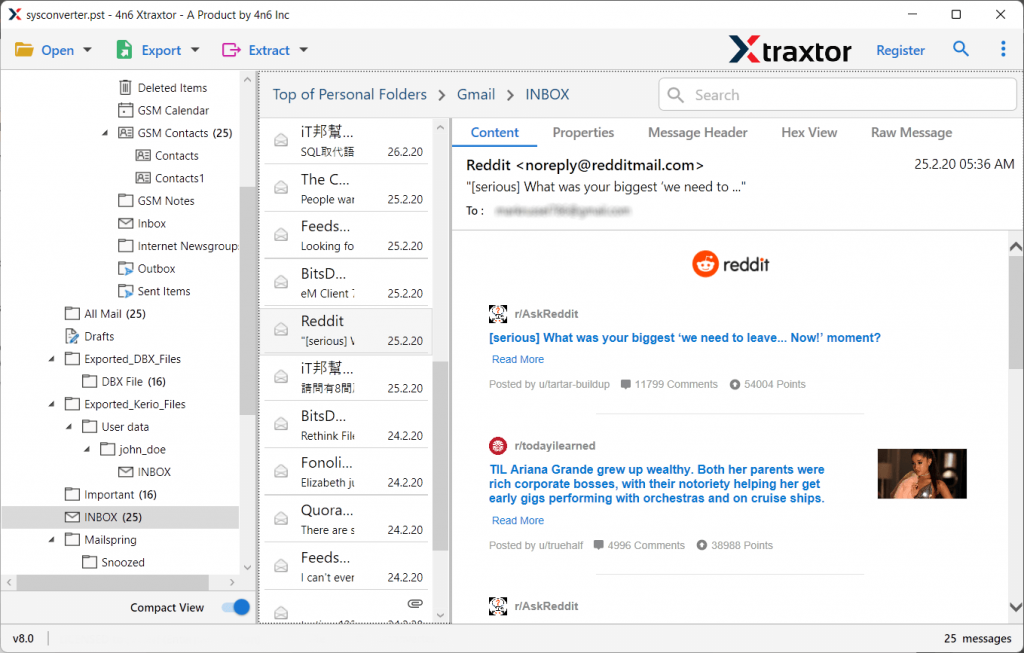
Step 5. Now click on the Export button and then click on EML format.

Step 6. In the end, browse the targeted location and click on the Save button.

Here, with the help of this tool, you convert MSG to EML with all attachments. You can check .eml file at your selected location to save the converted file.
Some Prominent Features of MSG to EML Converter
- Convert MSG to EML without Outlook
To export the .msg file to .eml, you do not need to install the Outlook email client on your system. With this utility, you can easily transfer Outlook messages with just a few clicks. The user only needs to import the email file into the software and the rest of the work is done by this tool. - Export MSG to EML with attachments
With this tool, users transfer messages with all their attachments. Also, this tool offers the option to extract attachments from the MSG file into a separate folder. Users can also extract email addresses, phone numbers, contact photos, etc. from the messages. - Unlimited MSG file transfer
With this tool, users can easily export multiple Outlook messages to another file format without data loss. Users can transfer large sizes of MSG files to EML efficiently using this wizard. - Supports Outlook for all versions of MSG file
This tool is capable enough to export Outlook MSG files of all versions. It is compatible with Outlook 2019, 2016 and other earlier versions. - Holds Email Attributes
By exporting Outlook messages to EML format, this tool makes sure to preserve all email attributes. The converted email files contain sender and recipient information, attachments, online images, and hyperlinks just like the original.
Conclusion
It is not easy to export the Outlook message to the EML file format. And in this article, we discuss one prominent method to perform the file conversion process. The automated way is a really easy to use tool that can convert multiple messages in a few seconds without data loss. Try the demo version of this tool and export MSG to EML yourself.
Frequently Asked Questions
Question 1. Can I convert multiple Outlook message files with this tool?
Answer. Yes, this tool export multiple MSG to EML or other file formats without facing any problem.
Question 2. Can your software export any selective MSG files to EML file format?
Answer. Yes, this wizard offers an advanced email filter that can help convert some selected emails as needed.
Question 3. Is it possible to extract phone numbers from the MSG file?
Answer. Yes, this software offers the option to extract certain information from an email file. some of them are email addresses, phone numbers, etc.