OLM file is a properties file format used by Mac Outlook to save its mailbox data. This file stores email messages, contacts, calendars, journals, and other mailbox components in a single file.
Sometimes user wants to import OLM files to Thunderbird and the reasons for doing so vary from user to user. In some cases, the user wants to switch from Mac OS to Windows and use Thunderbird as an email client. In other cases, due to some official requirements, it is necessary to save OLM file into Thunderbird account. There can be many other reasons.
Why Thunderbird Email Client?
Thunderbird is a free and open-source email client that can be easily used in both Windows and OS systems. It is also a newsgroup, news feed, and chat client with personal information manager inbuilt functionality. However this desktop-based application support MBOX files format, thus there is no direct manual way to perform the import process. Thus arise the need for an automated tool.
How to Import OLM File To Thunderbird For Windows?
To move OLM files to Thunderbird with complete accuracy and efficiency use OLM Converter software. This automated tool allows users to import OLM to Thunderbird email clients without any data loss. With the help of this software, you can import selective emails from OLM files to Thunderbird.
Some of the benefits of using this software are: moving orphaned OLM file to Thunderbird, offering several email tuning options to find emails from a specific field, batch importing OLM files and many more. With that, it also import OLM to Outlook 2021, 2019, 2016, and other previous versions

Follow the steps to Transfer OLM File to Thunderbird Using with Attachments –
- Install and run the SysConverter for OLM tool on your system.
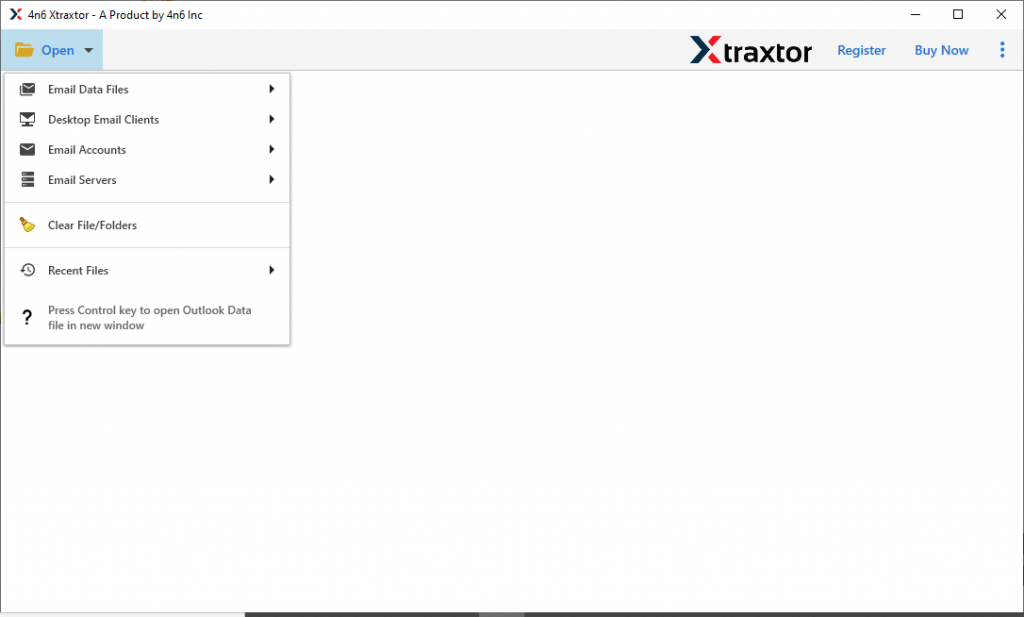
- Click on the Open button and choose from the given options.
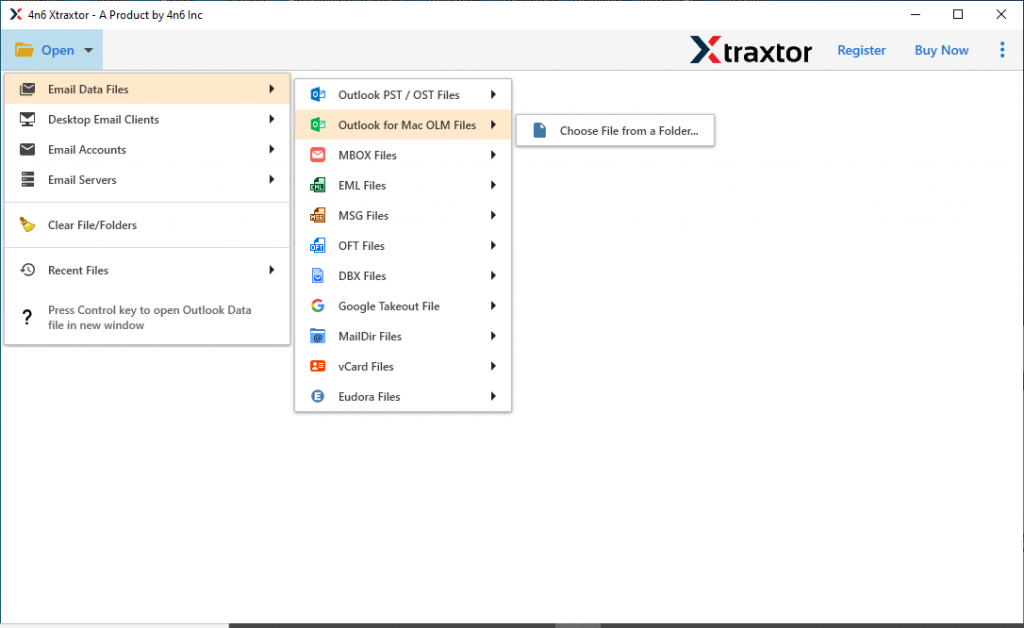
- Select Email Data File >> OLM File >> Select File from Folder.
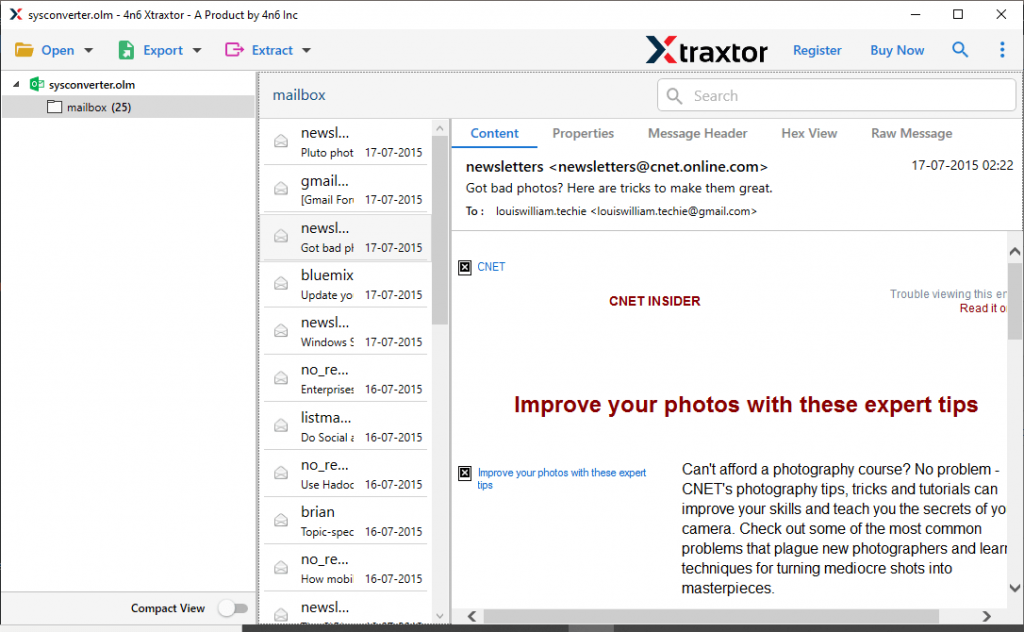
- Here you will find all your OLM file emails. Read them and select the email folder that you want to move.
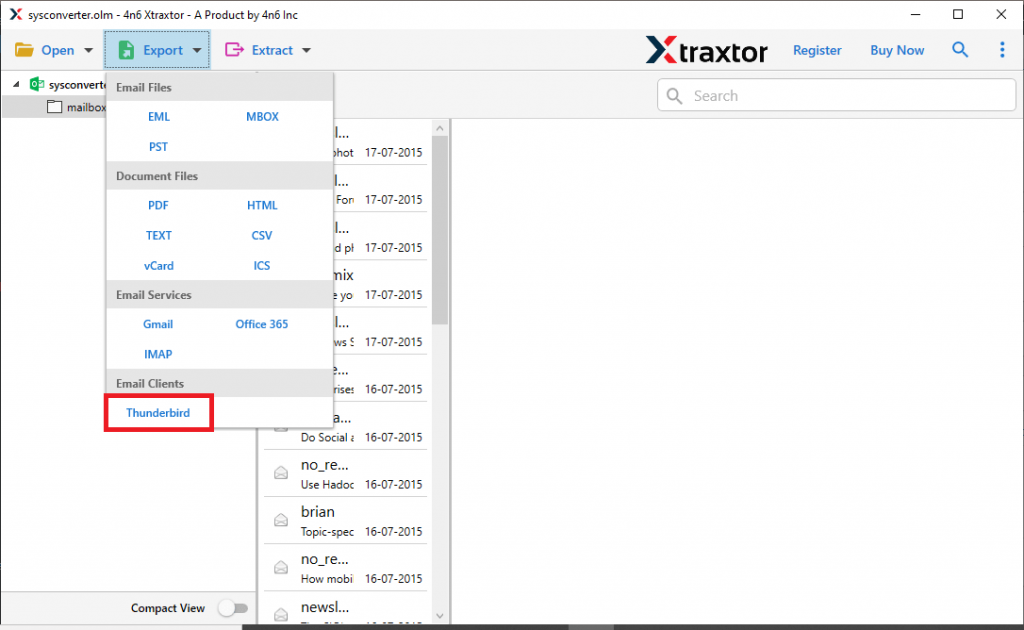
- Now click on Export and opt for the Thunderbird option.
- At the location section, check the location (The mentioned location is the default area where your Thunderbird mailbox data is saved on your system). Lastly, hit on the Save button.
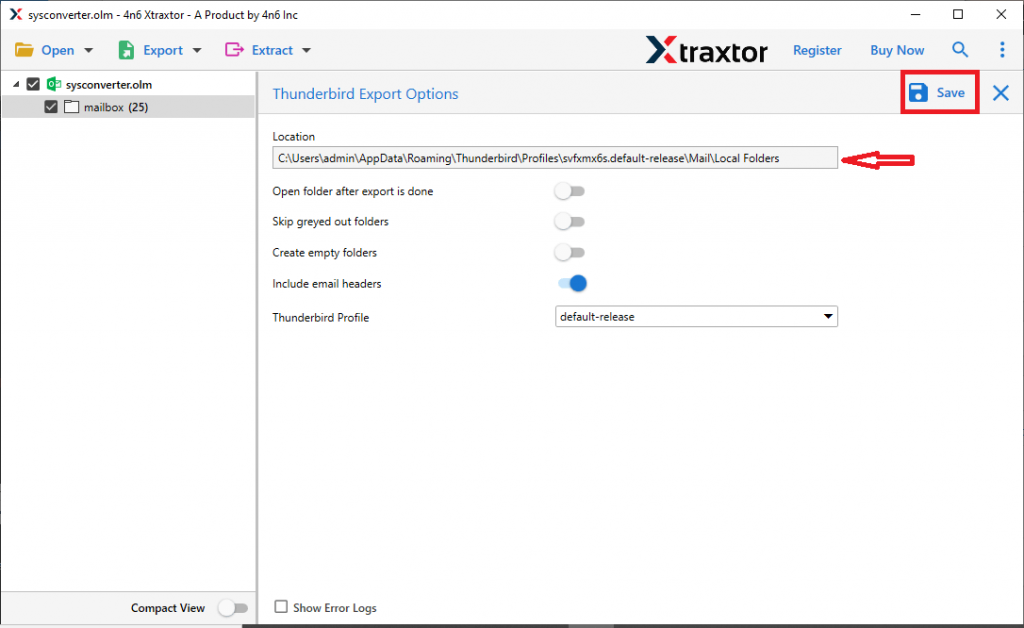
All Done! Using this professional approach you easily import OLM to Thunderbird with complete mailbox data. Let’s Check some advanced features of this automated tool.
Why Choose OLM to Thunderbird Import Tool?
This automated software has various outstanding attributes, some of them mention here.
Support Mac OLM All Version: This software allows you to convert OLM file from Outlook 2019, 2016 and all other previous versions. You just need to upload the data file and the tool will transfer OLM emails to Thunderbird and other email clients in a few simple clicks.
Search Option: The OLM to Thunderbird Import tool offer various email filter option to search specific emails from OLM file. The various filter options are – to, from, subject, date range, time, property id & name, etc. Along with these, you can select from different categories such as emails, contacts, calendars, journals, tasks, and other mailbox components.
Maintain Mailbox Structure: While moving OLM files to Thunderbird, this tool preserves the email folder and sub-folder structure and hierarchy. In addition to these, this tool also holds the email key attributes and properties.
Support Windows OS: This utility is designed for Windows-based operating systems. It supports Windows 11, 10, 8, Vista, XP, and all other previous versions with ease.
Simple Graphical Interface: The importing tool is designed with a simple interface so that even novice users can operate it. With self-explanatory features, it is easy to import OLM files to Thunderbird account in a few steps.
Move OLM to Cloud: Using this tool users can also import OLM to Yahoo, Gmail, Office 365, and other webmail accounts with ease. You enter your webmail account login details and hit on the save button, this tool performs the migration smoothly.
Conclusion
The import of emails can arise at any time as per the requirements of the users. One such scenario is where the user wants to import OLM to Thunderbird. To perform the operation, we mention an automated tool that efficiently moves multiple OLM files to Thunderbird account with a complete step-by-step guide. You can use the demo version of this tool and experience its working process.