If you are looking for a way to view your OST emails on any browser, then converting them into HTML file is the safe approach. Here in this post, we will discuss the one tested and safest tool to convert OST to HTML with complete data. Read the complete post and know the step-by-step guide for OST to HTML conversion process.
We already know that there is no manual way to convert OST emails into HTML file. Thus we need a dedicated tool that completes the conversion without affecting data integrity. Here in this post, we will discuss one such tool that will effortlessly export OST file to HTML file along with attachments.
Now without further delay, let’s dive in and convert emails from OST file to HTML format.
How to Export OST File to HTML Format?
Try out the OST Converter on your Windows to export your emails. The tool with its simple and user-friendly interface makes it easy to export all emails from OST file to HTML format with attachments. For that, add the OST file to the software, after that choose HTML as a saving option. After choosing the destination location, the tool will start the converting process.
Additionally, it also gives the option to select the import emails folder from the OST file and convert the necessary email only. Moreover, you can also view your emails before selecting them for conversion.
Click the link below and downalod the demo version of the software.

Steps to Convert OST to HTML Format
Steps 1. Download and open the SysConverter for OST on your system.
Step 2. Navigate your cursor to the Open option present on its interface.
Step 3. Now Select Email Data File >> Select Outlook File >> Select file from folder.

Step 4. This application accesses your email file and shows them to you.
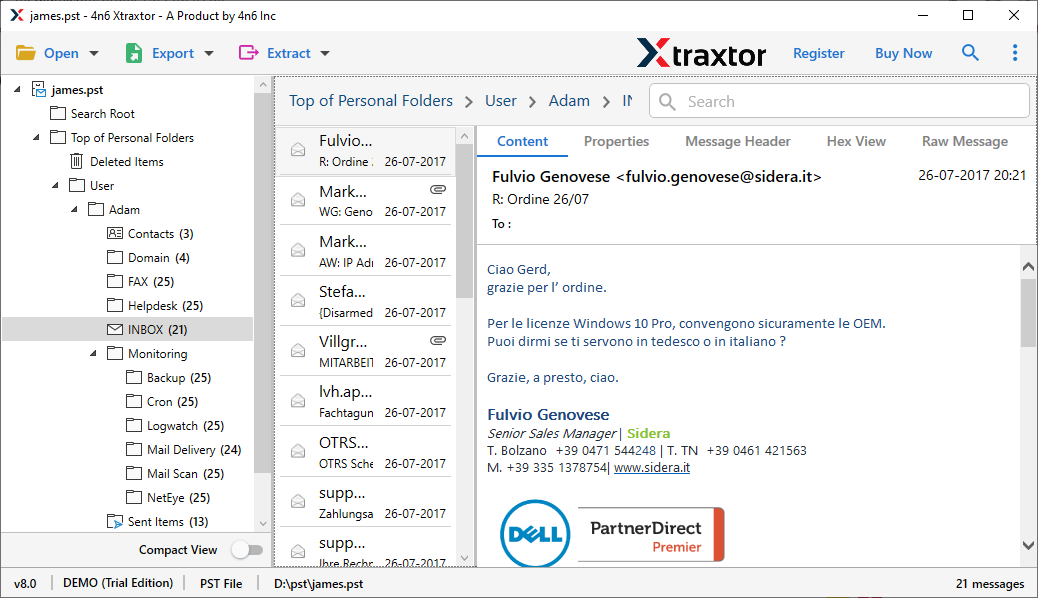
Step 5. Now move your cursor to Export and select HTML format from the given options.

Step 6. Browse Location to save the converted file and then hit the Save option.
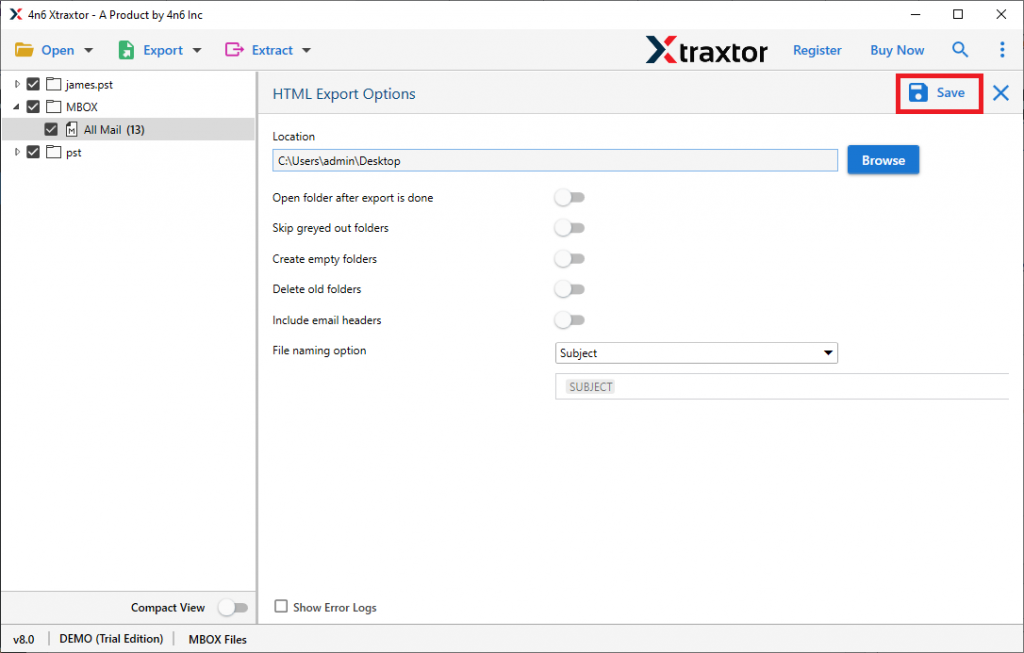
Here you efficiently convert OST to HTML with attachments in simple clicks and without any trouble. This tool solves all your conversion issues due to its advanced features, some of which are mentioned below.
Why Choose OST to HTML Converter
This converter possesses some amazing qualities that make it unique, below are some of them;
- Holds Emails Attributes: This tool comes with a special feature that allows users to convert emails from one format to another with their complete properties. While transferring files this tool holds different attributes like to, from, cc, bcc, attachments, hyperlinks, inline images, etc.
- Extract Email Information: Using this application, users can retrieve certain information from email files. After adding the OST file into the tool, it accesses your emails and provides to extract attachments from OST file along with email addresses, phone numbers, contact photos, etc. from given email files.
- Advance Filters: WIth this tool, there are various filter options to convert selective emails. You can apply filters such as- to, from, cc, bcc, name, date, time, attachments, and many more.
- Email Preview: The tool will show your OST file emails after you add them. This feature will be helpful in viewing your mailbox data before converting them.
- Various File Saving Options: This OST to HTML Converter is designed in such a way that it can export user’s OST files into multiple file formats. And the best part is that these multiple file options are present on a single interface. Using this utility users can export OST to HTML and also convert OST to PDF, EML, MBOX, ICS, CSV, and many more.
- Compatible with All Windows OS: This tool converts OST to HTML with attachments accurately on Windows all versions ie Windows 11, 10, XP, Vista and older versions.
Conclusion
In this blog, we try to answer users all queries and do our best to give the best possible solution to convert OST to HTML in an easy and secure way. We get to know about an OST to HTML converter that can easily convert large and orphan .ost files into .html and multiple formats without any glitches. Try the demo version of this software and do the conversion yourself and see accurate results yourself.
Frequently Asked Questions
Question 1. Is it possible to convert the damaged OST files into HTML?
Answer. Yes, this tool efficiently exports corrupted and damaged OST files into HTML format with complete email data and its properties.
Question 2. Can this software export a 25 GB Outlook OST file?
Answer. Yes, there is no size limitations with this tool. It easily transfers large .ost files in no time.
Question 3. Can I convert OST to HTML with attachments?
Answer. Yes, use this tool and export Outlook .ost files into .html with all attachments intact.
Question 4. Will the email attachments be preserved during the OST to HTML conversion?
Answer. Yes, the tool will convert OST to HTML along with attachments. Moreover, there will be no alteration in attachment attributes.