As we know, email conversion is a common practice nowadays. This increases the accessibility of emails.
Although you know what format you want to export your emails in, it is difficult to find a reliable solution to export emails.
One of those scenarios we will discuss here. We will talk about how to convert Eudora Mails to TEXT format.
Have you tried exporting your Eudora emails to TEXT format? And it ends unpleasantly.
Performing this conversion process is a complicated task as it involves your important data. There are many tools available on the internet and finding the best one is a difficult task.
However, finding a way to convert Eudora emails to TEXT format is not as difficult as it seems. This blog post provides you with a safe and workable solution for this conversion with 100% accuracy.
How to Export Eudora Mails to TEXT Format
The conversion process is not that difficult, accurately and efficiently converting along with the complete mailbox data without modification is a real challenge. To help you carry out this task, we introduce you to Eudora Converter. It is a unique solution that converts Eudora emails to TEXT format in one try with efficiency. You can use this utility to perform bulk Eudora to TEXT conversions without expensive and technical hassles.
Apart from this, it also export Eudora emails to other file formats in a single interface. Along with that, using this tool you can transfer Eudora emails to other email clients in a few simple clicks. It ensures to maintain mailbox structure and hierarchy during the conversion process. Without further delay, let’s check the working of this tool.

Steps to Convert Eudora Mails to TEXT Format
Follow the instruction and export your Eudora emails into TEXT format with complete mailbox data.
Step 1. Download and launch this converting wizard on your system.
Step 2. After that click on the Open button and choose the required options.
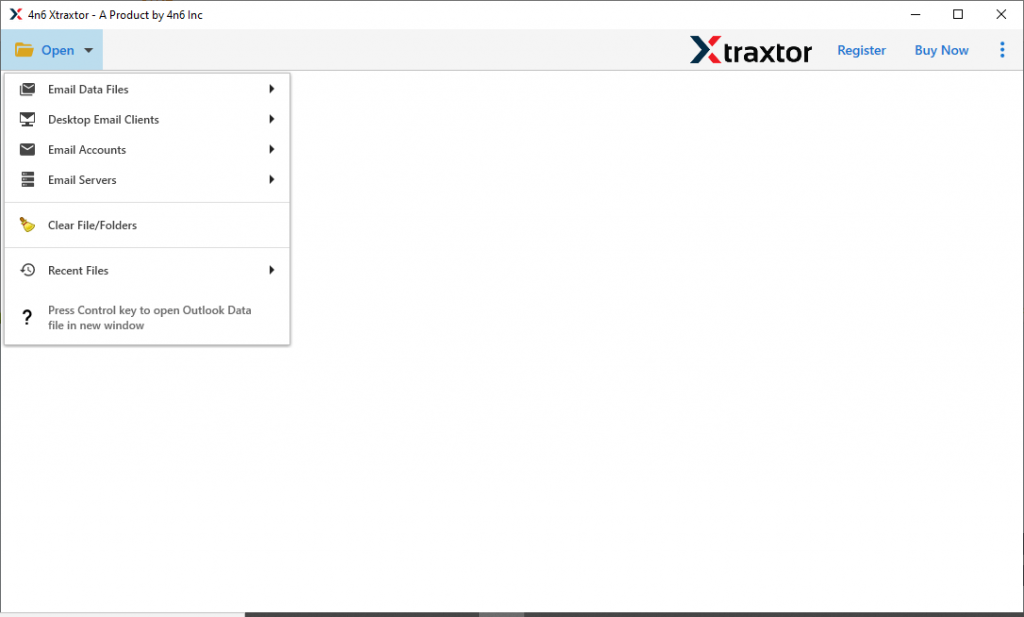
Step 3. Now click on Desktop Email Client >> Eudora Account >> Open Configure Eudora Account.
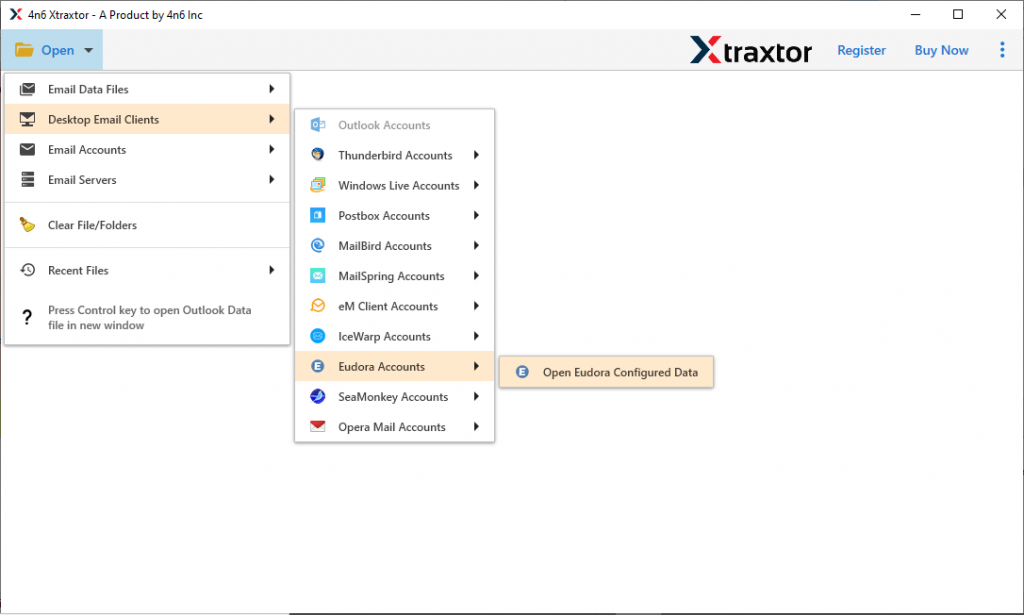
Step 4. Here you can view your emails and select the required folders to convert.

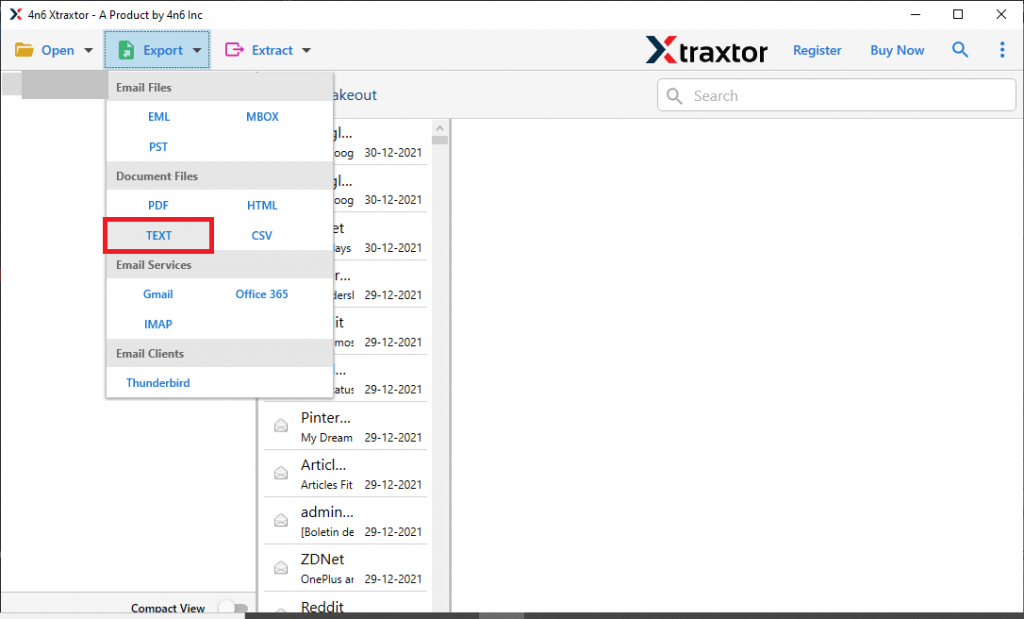
Step 5. Choose TEXT format from the Export options.
Step 6. At last, choose the destination location and click on the Save button.
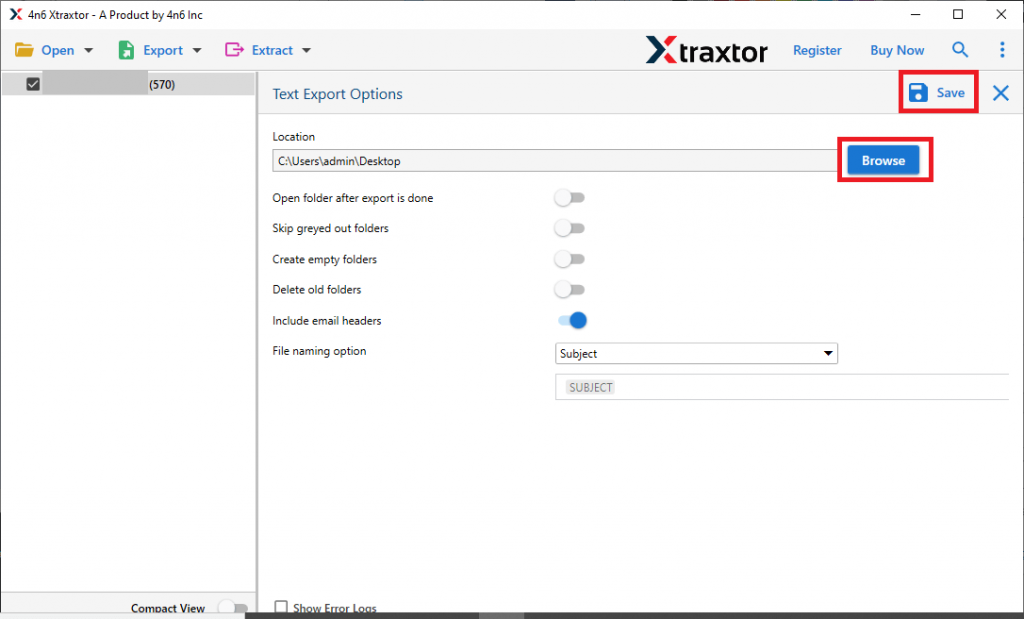
Complete! You convert Eudora emails to TEXT format with complete mailbox data using this automated tool.
Why Eudora to TEXT Converter
This wizard has multiple key features that make it unique, some of them are mentioned here,
1. Using this tool you can convert Eudora mails to TEXT in bulk that too without data loss.
2. It allows you to export emails from the Eudora account to other email clients or web-mail accounts with ease.
3. Preserve mailbox folder and sub-folder structure and hierarchy during the conversion process.
4. You also convert Eudora mails to MBOX, PST, EML, CSV, HTML, and PDF formats.
5. This Eudora to TEXT Converter also allow to extract email addresses, phone numbers, attachments, and other data in a separate text file.
6. Advance email filter option to convert Eudora emails from a particular field (to, from, subject, bcc, cc, and many more).
7. Support all Windows OS versions (Windows 11, 10, 8, Vista, and all previous versions) without any issue.
8. Automatically detect the configured Eudora application from your system and load its emails for conversion.
Conclusion – Convert Eudora Mails to TEXT Format
This Eudora to TEXT converter should help you in your email conversion process. Try the demo version of this tool and see how it works. After that, if you get a satisfactory result, you can move license versions for unlimited conversions from Eudora email to TEXT.