Looking for a secure and reliable solution to save emails from the Eudora account? If so, here is the solution you are looking for. Read the full article on how to convert Eudora Mails to HTML with attachments.
There are still many users who use the Eudora mail account to manage their email. In some scenarios, the user wants the email to be transferred to .html format.
If you are among them, use the automated solution mentioned in this article. However, before we talk about that tool, let us know the reasons for converting Eudora to HTML.
Why choose the HTML format for saving Eudora emails
There may be various reasons behind this conversion process, some of them are mentioned here,
1. HTML is a universal file format that can be accessed from any web browser.
2. This file is small in size so it takes less time to download.
3. Easy to transfer from one platform to another, thus increasing its accessibility.
4. The content of the data file can be edited according to the requirements.
5. You don’t need any additional application to open/read data from HTML files.
How to Export Emails from Eudora to HTML With Attachments
First of all, you should know that there is not a direct manual solution to transfer mail from Eudora to HTML format. Therefore, to perform this conversion process, you must use a trusted third-party solution. One such tool is Eudora Converter. A simplified yet powerful solution for all conversions of HTML mailboxes with attachments.
Since we know that Eudora saves both emails and attachments in a separate folder, we need to find a method that converts Eudora emails to HTML with attachments. This Eudora to HTML Converter is one such utility that expertly saves your emails from the mailbox in .html format along with attachments of all kinds (.pdf, doc, .png, .ppt, etc.). Most importantly, this smart tool automatically detects your configured account and uploads your emails and exports them in PDF format.

Steps to Convert Eudora Mails to HTML With Attachments
To save Eudora emails into .html format follow the given instructions;
Step 1. Install and Run this Eudora to HTML Converter on your system.
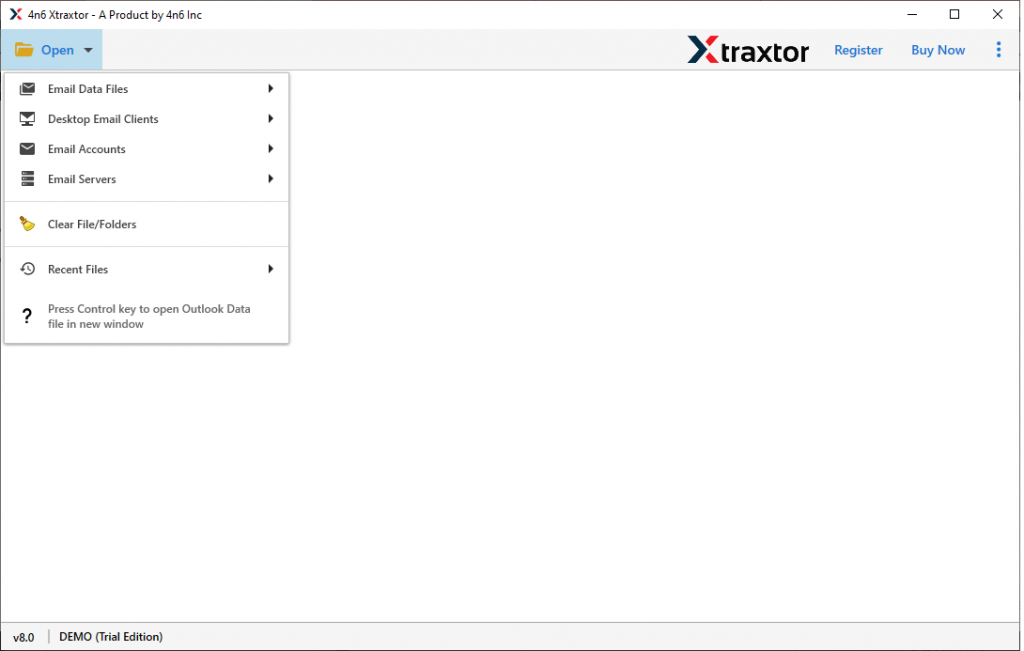
Step 2. Click on the Open button and choose the required field.
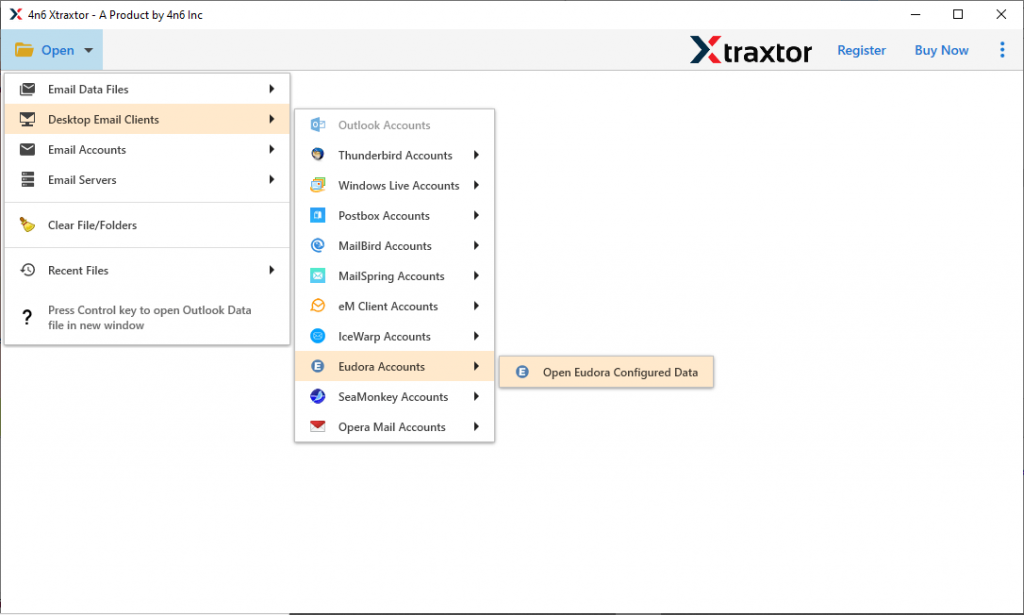
Step 3. Here click on the Desktop Email Client >> Eudora Account >> Open Eudora Configured Account.
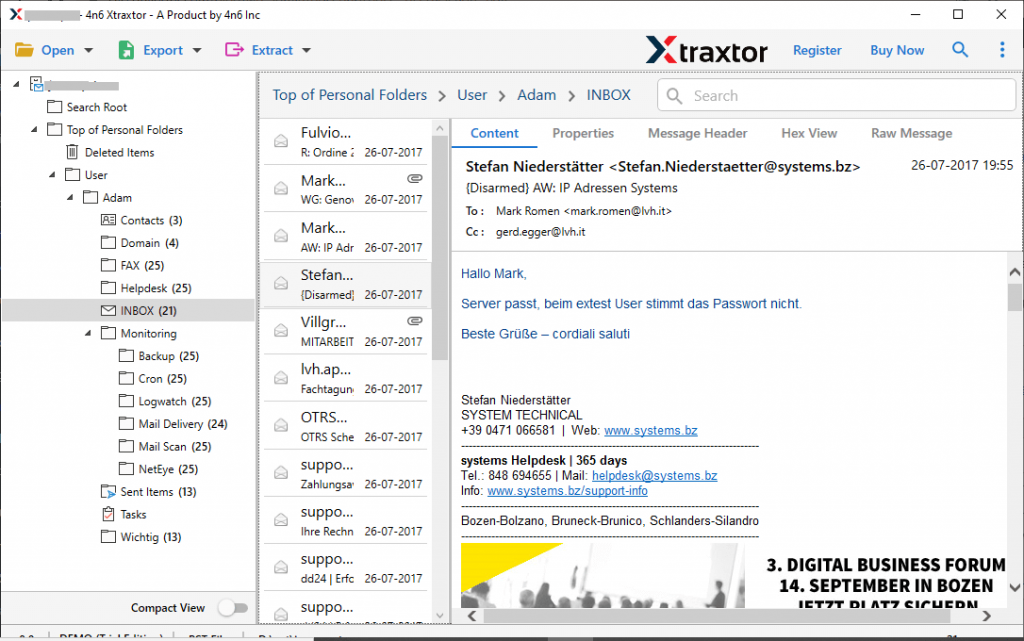
Step 4. You can read your mailbox emails and select the folder for selective email folder conversion.
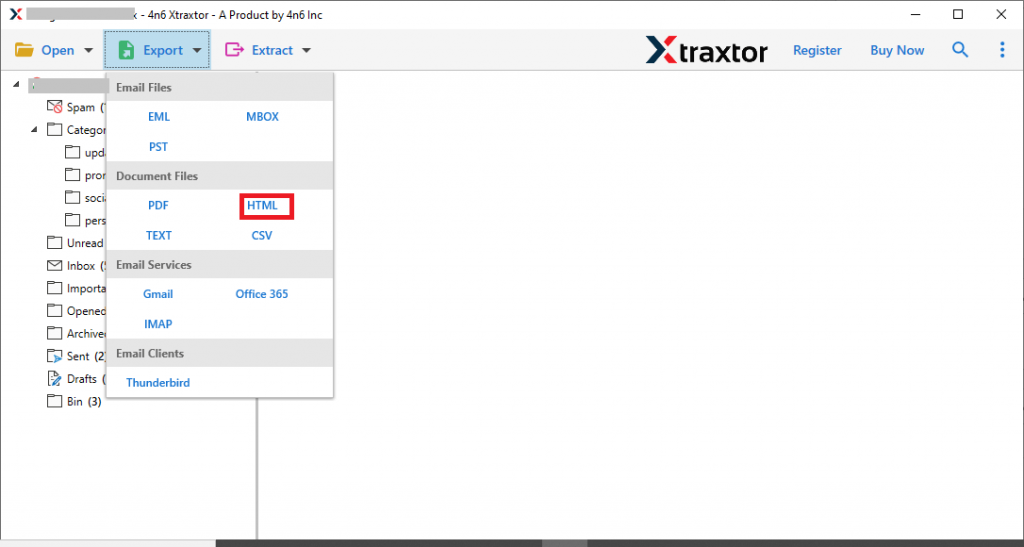
Step 5. At this stage, click on the Export option and choose HTML format from the given list.
Step 6. At last, browse the targeted location and click on the Save button.
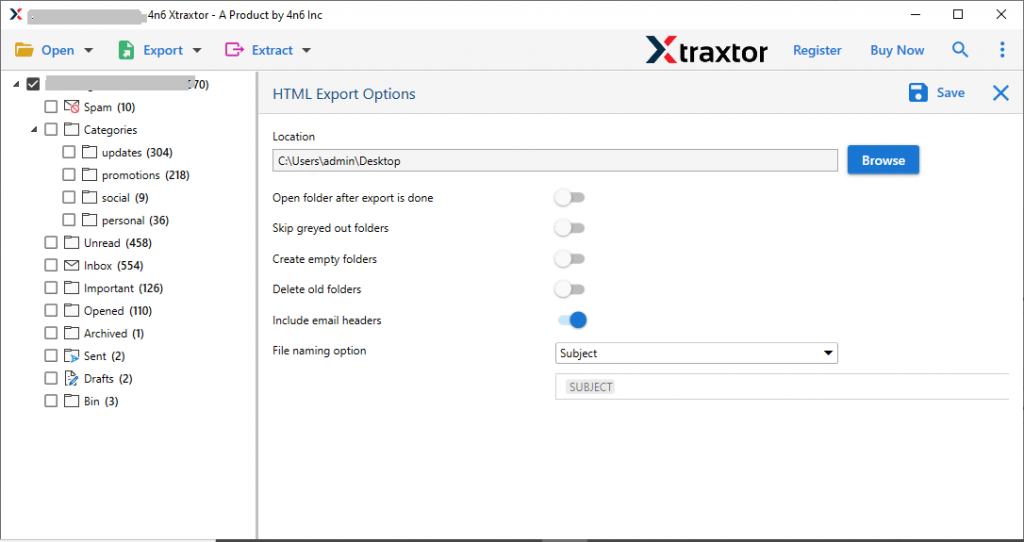
Here complete the Eudora to HTML conversion process. You can check the converted file at your selected destination location. Also, open the .html file on any web browser and access your Eudora mails.
Benefits of Using Eudora to HTML Converter
There are multiple reasons to opt for this tool, some of them mention here,
- Multiple email saving options
This tool offers several file formats to export your Eudora emails. It not only exports Eudora emails to HTML, but also converts Eudora mails to PDF, MBOX, PST, CSV and other file formats. All these saving options will be available in a single interface. - Maintain mailbox structure
Allows the user to convert Eudora emails to HTML with attached files. Along with that, it exports emails to other file formats while maintaining the folder or sub-folder structure of the mailbox. Along with that, it makes sure to preserve the key attributes and properties of the email. - Export selective Eudora mails
This Eudora to HTML converter has a special option that allows users to convert some selective mailbox folders to .html format. - Compatible with all Windows operating systems
The Email Converter is designed with an algorithm that supports and works on all versions of the Windows operating system. You can install this app on Windows 11, 10, 8, Vista, XP and other older versions.
Conclusion – Convert Eudora Mails to HTML with Attachments
This Eudora to HTML Converter is the best solution to export Eudora mails to HTML with attachments. In this blog, we describe the simple working to mailbox emails in .html format with screenshots for better understanding. Hope we are able to give a perfect solution for your conversion query.