Summary: In this article, we will learn the secure and efficient method to export emails to CSV format. Thus read the complete article and know how to convert Seamonkey mails to CSV format?
Did you still use the SeaMonkey email client and face security and email management problems? If yes, then it is time to change your application.
Although you decide to switch email clients, you are not sure which one to choose. In that case, it is better to save your mailbox data in a structured format so that you can use it later.
For that, it is better to convert SeaMonkey emails to CSV format. After that, you can import this excel file into your new desktop application.
When transferring your SeaMonkey emails to CSV format, it is important to take a secure approach to avoid hampering your important data. To help you with this SeaMonkey to CSV conversion, we are going to discuss the best method for this process that too without any data loss.
Why Choose CSV format to Save SeaMonkey Emails
Converting mailbox data to CSV format is a risky task, however, the appropriate software offers the best results. Now to answer the question, why is it necessary to save emails in .csv format? Well, the answer to your question is;
- CSV is a universal file format that can be supported by almost all email clients, thus increasing email accessibility.
- It is a simple format that saves data in rows and columns separated by commas, which make it easy to understand.
- CSV format is transferable, you can send this file over the internet without altering its structure and data.
- As this file format is small in size, it will load faster on any email client and server.
- Easily open in any application that supports excel format.
Note: SeaMonkey saves its mailbox data in MBOX format.
How to Export SeaMonkey Emails to CSV Format
In order to transfer your SeaMonkey emails into .csv format, you need reliable software that handles your important data securely and converts it into the desired format. One such tool is the SeaMonkey Converter, which allows the moving of unlimited emails from a mailbox to a CSV format without any data loss.
This converting Wizard allows to export Seamonkey mails to CSV in a single attempt. It smartly detects the configured email client and automatically uploads its emails for conversion. Along with that, it allows you to choose the folder of the email data file to batch convert Seamonkey mails to CSV format without facing any glitches.
Now without further delay, let’s see how this tool works with proper screenshots.

Steps to Convert SeaMonkey Mails to CSV Format
Follow the given instruction and export SeaMonkey emails to CSV format;
Step 1. Download and launch this SeaMonkey to CSV Converter on your system.
Step 2. Now, to begin with, click on the Open button.

Step 3. After that, select Desktop Email Client >> SeaMonkey Account >> Choose Folder or Open SeaMonkey Configured email account.

Step 4. You can read your emails and select the folder that needs to convert.

Step 5. Here click on the Export and opt for CSV format.
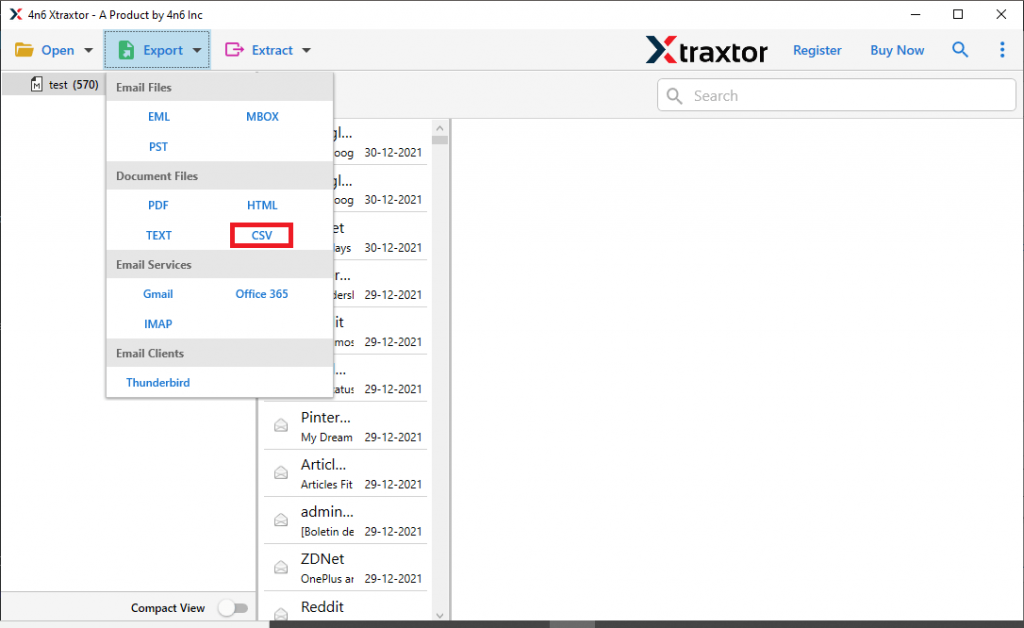
Step 6. At last, browse the location to save the .csv file and hit on the Save button.

Here completes the SeaMonkey to CSV Conversion process using this tool. Check out some amazing characteristics of this email converting tool.
Why Opt For SeaMonkey to CSV Converter
Some of the extraordinary features of this software are mentioned here;
- Multiple Export Options: With this tool, you will get an array of file formats to save your mailbox data. Using it you can also convert SeaMonkey mails to PST, PDF, EML, MBOX, HTML, and other file formats.
- Preserve Mailbox Hierarchy: During conversion, this SeaMonkey to CSV Converter upholds mailbox folder or sub-folder structure and hierarchy. It converts email without altering its key elements and properties.
- Advanced Search Option: This converting wizard has a search option to find emails with specific attributes. You can export emails from a particular field such as to, from, subject, bcc, cc, property id & name, etc.
- Export Emails to Other Email Clients: Using this SeaMonkey to CSV Converter, you can directly transfer mailbox emails to Outlook, Thunderbird, Opera Mail, Eudora Mail, Apple Mail, and other desktop applications.
Conclusion – Convert Seamonkey Mails to CSV
There may be a time when you decide to change your email client. It is a major decision and it needs special consideration.
Converting SeaMonkey emails to CSV format hold a lot of risks, however, using a secure approach eliminates this difficulty and save your emails in a particular file format.
One such error-free and secure approach is mentioned in this blog post. Try the demo version of this software and export SeaMonkey emails to CSV format with complete data.