Are you looking for a secure and workable solution to save Yahoo emails to MBOX file? If your answer is Yes, then this article is for you. Read the complete blog and export Yahoo Mail to MBOX format with attachments.
Yahoo is a popular webmail account that provides various advanced features to send and receive emails without any issues. However, sometimes users want to save their mailbox data into a data file to access emails locally. Thus they want to export Yahoo Mail to MBOX format so that it will be easy to open a data file in an email client that supports this format.
Here in this blog, we will discuss two workable solutions to export Yahoo emails to MBOX format with attachments. Before that, let’s understand the situation through a user query.
I was looking for a solution to save my Yahoo emails into MBOX file. However, the solutions I find are not suitable and able to solve my problem. Although I try to export Yahoo emails manually, it doesn’t save them into the .mbox file. Can anyone tell me a secure way to export Yahoo Mail to MBOX file without any data loss?
It is a common query asked by many users on different forums. We have mentioned two workable solutions regarding this user query, let’s check them.
Methods to Export Yahoo Emails to MBOX File
You can transfer emails from Yahoo Mail account to .mbox file in two ways –
#1. Manually Move Yahoo Emails to MBOX
#2. Instantly Transfer Yahoo Emails to MBOX
Let’s know the working of these solutions in a detailed manner with the proper working process.
How to Export Yahoo to MBOX Format Manually?
To move Yahoo emails to MBOX format, you can use the Thunderbird email client. Firstly you need to configure your Yahoo Mail to Thunderbird and then using the ImportExport tool downlaod all the webmail emails into MBOX file. Follow the given instructions and export Yahoo emails to .mbox file –
Note: To perform this manual method, you need to install Thunderbird application on your system.
- Open the Thunderbird email client on your system.
- After that, go to Tool >> Account Setting >> Account Actions.
- From the drop-down list, select Add Mail Account option.
- Enter your Name, Yahoo Email id, Password and click on the Continue button.
- After that, click on “IMAP (remote folder) option and then click on the Manual Config option.
- Now enter the given information and click on the Re-test option.
Incoming: ima.mail.yahoo.com – Port: 993/143
– Outgoing smtp.mail.yahoo.com – Port: 465/22 - Now click on the Done button and restart your email application.
After re-opening the email client, you will find your Yahoo email. Using Thunderbird Import/Export tool you can easily export Yahoo Mail to MBOX file with atachments.
Although, this solution will export your Yahoo emails to MBOX file it is not a secure way to perform this task. There are high chances of data loss if your Yahoo account has a huge amount of data. Along with that, there is no option to move selective emails and folders. Thus it is best to rely on the expert solution.
How to Export Yahoo Emails to MBOX With Attachments?
To instantly transfer emails from Yahoo Mail into MBOX format use SysConverter Email Backup Tool for Windows. Using this software, you can transfer all emails from Yahoo Mail account with attachments. If you want to transfer emails with a particular date, time, name, subject, content, etc, then you can use the filter options offered by this software.
Additionally, this tool will transfer Yahoo Mail to PST, PDF, HTML, EML, and various other file formats. With its easy-to-use interface, any novice user can operate this wizard and export their Yahoo emails.

Follow the Instructions to Export Emails from Yahoo to MBOX File –
- Install and Run SysConverter Email Backup Tool on your Windows.
- After that, select Open >> Email Accounts >> Add Account.

- Now enter your Yahoo Mail login details and hit on the Add button.
(Note: Create App Password in your Yahoo Mail account and use it here.) <l/i>
<l/i> - Here you can view your mailbox emails before exporting them.

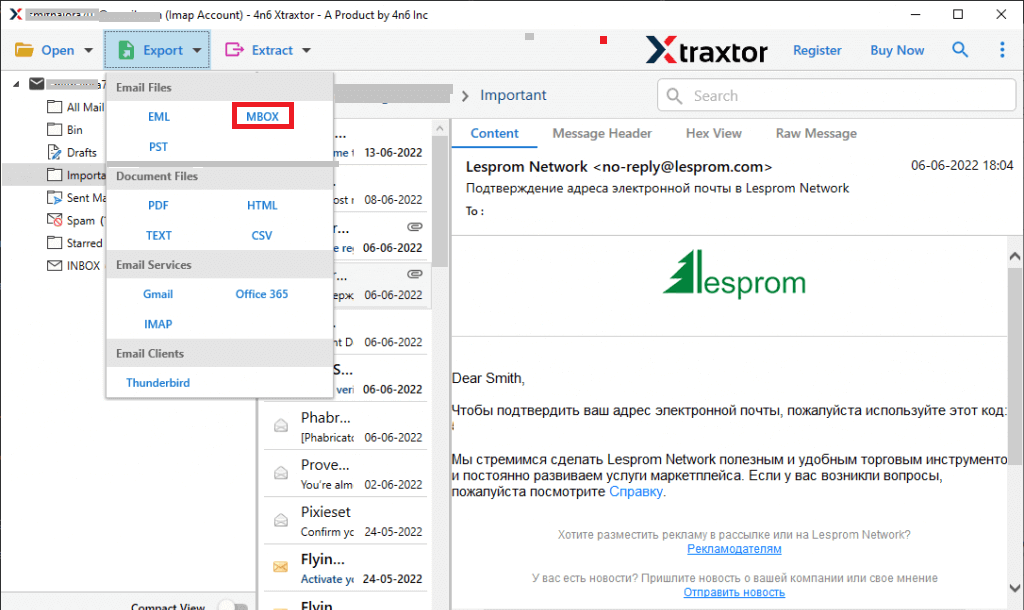
- Click on Export and choose MBOX format.
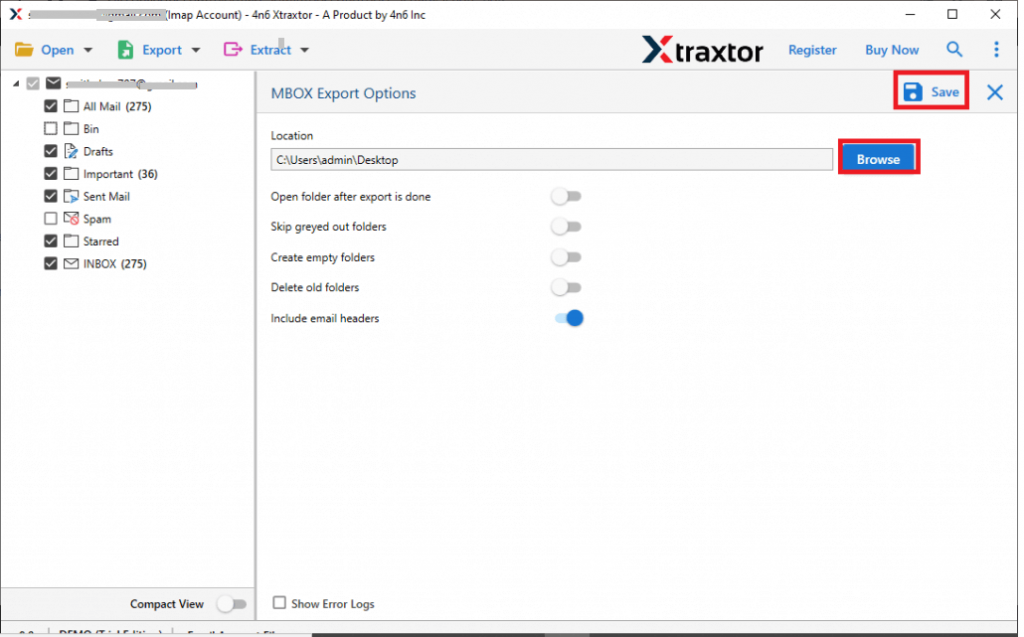
- If you want to export only important email folders, then you can select them here.

- At last, browse the target location and hit on the Save button to start the exporting process.
Done! Here you export Yahoo Mail to MBOX format in a few simple steps. You can use the demo version of this tool and export Yahoo emails to MBOX file format.
Conclusion
In this post, we have mentioned two workable solutions to export Yahoo Mail to MBOX format with attachments. Both the given solutions can be used to save emails to a file format. Depending on your needs you can opt for any of the given solutions and export emails from Yahoo account to MBOX file format. Hope this article will be able to save their Yahoo webmail account to .mbox file with ease.