Looking for a secure way to export emails from Zimbra TGZ to PST format? If yes, then here is the complete solution to convert Zimbra TGZ to PST with complete mailbox data.
Zimbra is one of the leading open-source platforms that provide various services across different countries. It is a collaborative suite that includes an email server and email client. This application saves its mailbox data into TGZ format.
However, sometimes users want to switch their email client to Outlook. In that scenario, you need to convert Zimbra to PST format so that it can be uploaded to the Outlook interface.
Noe without any further delay, let’s know the way to convert Zimbra TGZ to PST format.
Methods to Export Zimbra Mails to PST
You can perform this conversion process in two ways. Depending on the needs opt for any of them.
#1. Convert Emails from Zimbra to PST Using Automated Tool
#2. Convert Zimbra TGZ to PST Using Outlook
Let’s check, how these methods help you to transfer emails from the Zimbra TGZ file to PST format.
Solution 1: Convert Zimbra to PST Instantly
To export emails from the Zimbra mailbox file into PST format use the Zimbra Converter tool. This tool easily export multiple Zimbra TGZ files into PST format in a single attempt. Along with that, this tool offers to select an email folder and convert selective Zimbra emails into PST data file. This tool not only export Zimbra TGZ to PST but also in different file formats.
In addition to these, you will find many advanced features such as – maintaining mailbox structure/hierarchy, a free preview option to read emails before conversion, and many more will be discussed in the coming section.
How to Convert Zimbra TGZ to PST Format
Follow the given instructions and export emails from the Zimbra mailbox file to PST format.
Step 1. Downlaod and run this automated tool on your system.
Step 2. After that click on Open and select the required option.

Step 3. Now select Email Server >> Zimbra File >> Select File or Folder.

Step 4. Here you can read your Zimbra emails and select the folder that needs to convert.

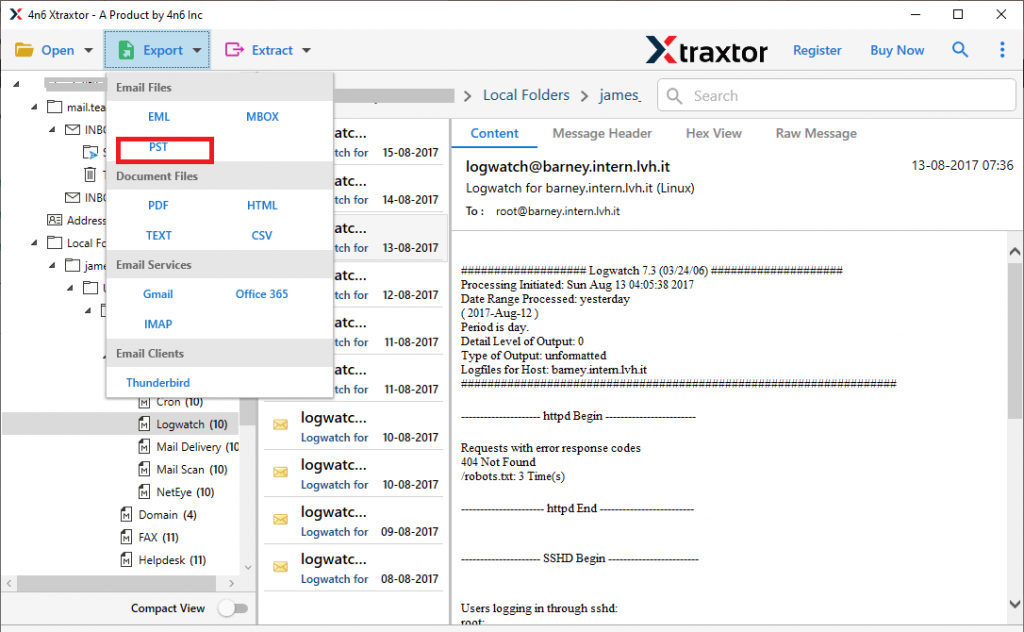
Step 5. Click on Export and choose PST format from the given list.
Step 6. At last, browse the saving location and hit on the Save button.
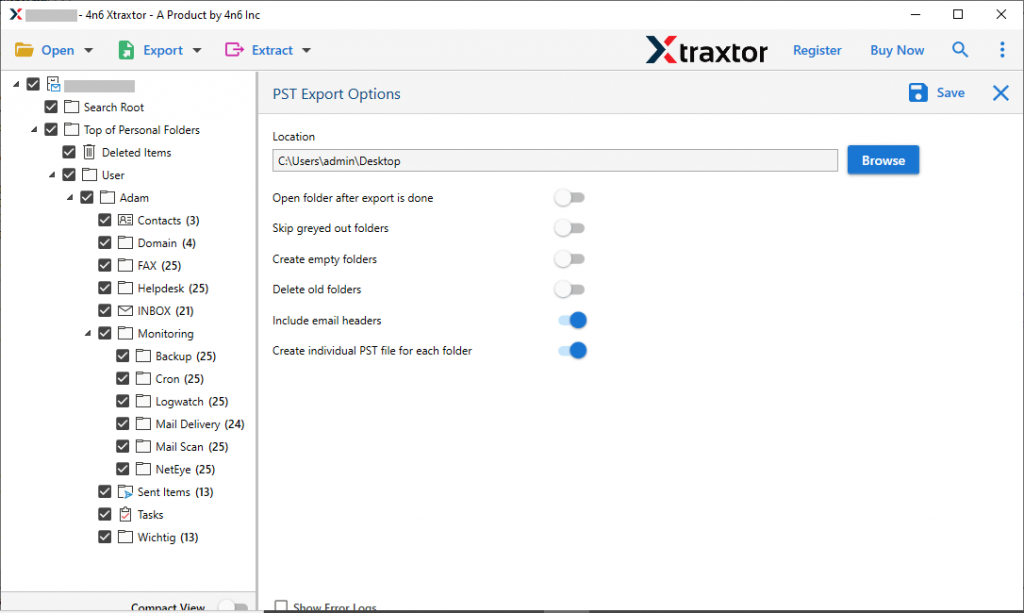
All Done! Here completes the Zimbra to PST conversion process.
Why Zimbra to PST Converter
There are various reasons to choose this tool for Zimbra TGZ to PST conversion. Some of them mention here.
Convert Zimbra to PST In Bulk: This software offers an option to select the folder that contains various .tgz files. In this way, you can export multiple Zimbra TGZ files to PST format without any data loss.
Selctive Email Conversion: When there are lots of emails in the Zimbra TGZ file and need to convert only needed emails into a PST file, then this tool offers the selection option. Users can select the email folder that is needed and convert only them.
Maintain Mailbox Hierarchy: The Zimbra to PST converter ensures preserve Zimbra mailbox data in their original format. During the conversion process, you will get the emails and other components as same as the original.
Support Windows OS: This utility is compatible with all the Windows OS versions. You can install and operate this tool on Windows 11, 10, 8, XP, Vista, and all the previous versions.
Solution 2: Manually Convert Zimbra TGZ to PST Using Outlook
There is no direct manual way to export emails from Zimbra to PST. However, there is an alternative solution for this conversion. To perform this conversion, firstly you need to extract emails from the TGZ file. After extraction you will get EML files, now import these .olm files into Outlook and at last export the emails in PST format.
Follow the given instructions to convert Zimbra to PST format using the native method.
Step 1. Firstly extract .eml fie from the Zimbra TGZ file.
Step 2. No open the Outlook and create a new folder.
Step 3. After that, go to a location where TGZ file is stored.
Step 4. Drag the email and drop them into the newly created format. Repeat these steps to convert EML to PST file format.
Step 5. Now, you have Zimbra TGZ file data in your email client application.
Step 6. Go to File >> Open & Export >> Import/Export.
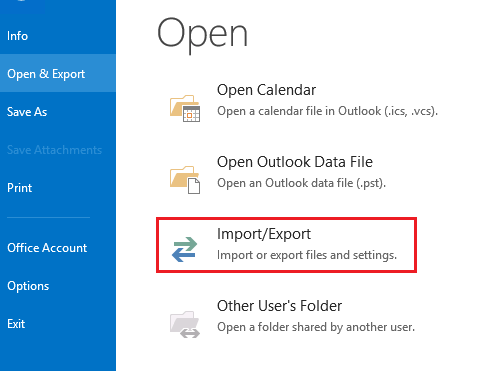
Step 7. Select Export a file and click on the Next button.

Step 8. Choose Outlook Data file (.pst) and hit on the Next button.
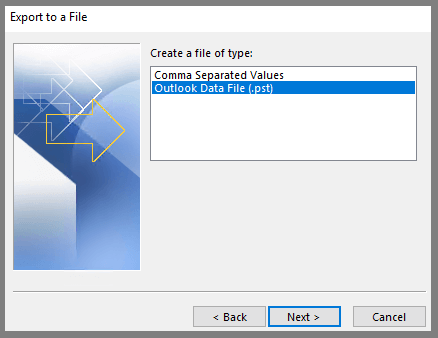
Step 9. Select the email folder that you want to export.
Step 10. At last, browse the saving location and hit on the Finish button.
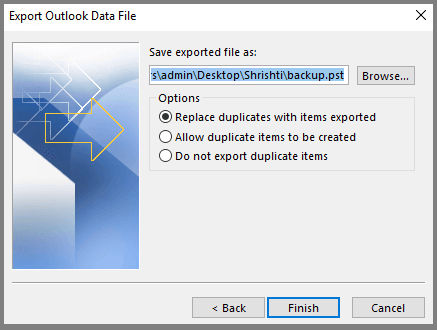
Finish! Here you manually convert Zimbra TGZ to PST using the Outlook interface.
Limitations With Manual Method
While using this manual method to convert Zimbra to PST, you can face certain restrictions. Some of them are mentioned here.
1. It is a lengthy process that requires lots of patience.
2. This approach is suitable when you have limited emails in your TGZ file. As it is not suitable to perform the bulk conversion.
3. If try to export multiple TGZ files at once, then there are high chances of data loss.
4. Although you can select the email folder you want to export, it has no option to select particular emails to transfer.
5. There is no assurance that your mailbox data will be in the proper format or structure after conversion.
To avoid all these limitations you can opt for the automated tool mentioned in this blog. To experience the Zimbra to PST conversion you can use the demo version of the software and save emails from Zimbra TGZ file to Outlook PST format with ease.

Conclusion
In this article, we discuss the efficient way to convert Zimbra TGZ to PST format. You can manually perform email conversion, but it has several drawbacks. To overcome these limitations, we mention Zimbra to PST Converter tool, which easily performs bulk conversion without data loss. You can use its demo version of this utility and perform Zimbra to PST conversion by yourself.