Summary: Looking for a secure approach to export SeaMonkey emails to Outlook PST file? If yes, then read this article and learn how to convert SeaMonkey Mails to PST format with attachments.
Every big or small businesses need email clients to manage their business mails. These desktop applications make easy communication between office employees as well as clients.
One such email clint is SeaMonkey. However it is not that popular, still, most of the users use this application. Although SeaMonkey has many great features such as junk mail detection, support multiple accounts, feed reader, still lack security and advanced email management. That is the main reason many users switch it and opt for another feature-rich email client.
However, if you also intend to switch to another app, Outlook is your best option. To export mailbox data to the Outlook interface, you need to convert SeaMonkey mails to PST format.
As exporting emails from one platform to another seems easy, but believe it is a very complex and tricky process. Especially if you try to export SeaMonkey emails to Outlook, as both the email client like day and night.
However, if you are urgently needed to convert SeaMonkey mails to PST with attachments, then you don’t have to worry. Read the complete article.
You will find a step by step process for SeaMonkey to PST conversion. Follow the instruction to help yourself with this email conversion.
Export SeaMonkey to Outlook PST With Attachments
Unfortunately, SeaMonkey doesn’t offer any option to transfer its mailbox data to Outlook. Along with that Outlook use PST format to save its database and on the other hand, SeaMonkey supports the MBOX file format. This makes this conversion process challenging.
Don’t worry, there is a tool that is specially designed to export SeaMonkey emails to PST format. SeaMonkey Converter is that utility, that is capable enough to transfer SeaMonkey emails to Outlook with complete mailbox data. It easily detects the configured email account and converts its emails. Along with that, this tool allows to upload .mbox file from the system and export it to Outlook PST format.

Read further to know how this tool works and perform SeaMonkey to PST conversion process.
How to Convert SeaMonkey Mails to PST with Attachments
Follow the given steps to save emails from SeaMonkey as PST format for Outlook.
Step 1. Download and launch this email converter on your machines.
Step 2. To start with, click on the Open option.

Step 3. Here select Desktop Email Client >> SeaMonkey Account >> Choose Folder or Open SeaMonkey Configured email account.
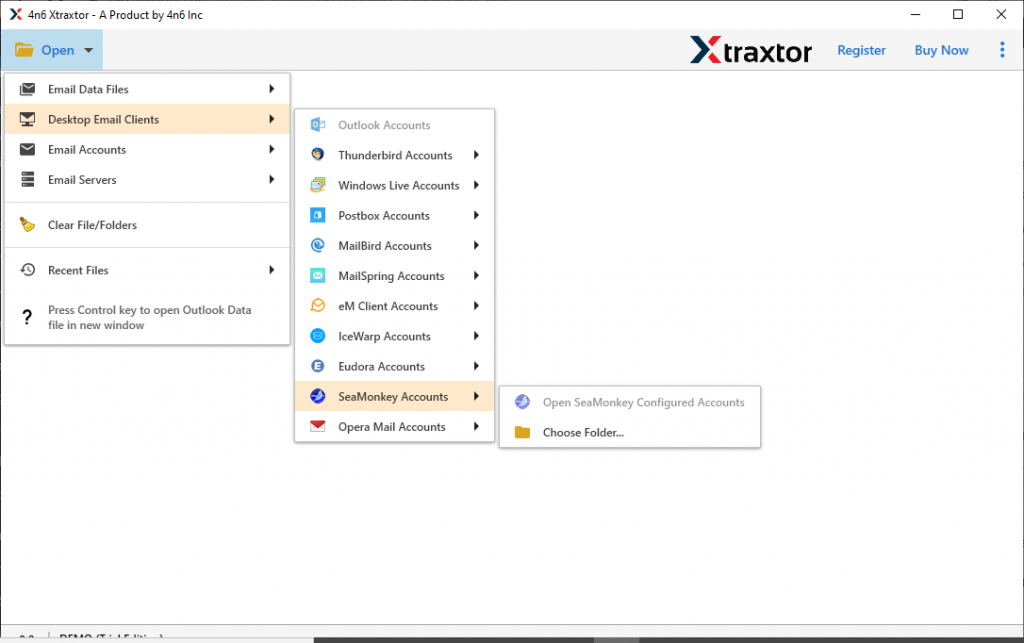
Step 4. After uploading mailbox data, you can see view your emails and read them. Select the email folder that needs to convert (If Required).

Step 5. At this point, click on the Export and choose PST file format.

Step 6. At last, select the destination location and hit on the Save button.

Here you convert SeaMonkey emails to PST with attachments. Now you can import PST to Outlook and access SeaMonkey emails in its interface.
However, this method directly exports emails from SeaMonkey’s configured emails. If you have an email data file in your system, you can also choose the file as mentioned in the steps above. If you receive a .mbox file from someone, then you know where to find it. At the same time, if you save your emails from the mail account, then you must know where you will find that file.
If not, then here is the location where you found your data file.
In Windows to find the Seamonkey data file, follow these steps;
1. Open your SeaMonkey email client.
2. Select the folder that contains emails.
3. Now clcik on the View Setting for this account and clcik on the Server setting.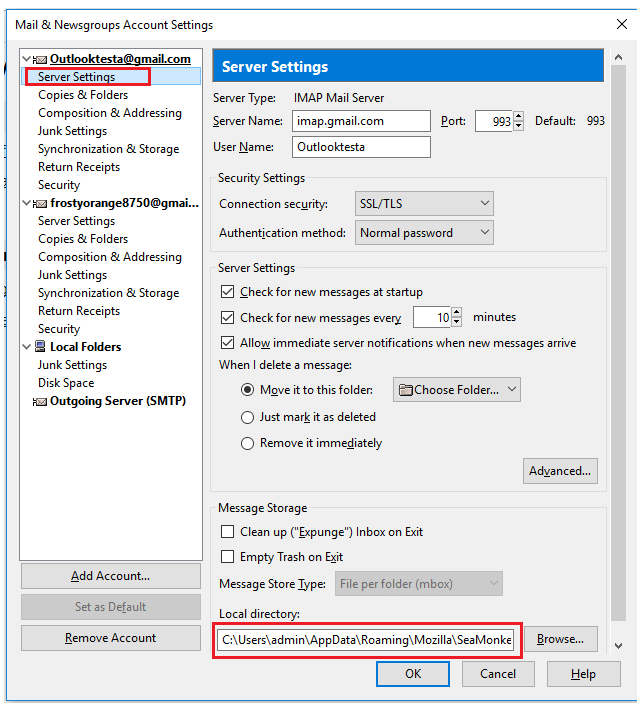
4. You will find your data file path under the Local directory. Copy it and paste it on the File Explorer navigation bar.
Default Location: C:\Users\admin\AppData\Roaming\Mozilla\SeaMonkey\Profiles
\profile name\ImapMail\imap.gmail.com
After locating the data file, use the above mention automated tool and export SeaMonkey emails to Outlook PST format with attachments.
Why Choose SeaMonkey to PST Converter
There are numerous reasons to opt for this tool for SeaMonkey to OST conversion process. Some of them mention here,
- Multiple Export Option: This converting wizard offer an array of file formats to save SeaMonkey emails. Using this you not only export emails to PST format, but also convert SeaMonkey mails to CSV, PDF, HTML, and other formats.
- Preserve Mailbox Structure: While using this SeaMonkey to PST Converter, you can convert your emails with complete properties. It also maintains the mailbox folder or sub-folder structure in the new format.
- Export SeaMonkey to Other Email Clients: This email converter swiftly exports SeaMonkey emails to Thunderbird, Opera Mail, Eudora, MailBird, MailSpring and many more.
- Extract Mailbox Data: With this tool, you will get an extraction option to save specific email information. You can save email addresses, phone numbers, attachments and associated email addresses and phone numbers in a text file.
Conclusion – Convert SeaMonkey Mails to PST
The first step to export SeaMonkey to Outlook PST is to find a reliable solution. One of those tools we mentioned in this article. Along with that, we describe the detailed working process of this conversion. Try the demo version of the software described in this post. I hope it solves your conversion problem.