“Hello, I’m Samual and I work as a manager in an MNC. I have to send some contacts from the OLM file that I get from my boss. But the problem is that I can’t get any contact information from this file. Please suggest to me any reliable method that will help me convert OLM to vCard from MAc Outlook email file as soon as possible? “
Are these situations similar for you? Then read this article to the end. Today in this article we are going to address these questions and recommend the best effective method for this OLM to vCard conversion.
Before we go any further, let us know what these file formats are and why we are using them.
What is OLM & vCard/VCF?
OLM is a Mac Outlook data file that stores all mailbox data. This file stores email messages, journals, calendars, contacts, and other mailbox data in a single file. It is only used by the Mac operating system to store Outlook data.
Whereas VCF or vCard is a standard file format to save contact information from mailbox data. This essentially includes your name, email address, telephone number and other contact details. This file can also store multiple custom data fields such as pictures, contact photos, and other media data.
There can be multiple reasons to convert OLM to vCard or VCF file format, some of them mention below;
Reasons to Export Contacts from OLM file
If users are using Mac Outlook and want to send contact information to someone, it is beneficial to export OLM to VCF format. Because VCF is a standard format for storing contact information, it can be broadcast to any system or device. This file format can also be easily accessed on Windows OS, Mac OS, and mobile devices. Most importantly, it is a lightweight file format so it can be easily transferred in less time.
Methods to Convert OLM to vCard
The need to convert OLM to vCard may vary based on user requirements. The main concern, however, is which method can best meet user needs.
It also takes a long time to choose the best method to export contacts from an OLM file to VCF format.
But no worries! After searching and testing many methods, we came up with two methods, manual method and automated software.
#1. Manual Approach via Mac Outlook
#2. Expert Tool OLM Converter
Let’s discuss these methods in detail one by one. Stay tuned and learn more about the process to export OLM to vCard using the methods above.
Method 1: Manually Export Contacts From Mac Outlook To VCF format
In this method, we use the Mac Outlook email client interface to save contact information in the standard file format. Follow these steps in a proper manner as mentioned to avoid any glitches.
Step 1. Open Microsoft Outlook on Mac System.
Step 2. Navigate to Tools Tab and click on the Export option.
Step 3. An Export to Archive File (.olm) box will appear on this application interface.
Step 4. Click on the check box to choose an item to be exported (i.e. Contacts) in this scenario.
Step 5. In the save as box, click on the Download option and click on the Save button.
Step 6. Once the conversion is completed, there will be a pop-up notification that shows the successful result.
At last click on the Finish button and close the process. There is a certain limitation with this manual method, some of them mentioned in the next segment.
Restriction With Manual Method
There are many limitations faced while using this method, some of them are;
- With the manual method, there is no way to convert selected contacts from the OLM files.
- It only exports contacts from a single OLM file. If the user has multiple OLM files, there is no option to save contacts from these files at the same time.
- When converting contact information from a large OLM file, there may be some glitches and, most importantly, there is a risk of data loss.
To overcome these limitations, we are going to advise an automated tool that can easily suppress the above point.
Method 2: Convert OLM Contacts to vCard/VCF Format via Professional Approach
Finding the best tool for OLM to vCard is very complicated, but the main question here is what function the user wants in the tool and how it works.
According to the query in all forums, a user is looking for a tool with a fast conversion ratio that ensures data integrity, a user-friendly interface and, above all, protection against viruses and advertising.
If you are looking for these properties in your tool, OLM Converter is the utility you are looking for.
This converter is designed with an advanced algorithm that made this tool capable to export OLM files into web-based email clients and servers. To know the working of this tool read the next segment.

How OLM to vCard Converter Works
This tool has a simple user interface that makes it easy to use by novice users. The complete operation of this utility is mentioned below.
Step 1. Download and run this software on your Windows OS.
Step 2. Mouse-click on the Open drop-down button.

Step 3. After that, Select Data File >> Select OLM file >> Select files or folder.
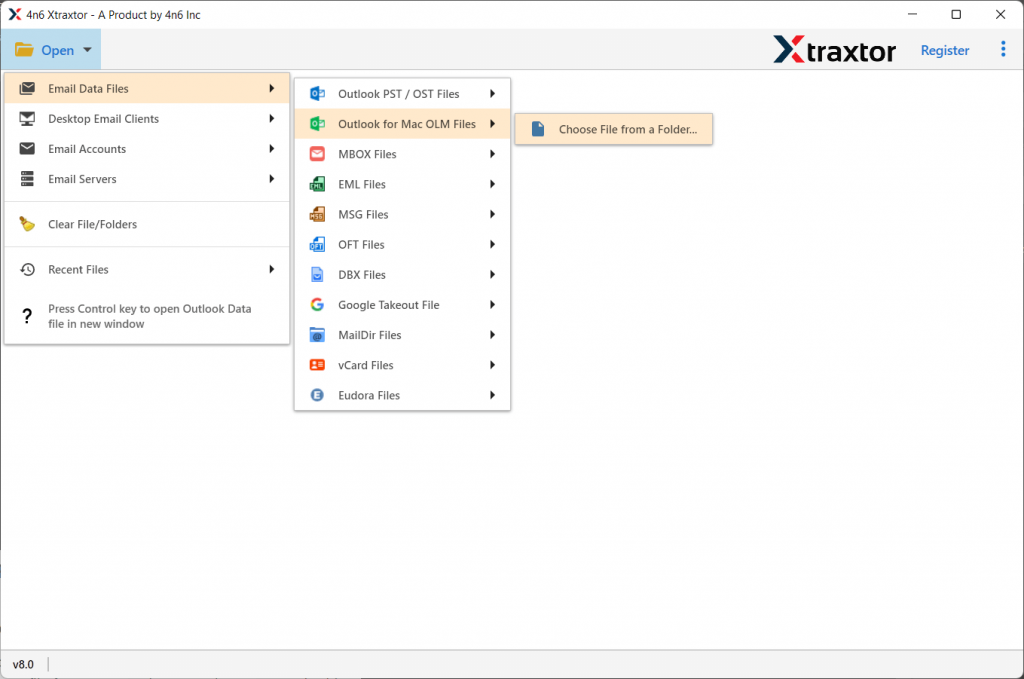
Step 4. All the emails will be shown on the software interface to read/view before conversion.

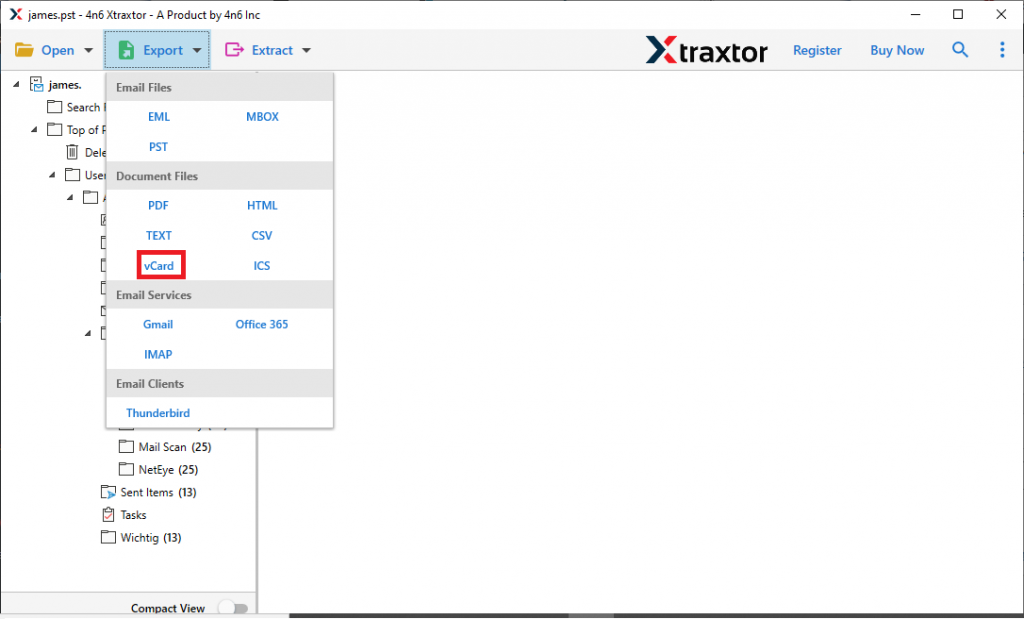
Step 5. Now click on the Export option and select vCard format from the given list.
Step 6. In the last stage, browse the saving location and then click on the Save button.
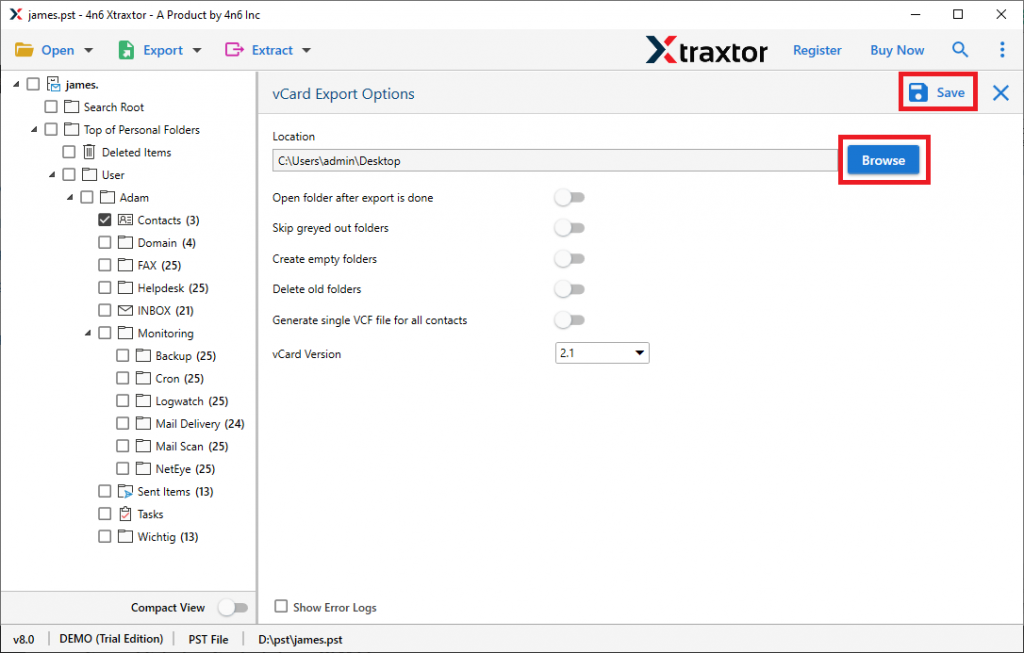
With this tool, you successfully convert OLM contacts to vCard format in just six steps. Now users can access this contact file on any OS and device.
Amazing Feature of OLM to vCard Converter
- Export Contacts from Large OLM file
With OLM to vCard Converter, there is no file size limitation. Users can transfer contact information from large file OLM files into VCF file formats without facing any glitches. It is also efficient enough to convert OLM to MBOX, PST, ICS and other file formats regardless of size.
- Bulk OLM file Conversion
This software provides the ability to export multiple OLM files at once. When the user converts OLM to vCard in bulk, then this tool makes sure to maintain the data integrity.
- Convert Selective Contacts From OLM file
It is the best tool to export some selective contact information. If the user wishes to convert some contacts, then the user needs to apply email filters and avoid unwanted conversion.
- Support All Mac Outlook Version
This tool supports the OLM file created by Mac Outlook 2019, 2016, and other previous versions. Also convert contacts information into vCard different versions (2.1, 3.0, 4.0).
Conclusion
In this write-up, we mention two different methods to convert OLM to vCard. Either method can do the conversion, but there are some drawbacks to the manual method as mentioned in the sections above. And to rule out these disadvantages, we mention an automation tool from SysConverter. Now the user can decide which is the best way for them and use this method to export OLM to vCard.
Frequently Asked Questions
Question 1. Does this software convert some selective contacts from OLM files?
Answer. Yes, this tool offers some advanced filter options for the selective conversion.
Question 2. Is this tool convert contacts from 10 OLM files into a single VCF file?
Answer. Yes, this software can easily create a single VCF file from multiple OLM files without affecting email data.